Servlet Examples
Servlet is a Java class that serves HTTP requests and implementsjavax.servlet.Servletinterface. Web application developers typically write Servlets to extend javax.servlet.http.HttpServlet, an abstract class that implements the Servlet interface and is specifically designed to handle HTTP requests.
Hello World Example Code
Below is the example source code for a Servlet that outputs Hello World:
// 导入必需的 java 库
import java.io.*;
import javax.servlet.*;
import javax.servlet.http.*;

// 扩展 HttpServlet 类
public class HelloWorld extends HttpServlet {

  private String message;

  public void init() throws ServletException
  {
      // 执行必需的初始化
      message = "Hello World";
  }

  public void doGet(HttpServletRequest request,
                    HttpServletResponse response)
            throws ServletException, IOException
  {
      // 设置响应内容类型
      response.setContentType("text/html");

      // 实际的逻辑是在这里
      PrintWriter out = response.getWriter();
      out.println("<h1>" + message + "</h1>");
  }

  public void destroy()
  {
      // 什么也不做
  }
}
Compile Servlet
Let's write the above code in a HelloWorld.java file and place it in C:\ServletDevel (on Windows) or /usr/ServletDevel (on UNIX). You also need to add these directories to the CLASSPATH.
Assuming your environment is set up correctly, enter theServletDeveldirectory and compile HelloWorld.java as shown below:
$ javac HelloWorld.java
If the Servlet depends on any other libraries, you must include those JAR files in the CLASSPATH. Here, I only included the servlet-api.jar JAR file because I did not use any other libraries in the Hello World program.
This command line uses the javac compiler built into the Sun Microsystems Java Software Development Kit (JDK). For this command to work properly, the PATH environment variable needs to be set to the Java SDK path.
If all goes well, the compilation above will generate a HelloWorld.class file in the same directory. The next section will explain how to deploy the compiled Servlet in production.
Servlet Deployment
By default, Servlet applications are located under the path <Tomcat-installation-directory>/webapps/ROOT, and class files are placed in <Tomcat-installation-directory>/webapps/ROOT/WEB-INF/classes.
If you have a fully qualified class namecom.myorg.MyServlet, then this Servlet class must be located in WEB-INF/classes/com/myorg/MyServlet.class.
Now, let's copy HelloWorld.class to <Tomcat-installation-directory>/webapps/ROOT/WEB-INF/classes and, in the file located at <Tomcat-installation-directory>/webapps/ROOT/WEB-INF/web.xmlcreate the following entry:
<web-app>
    <servlet>
        <servlet-name>HelloWorld</servlet-name>
        <servlet-class>HelloWorld</servlet-class>
    </servlet>

    <servlet-mapping>
        <servlet-name>HelloWorld</servlet-name>
        <url-pattern>/HelloWorld</url-pattern>
    </servlet-mapping>
</web-app>
The above entry should be created within the <web-app>...</web-app> tags in the web.xml file. There may already be various entries available in the file, but don't worry about them.
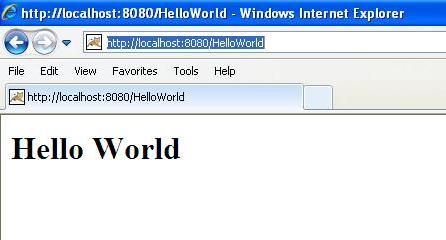
At this point, you are basically done. Now let's start the Tomcat server using <Tomcat-installation-directory>\bin\startup.bat (on Windows) or <Tomcat-installation-directory>/bin/startup.sh (on Linux/Solaris, etc.), and finally enter the following in the browser's address bar:http://localhost:8080/HelloWorld. If all goes well, you will see the following result: