Scala Arrays
Arrays provided in the Scala language are used to store fixed-size elements of the same type. Arrays are one of the important data structures for every programming language.
Declaring an array variable is not declaring individual variables like number0, number1, ..., number99 one by one, but rather declaring a variable such as numbers, and then using numbers
The index of the first element of an array is 0, and the index of the last element is the total number of elements minus 1.
Declare Arrays
The following is the syntax format for Scala array declarations:
var z:Array[String] = new Array[String](3)

或

var z = new Array[String](3)
In the above syntax, z declares an array of string type with length 3, which can store 3 elements. We can set a value for each element and access each element through its index, as shown below:
z(0) = "Example"; z(1) = "Baidu"; z(4/2) = "Google"
The index of the last element uses the expression4/2as the index, similar toz(2) = "Google"。
We can also define an array in the following way:
var z = Array("Example", "Baidu", "Google")
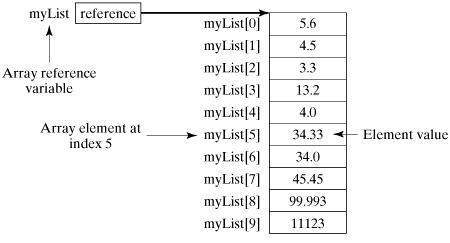
The following figure shows an array myList of length 10, with index values from 0 to 9:
Processing Arrays
The element types and size of an array are fixed, so when processing array elements, we usually use a basic for loop.
The following example demonstrates the process of creating, initializing, and processing an array:
Example
def main(args: Array[String]) {
var myList = Array(1.9, 2.9, 3.4, 3.5)
// Output all array elements
for ( x <- myList ) {
println( x )
}
// Calculate the sum of all array elements
var total = 0.0;
for ( i <- 0 to (myList.length - 1)) {
total += myList(i);
}
println(Sum = + total);
// Find the largest element in the array
var max = myList(0);
for ( i <- 1 to (myList.length - 1) ) {
if (myList(i) > max) max = myList(i);
}
println(Max = + max);
}
}
Executing the above code produces the following output:
$ scalac Test.scala
$ scala Test
1.9
2.9
3.4
3.5
总和为 11.7
最大值为 3.5
Multidimensional Arrays
In multidimensional arrays, the values in one array can be another array, and the values of another array can also be an array. Matrices and tables are common two-dimensional arrays.
The above is an example that defines a two-dimensional array:
val myMatrix = Array.ofDim[Int](3, 3)
In the example, the array contains three array elements, and each array element contains three values.
Next, let's look at a complete example of processing a two-dimensional array:
Example
object Test {
def main(args: Array[String]) {
val myMatrix = Array.ofDim[Int](3, 3)
// Create a matrix
for (i <- 0 to 2) {
for ( j <- 0 to 2) {
myMatrix(i)(j) = j;
}
}
// Print the two-dimensional array
for (i <- 0 to 2) {
for ( j <- 0 to 2) {
print(" " + myMatrix(i)(j));
}
println();
}
}
}
Executing the above code produces the following output:
$ scalac Test.scala
$ scala Test
0 1 2
0 1 2
0 1 2
Concatenate Arrays
In the following example, we use the concat() method to concatenate two arrays. The concat() method accepts multiple array parameters:
Example
object Test {
def main(args: Array[String]) {
var myList1 = Array(1.9, 2.9, 3.4, 3.5)
var myList2 = Array(8.9, 7.9, 0.4, 1.5)
var myList3 = concat( myList1, myList2)
// Output all array elements
for ( x <- myList3 ) {
println( x )
}
}
}
Executing the above code produces the following output:
$ scalac Test.scala
$ scala Test
1.9
2.9
3.4
3.5
8.9
7.9
0.4
1.5
Creating Range Arrays
In the following example, we use the range() method to generate an array within a range. The last parameter of the range() method is the step, which defaults to 1:
Example
object Test {
def main(args: Array[String]) {
var myList1 = range(10, 20, 2)
var myList2 = range(10,20)
// Output all array elements
for ( x <- myList1 ) {
print( " " + x )
}
println()
for ( x <- myList2 ) {
print( " " + x )
}
}
}
Executing the above code produces the following output:
$ scalac Test.scala
$ scala Test
10 12 14 16 18
10 11 12 13 14 15 16 17 18 19
Scala Array Methods
The following table lists the important methods for handling arrays in Scala. Before using them, we need to useimport Array._to import the package.
| No. | Method and Description |
|---|---|
| 1 |
def apply( x: T, xs: T* ): Array[T] Creates an array of the specified type T; T can be Unit, Double, Float, Long, Int, Char, Short, Byte, Boolean. |
| 2 |
def concat[T]( xss: Array[T]* ): Array[T] Concatenates arrays |
| 3 |
def copy( src: AnyRef, srcPos: Int, dest: AnyRef, destPos: Int, length: Int ): Unit Copies one array to another. Equivalent to Java's System.arraycopy(src, srcPos, dest, destPos, length). |
| 4 |
def empty[T]: Array[T] Returns an array of length 0 |
| 5 |
def iterate[T]( start: T, len: Int )( f: (T) => T ): Array[T] Returns an array of the specified length, where each element is the return value of the specified function. In the above example, the array has an initial value of 0, length 3, and the calculation function isa=>a+1: scala> Array.iterate(0,3)(a=>a+1) res1: Array[Int] = Array(0, 1, 2) |
| 6 |
def fill[T]( n: Int )(elem: => T): Array[T] Returns an array whose length is specified by the first parameter, and each element is filled with the second parameter. |
| 7 |
def fill[T]( n1: Int, n2: Int )( elem: => T ): Array[Array[T]] Returns a two-dimensional array, whose length is specified by the first parameter, and each element is filled with the second parameter. |
| 8 |
def ofDim[T]( n1: Int ): Array[T] Creates an array of the specified length |
| 9 |
def ofDim[T]( n1: Int, n2: Int ): Array[Array[T]] Creates a two-dimensional array |
| 10 |
def ofDim[T]( n1: Int, n2: Int, n3: Int ): Array[Array[Array[T]]] Creates a three-dimensional array |
| 11 |
def range( start: Int, end: Int, step: Int ): Array[Int] Creates an array within the specified range, with step being the step size between each element |
| 12 |
def range( start: Int, end: Int ): Array[Int] Creates an array within the specified range |
| 13 |
def tabulate[T]( n: Int )(f: (Int)=> T): Array[T] Returns an array of the specified length, where each element is the return value of the specified function, starting from 0 by default. In the above example, it returns 3 elements: scala> Array.tabulate(3)(a => a + 5) res0: Array[Int] = Array(5, 6, 7) |
| 14 |
def tabulate[T]( n1: Int, n2: Int )( f: (Int, Int ) => T): Array[Array[T]] Returns a two-dimensional array of the specified length, where each element is the return value of the specified function, starting from 0 by default. |