Ruby Database Access - DBI Tutorial
This chapter will explain how to use Ruby to access databases.Ruby DBIThe module provides Ruby scripts with a database-independent interface similar to the Perl DBI module.
DBI stands for Database Independent Interface, representing Ruby's database-independent interface. DBI provides an abstraction layer between Ruby code and the underlying database, allowing you to easily switch databases. It defines a series of methods, variables, and specifications, providing a consistent database interface that is independent of the database.
DBI can interact with the following:
- ADO (ActiveX Data Objects)
- DB2
- Frontbase
- mSQL
- MySQL
- ODBC
- Oracle
- OCI8 (Oracle)
- PostgreSQL
- Proxy/Server
- SQLite
- SQLRelay
DBI Application Architecture
DBI is independent of any database available in the background. Whether you use Oracle, MySQL, or Informix, you can use DBI. The following architecture diagram clearly illustrates this.
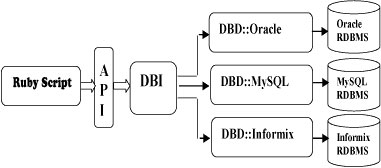
Ruby DBI generally uses a two-layer architecture:
- Database Interface (DBI) layer. This layer is independent of the database and provides a series of public access methods that can be used regardless of the database server type.
- Database Driver (DBD) layer. This layer is dependent on the database; different drivers provide access to different database engines. MySQL, PostgreSQL, InterBase, Oracle, etc., each use different drivers. Each driver is responsible for interpreting requests from the DBI layer and mapping those requests to requests suitable for a given type of database server.
Installation
If you want to write Ruby scripts to access a MySQL database, you need to install the Ruby MySQL module first.
Installing the MySQL Development Package
On Mac OS, you need to modify the ~/.bash_profile or ~/.profile file and add the following code:
Or use a symbolic link:
Installing DBI with RubyGems (Recommended)
RubyGems was created around November 2003 and has been part of the Ruby standard library since Ruby 1.9. For more details, you can check:Ruby RubyGems
Use gem to install dbi and dbd-mysql:
Installing from Source (Use this method for Ruby versions earlier than 1.9)
This module is a DBD, and can behttp://tmtm.org/downloads/mysql/ruby/downloaded from.
After downloading the latest package, extract it and enter the directory, then run the following commands to install:
Then compile:
Obtain and Install Ruby/DBI
You can download and install the Ruby DBI module from the link below:
https://github.com/erikh/ruby-dbi
Before starting the installation, make sure you have root privileges. Now, follow the steps below to install:
Step 1
Or directly download the zip package and extract it.
Step 2
Enter the directoryruby-dbi-masterand in the directory, use thesetup.rbscript to configure. The most common configuration command is 'config' with no parameters. This command defaults to installing all drivers.
More specifically, you can use the --with option to list the specific parts you want to use. For example, if you only want to configure the main DBI module and the MySQL DBD layer driver, enter the following command:
Step 3
The final step is to build the drivers and install them using the following command:
Database Connection
Assuming we are using a MySQL database, before connecting to the database, make sure:
- You have created a database TESTDB.
- You have created the table EMPLOYEE in TESTDB.
- The table has fields FIRST_NAME, LAST_NAME, AGE, SEX, and INCOME.
- Set user ID "testuser" and password "test123" to access TESTDB.
- The Ruby module DBI has been correctly installed on your machine.
- You have read the MySQL tutorial and understand the basic operations of MySQL.
Below is an example of connecting to the MySQL database "TESTDB":
Example
When running this script, the following results will be produced on a Linux machine.
Server version: 5.0.45
If the connection is established with a data source, a database handle is returned and saved todbhfor later use, otherwisedbhwill be set to nil,e.errande::errstrreturning an error code and an error string, respectively.
Finally, before exiting this program, make sure to close the database connection and release resources.
INSERT Operation
When you want to create records in a database table, you need to use the INSERT operation.
Once the database connection is established, we can prepare to use thedomethod orprepareandexecutemethod to create tables or create records to insert into database tables.
Using the do Statement
Statements that do not return rows can be executed by calling thedodatabase handling method. This method takes a statement string parameter and returns the number of rows affected by the statement.
Similarly, you can execute SQLINSERTstatements to create records and insert them into the EMPLOYEE table.
Example
Usingprepareandexecute
You can use DBI'sprepareandexecutemethod to execute SQL statements in Ruby code.
The steps to create records are as follows:
- Prepare an SQL statement with the INSERT statement. This will be done using thepreparemethod.
- Execute the SQL query to select all results from the database. This will be done using theexecutemethod.
- Release the statement handle. This will be done using thefinishAPI.
- If everything goes smoothly, thencommitthis operation, otherwise you canrollbackcomplete the transaction.
Below is the syntax for using these two methods:
Example
These two methods can be used to passbindvalues to SQL statements. Sometimes the values to be input may not be given in advance; in this case, bound values are used. Use a question mark (?) to replace the actual value, and the actual value is passed through the execute() API.
The following example creates two records in the EMPLOYEE table:
Example
If you are using multiple INSERTs, preparing one statement and then executing it multiple times in a loop is much more efficient than calling do each time through the loop.
READ Operation
The READ operation on any database refers to fetching useful information from the database.
Once the database connection is established, we can prepare to query the database. We can use thedomethod orprepareandexecutemethod to fetch values from database tables.
The steps to fetch records are as follows:
- Based on the required conditions, prepare the SQL query. This will be done by usingpreparemethod.
- Execute the SQL query to select all results from the database. This will be done by usingexecutemethod.
- Fetch the results one by one, and output these results. This will be done by usingfetchmethod.
- Release the statement handle. This will be done by usingfinishmethod.
The following example queries all records with a salary greater than 1000 from the EMPLOYEE table.
Example
This will produce the following result:
First Name: Mac, Last Name : Mohan
Age: 20, Sex : M
Salary :2000

First Name: John, Last Name : Poul
Age: 25, Sex : M
Salary :2300
There are many other methods for fetching records from the database. If you are interested, you can checkRuby DBI Read Operation。
Update Operation
The UPDATE operation on any database refers to updating one or more existing records in the database. The following example updates all records with SEX as 'M'. Here, we will increase the AGE of all males by one year. This is divided into three steps:
- Based on the required conditions, prepare the SQL query. This will be done by usingpreparemethod.
- Execute the SQL query to select all results from the database. This will be done by usingexecutemethod.
- Release the statement handle. This will be done by usingfinishmethod.
- If everything goes well, thencommitthe operation, otherwise you canrollbackcomplete the transaction.
Example
DELETE Operation
When you want to delete records from the database, you need to use the DELETE operation. The following example deletes all records from EMPLOYEE where AGE exceeds 20. The steps for this operation are as follows:
- Based on the required conditions, prepare the SQL query. This will be done by usingpreparemethod.
- Execute the SQL query to delete the required records from the database. This will be done by usingexecutemethod.
- Release the statement handle. This will be done by usingfinishmethod.
- If everything goes well, thencommitthe operation, otherwise you canrollbackcomplete the transaction.
Example
Executing Transactions
A transaction is a mechanism that ensures transaction consistency. A transaction should have the following four attributes:
- Atomicity:The atomicity of a transaction means that the programs contained in the transaction serve as the logical unit of work for the database; the data modification operations they perform are either all executed or not executed at all.
- Consistency:The consistency of a transaction means that the database must be in a consistent state before and after a transaction is executed. If the state of the database satisfies all integrity constraints, the database is said to be consistent.
- Isolation:The isolation of transactions means that concurrent transactions are isolated from each other, i.e., the operations within a transaction and the data being operated on must be locked and not visible to other transactions attempting to modify them.
- Durability:The durability of a transaction means that when a system or media failure occurs, the updates of committed transactions are guaranteed not to be lost. That is, once a transaction is committed, its changes to the data in the database should be permanent and withstand any database system failure. Durability is ensured through database backup and recovery.
DBI provides two methods for performing transactions. One iscommitorrollbackmethod, used to commit or roll back transactions. The other istransactionmethod, which can be used to implement transactions. Next, let us introduce these two simple methods for implementing transactions:
Method I
The first method uses DBI'scommitandrollbackmethod to explicitly commit or cancel a transaction:
Example
Method II
The second method usestransactionmethod. This method is relatively simpler because it requires a code block that contains the statements making up the transaction.transactionThe method executes the block, and then, depending on whether the block executes successfully, automatically callscommitorrollback:
Example
COMMIT Operation
Commit is an operation that marks the database as having completed changes. After this operation, all changes are irreversible.
Below is a simple example of calling thecommitmethod.
ROLLBACK Operation
If you are not satisfied with one or more changes, and you want to completely revert these changes, then use therollbackmethod.
Below is a simple example of calling therollbackmethod.
Disconnecting the Database
To disconnect from the database, use the disconnect API.
If the user closes the database connection through the disconnect method, DBI will roll back all unfinished transactions. However, without relying on any DBI implementation details, your application can gracefully explicitly call commit or rollback.
Handling Errors
There are many different sources of errors. For example, syntax errors when executing SQL statements, connection failures, or calling the fetch method on a cancelled or completed statement handle.
If a DBI method fails, DBI will raise an exception. DBI methods can raise exceptions of any type, but the two most important exception classes areDBI::InterfaceErrorandDBI::DatabaseError。
Exception objects of these classes haveerr、errstrandstatethree attributes, respectively representing the error number, a descriptive error string, and a standard error code. The attributes are described in detail as follows:
- err:Returns an integer representation of the error that occurred; if the DBD does not support this, it returnsnil. For example, the Oracle DBD returnsORA-XXXXthe numeric part of the error message.
- errstr:Returns a string representation of the error that occurred.
- state:Returns the SQLSTATE code of the error that occurred. SQLSTATE is a five-character string. Most DBDs do not support it, so they return nil.
In the above examples, you have already seen the following code:
To obtain debugging information about what the script does during execution, you can enable tracing. To do this, you must first download the dbi/trace module, and then call thetracemethod:
The value of mode can be 0 (off), 1, 2, or 3, and the value of destination should be an IO object. The default values are 2 and STDERR, respectively.
Method Code Blocks
There are some methods that create handles. These methods are called with a code block. The advantage of using code blocks with methods is that they provide the handle as an argument to the block, and the handle is automatically cleaned up when the block terminates. The following are some examples to help understand this concept.
- DBI.connect :This method creates a database handle. It is recommended to call at the end of the blockdisconnectto disconnect from the database.
- dbh.prepare :This method creates a statement handle. It is recommended to call at the end of the blockfinish. Inside the block, you must callexecutemethod to execute the statement.
- dbh.execute :This method is similar to dbh.prepare, but with dbh.execute you do not need to call the execute method inside the block. The statement handle is executed automatically.
Example 1
DBI.connectIt can take a code block, pass the database handle to it, and automatically disconnect the handle at the end of the block.
dbh = DBI.connect("DBI:Mysql:TESTDB:localhost",
                  "testuser", "test123") do |dbh|
Example 2
dbh.prepareIt can take a code block, pass the statement handle to it, and automatically call finish at the end of the block.
Example 3
dbh.executeIt can take a code block, pass the statement handle to it, and automatically call finish at the end of the block.
DBI transactionThe method can also take a code block, as already explained in the chapters above.
Driver-Specific Functions and Attributes
DBI allows database drivers to provide additional database-specific functions, which can be called by the user through any Handle object'sfuncmethod.
Use the[]= or []method to set or get driver-specific attributes.
DBD::Mysql implements the following driver-specific functions:
| No. | Function & Description |
|---|---|
| 1 | dbh.func(:createdb, db_name) Creates a new database. |
| 2 | dbh.func(:dropdb, db_name) Deletes a database. |
| 3 | dbh.func(:reload) Performs a reload operation. |
| 4 | dbh.func(:shutdown) Shuts down the server. |
| 5 | dbh.func(:insert_id) => Fixnum Returns the most recent AUTO_INCREMENT value for this connection. |
| 6 | dbh.func(:client_info) => String Returns MySQL client information based on version. |
| 7 | dbh.func(:client_version) => Fixnum Returns client information based on version. This is similar to :client_info, but it returns a fixnum instead of a string. |
| 8 | dbh.func(:host_info) => String Return host information. |
| 9 | dbh.func(:proto_info) => Fixnum Return the protocol used for communication. |
| 10 | dbh.func(:server_info) => String Return MySQL server-side information based on the version. |
| 11 | dbh.func(:stat) => Stringb> Return the current status of the database. |
| 12 | dbh.func(:thread_id) => Fixnum Return the ID of the current thread. |
#!/usr/bin/ruby
require "dbi"
begin
#Connect to the MySQL server
dbh = DBI.connect("DBI:Mysql:TESTDB:localhost",
"testuser", "test123")
puts dbh.func(:client_info)
puts dbh.func(:client_version)
puts dbh.func(:host_info)
puts dbh.func(:proto_info)
puts dbh.func(:server_info)
puts dbh.func(:thread_id)
puts dbh.func(:stat)
rescue DBI::DatabaseError => e
puts "An error occurred"
puts "Error code: #{e.err}"
puts "Error message: #{e.errstr}"
ensure
dbh.disconnect if dbh
end
This will produce the following result:
5.0.45
50045
Localhost via UNIX socket
10
5.0.45
150621
Uptime: 384981  Threads: 1  Questions: 1101078  Slow queries: 4 \
Opens: 324  Flush tables: 1  Open tables: 64  \
Queries per second avg: 2.860