Ruby CGI Programming
Ruby is a general-purpose language, not only a language for WEB development, but Ruby is most common in the development of WEB applications and WEB tools.
Using Ruby, you can not only write your own SMTP server, FTP program, or Ruby Web server, but also use Ruby for CGI programming.
Next, let's spend some time learning Ruby CGI programming.
Web Browsing
To better understand how CGI works, we can look at the flow of clicking a link or URL on a web page:
- 1. Use your browser to access the URL and connect to the HTTP web server.
- 2. After receiving the request, the Web server parses the URL and checks whether the accessed file exists on the server. If it exists, it returns the file content; otherwise, it returns an error message.
- 3. The browser receives the information from the server and displays the received file or error message.
CGI programs can be Ruby scripts, Python scripts, PERL scripts, SHELL scripts, C or C++ programs, etc.
CGI Architecture Diagram
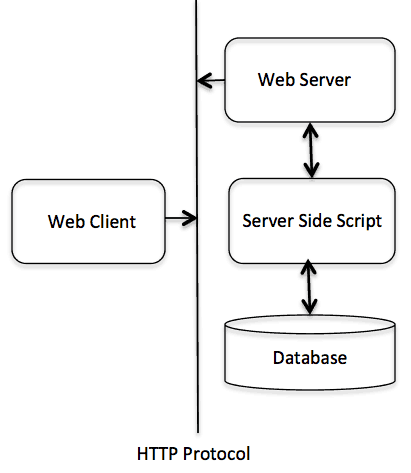
Web Server Support and Configuration
Before you start CGI programming, ensure that your Web server supports CGI and that the CGI handler has been configured.
Apache CGI configuration:
Set up the CGI directory:
ScriptAlias /cgi-bin/ /var/www/cgi-bin/
CGI programs executed by all HTTP servers are stored in a pre-configured directory. This directory is called the CGI directory, and by convention, it is named the /var/www/cgi-bin directory.
The extension of CGI files is .cgi, and Ruby can also use the .rb extension.
By default, on Linux servers, the configured cgi-bin directory is /var/www.
If you want to specify another directory for running CGI scripts, you can modify the httpd.conf configuration file as follows:
<Directory "/var/www/cgi-bin">
   AllowOverride None
   Options +ExecCGI
   Order allow,deny
   Allow from all
</Directory>
Add the .rb suffix in AddHandler, so that we can access Ruby script files ending with .rb:
AddHandler cgi-script .cgi .pl .rb
Writing CGI Scripts
The most basic Ruby CGI code is as follows:
#!/usr/bin/ruby

puts "Content-type: text/html\n\n"
puts "<html><body>This is a test</body></html>"
You can save this code to the test.cgi file, upload it to the server and grant sufficient permissions, and then it can be executed as a CGI script.
If your site address is http://www.example.com/, you can access the program via http://www.example.com/test.cgi, and the output result is: "This is a test."
After the browser visits the URL, the Web server will find the test.cgi file in the site directory, and then use the Ruby parser to parse the script code and access the HTML document.
Using cgi.rb
Ruby can call the CGI library to write more complex CGI scripts.
The following code calls the CGI library to create a CGI script.
#!/usr/bin/ruby

require 'cgi'

cgi = CGI.new
puts cgi.header
puts "<html><body>This is a test</body></html>"
In the following code, a CGI object is created and the header information is printed.
Form Processing
Using the CGI library, you can obtain data submitted by forms (or parameters in the URL) in two ways, for example URL: /cgi-bin/test.cgi?FirstName=Zara&LastName=Ali.
You can use CGI#[] to directly get the parameters FirstName and LastName:
#!/usr/bin/ruby

require 'cgi'
cgi = CGI.new
cgi['FirstName'] # =>  ["Zara"]
cgi['LastName']  # =>  ["Ali"]
Another way to get form data:
#!/usr/bin/ruby

require 'cgi'
cgi = CGI.new
h = cgi.params  # =>  {"FirstName"=>["Zara"],"LastName"=>["Ali"]}
h['FirstName']  # =>  ["Zara"]
h['LastName']   # =>  ["Ali"]
The following code is used to retrieve all key-value pairs:
#!/usr/bin/ruby

require 'cgi'
cgi = CGI.new
cgi.keys         # =>  ["FirstName", "LastName"]
If the form contains multiple fields with the same name, the values of the same field will be stored in an array.
In the following example, three identical fields "name" are specified in the form, with values "Zara", "Huma" and "Nuha":
#!/usr/bin/ruby

require 'cgi'
cgi = CGI.new
cgi['name']        # => "Zara"
cgi.params['name'] # => ["Zara", "Huma", "Nuha"]
cgi.keys           # => ["name"]
cgi.params         # => {"name"=>["Zara", "Huma", "Nuha"]}
Note:Ruby automatically determines the GET and POST methods, so there is no need to treat the two methods differently.
The following is the relevant HTML code:
<html>
<body>
<form method="POST" action="http://www.example.com/test.cgi">
First Name :<input type="text" name="FirstName" value="" />
<br />
Last Name :<input type="text" name="LastName" value="" />

<input type="submit" value="Submit Data" />
</form>
</body>
</html>
Creating Form and HTML
CGI contains a large number of methods for creating HTML, and each HTML tag has a corresponding method. Before using these methods, you must create a CGI object through CGI.new.
To make tag nesting easier, these methods take content as a code block, and the code block returns a string as the content of the tag. As shown below:
#!/usr/bin/ruby

require "cgi"
cgi = CGI.new("html4")
cgi.out{
   cgi.html{
      cgi.head{ "\n"+cgi.title{"This Is a Test"} } +
      cgi.body{ "\n"+
         cgi.form{"\n"+
            cgi.hr +
            cgi.h1 { "A Form: " } + "\n"+
            cgi.textarea("get_text") +"\n"+
            cgi.br +
            cgi.submit
         }
      }
   }
}
String Escaping
When you are dealing with parameters in URLs or HTML form data, you need to escape certain special characters, such as quotation marks (") and backslash (/).
The Ruby CGI object provides CGI.escape and CGI.unescape methods to handle the escaping of these special characters:
#!/usr/bin/ruby

require 'cgi'
puts CGI.escape(Zara Ali/A Sweet & Sour Girl")
The execution result of the above code is as follows:
#!/usr/bin/ruby

require 'cgi'
puts CGI.escape(Zara Ali/A Sweet & Sour Girl")
Another set of examples:
#!/usr/bin/ruby

require 'cgi'
puts CGI.escapeHTML('<h1>Zara Ali/A Sweet & Sour Girl</h1>')
The execution result of the above code is as follows:
<h1>Zara Ali/A Sweet & Sour Girl</h1>'
Commonly Used Methods in CGI Class
The following are the related methods of the complete CGI class in Ruby
- Ruby CGI- Standard CGI library methods
Cookies and Sessions
- Ruby CGI Cookies- How to handle CGI Cookies.
- Ruby CGI Sessions- How to handle CGI sessions.