HTML DOM clientLeft Property
 Element Object
Example
Get the width of the top and left borders of a div element:
var elmnt = document.getElementById("myDIV");
var txt = "Width of the top border:" + elmnt.clientTop + "px<br>";
txt += "Width of the left border:" + elmnt.clientLeft + "px";
Try it Yourself »
Definition and Usage
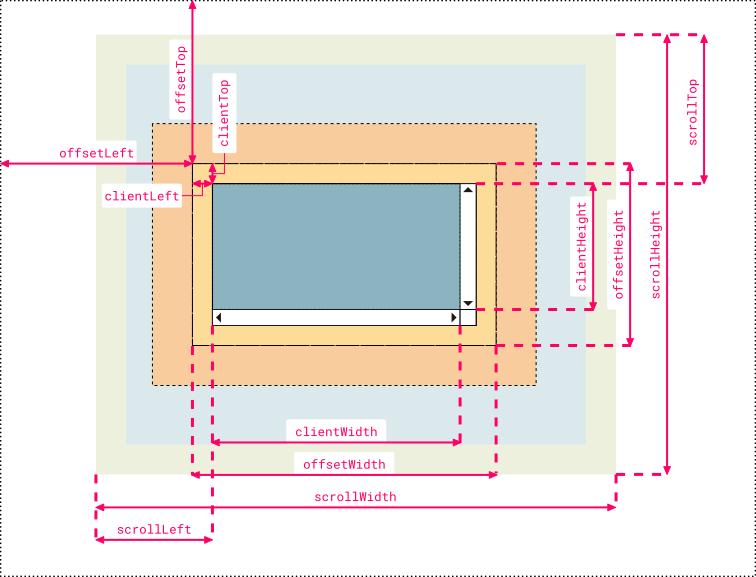
clientLeft returns the width of the left border of an element, in pixels. If the element's text direction is right-to-left (RTL) and a vertical scrollbar appears on the left due to content overflow, the property includes the width of the scrollbar.
clientLeft does not include the left margin and left padding.
Note:You can use thestyle.borderLeftWidthproperty to get the width of the element's left border.
Note:To return the width of the element's top border, you can use theclientTopproperty.
clientLeft is read-only.
Browser Support
| Property | |||||
|---|---|---|---|---|---|
| clientLeft | Yes | Yes | Yes | Yes | Yes |
Syntax
element.clientLeft
Technical Details
| Return Value: | Returns an integer representing the width of the element's left border. |
|---|
More Examples
Example
In the following example, the div element has a text direction of right-to-left and has a scrollbar:
var left = document.getElementById("myDIV").clientLeft;
Try it Yourself »
Other Extensions