JavaScript forEach()Method
 JavaScript Array Object
Example
List each element of the array:
<button onclick="numbers.forEach(myFunction)">Click me</button>
<p id="demo"></p>
<script>
demoP = document.getElementById("demo");
var numbers = [4, 9, 16, 25];
function myFunction(item, index) {
demoP.innerHTML = demoP.innerHTML + "index[" + index + "]: " + item + "<br>";
}
</script>
Output result:
index[0]: 4
index[1]: 9
index[2]: 16
index[3]: 25
index[1]: 9
index[2]: 16
index[3]: 25
Try it Yourself »
Definition and Usage
The forEach() method is used to call each element of an array and pass the element to a callback function.
Note:forEach() does not execute the callback function for empty arrays.
Browser Support
The numbers in the table indicate the first browser version number that supports the method.
| Method | |||||
|---|---|---|---|---|---|
| forEach() | Yes | 9.0 | 1.5 | Yes | Yes |
Syntax
array.forEach(callbackFn(currentValue, index, arr), thisValue)
Parameters
| Parameter | Description | ||||||||
|---|---|---|---|---|---|---|---|---|---|
| callbackFn(currentValue, index, arr) | Required. The function to be called for each element in the array. Function parameters:
|
||||||||
| thisValue | Optional. The value passed to the function is generally used as the "this" value. If this parameter is empty, "undefined" will be passed to the "this" value. |
Other syntax formats:
// Arrow function
forEach((element) => { /* … */ })
forEach((element, index) => { /* … */ })
forEach((element, index, array) => { /* … */ })
// Callback function
forEach(callbackFn)
forEach(callbackFn, thisArg)
// Inline callback function
forEach(function(element) { /* … */ })
forEach(function(element, index) { /* … */ })
forEach(function(element, index, array){ /* … */ })
forEach(function(element, index, array) { /* … */ }, thisArg)
forEach((element) => { /* … */ })
forEach((element, index) => { /* … */ })
forEach((element, index, array) => { /* … */ })
// Callback function
forEach(callbackFn)
forEach(callbackFn, thisArg)
// Inline callback function
forEach(function(element) { /* … */ })
forEach(function(element, index) { /* … */ })
forEach(function(element, index, array){ /* … */ })
forEach(function(element, index, array) { /* … */ }, thisArg)
Technical Details
| Return value: | undefined |
|---|---|
| JavaScript Version: | ECMAScript 3 |
More Examples
Example
Calculate the total sum of all elements in the array:
<button onclick="numbers.forEach(myFunction)">Click me</button>
<p>Sum of array elements:<span id="demo"></span></p>
<script>
var sum = 0;
var numbers = [65, 44, 12, 4];
function myFunction(item) {
sum += item;
demo.innerHTML = sum;
}
</script>
Try it Yourself »
Example
Multiply all values in the array by a specific number:
<p>Multiply by:<input type="number" id="multiplyWith" value="10"></p>
<button onclick="numbers.forEach(myFunction)">Click me</button>
<p>Calculated value:<span id="demo"></span></p>
<script>
var numbers = [65, 44, 12, 4];
function myFunction(item,index,arr) {
arr[index] = item * document.getElementById("multiplyWith").value;
demo.innerHTML = numbers;
}
</script>
Try it Yourself »
Continue and Break in forEach()
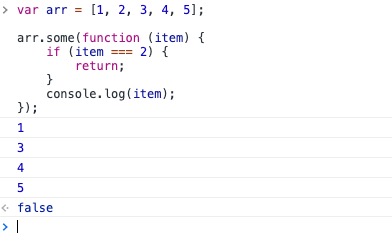
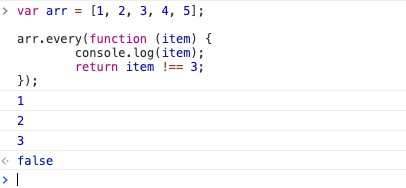
forEach() itself does not support the continue and break statements. We cansomeandeveryimplement it.
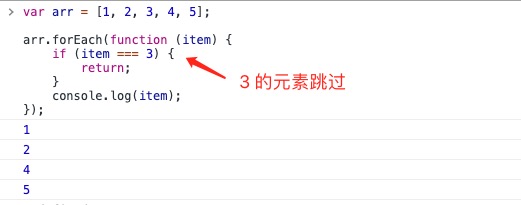
Usereturnstatement to implementcontinuethe effect of the keyword:
Implementing continue
Example
var arr = [1, 2, 3, 4, 5];
arr.forEach(function (item) {
if (item === 3) {
return;
}
console.log(item);
});
arr.forEach(function (item) {
if (item === 3) {
return;
}
console.log(item);
});
var arr = [1, 2, 3, 4, 5];
arr.some(function (item) {
if (item === 2) {
return; // Cannot be return false
}
console.log(item);
});
arr.some(function (item) {
if (item === 2) {
return; // Cannot be return false
}
console.log(item);
});
Implementing break
Example
var arr = [1, 2, 3, 4, 5];
arr.every(function (item) {
console.log(item);
return item !== 3;
});
arr.every(function (item) {
console.log(item);
return item !== 3;
});
Other Extensions