JavaScript forEach()メソッド
 JavaScript Array オブジェクト
例
配列の各要素をリスト表示する:
<button onclick="numbers.forEach(myFunction)">クリック</button>
<p id="demo"></p>
<script>
demoP = document.getElementById("demo");
var numbers = [4, 9, 16, 25];
function myFunction(item, index) {
demoP.innerHTML = demoP.innerHTML + "index[" + index + "]: " + item + "<br>";
}
</script>
出力結果:
index[0]: 4
index[1]: 9
index[2]: 16
index[3]: 25
index[1]: 9
index[2]: 16
index[3]: 25
試してみる »
定義と使い方
forEach() メソッドは配列の各要素を呼び出し、要素をコールバック関数に渡します。
注意:forEach() は空の配列に対してはコールバック関数を実行しません。
ブラウザサポート
表内の数字は、そのメソッドをサポートする最初のブラウザバージョン番号を示します。
| メソッド | |||||
|---|---|---|---|---|---|
| forEach() | Yes | 9.0 | 1.5 | Yes | Yes |
構文
array.forEach(callbackFn(currentValue, index, arr), thisValue)
パラメータ
| パラメータ | 説明 | ||||||||
|---|---|---|---|---|---|---|---|---|---|
| callbackFn(currentValue, index, arr) | 必須。配列内の各要素に対して呼び出す必要がある関数。 関数のパラメータ:
|
||||||||
| thisValue | 省略可能。関数に渡される値で、通常は "this" 値として使われます。 このパラメータが空の場合、"undefined" が "this" 値として渡されます。 |
他の形式の構文:
// アロー関数
forEach((element) => { /* … */ })
forEach((element, index) => { /* … */ })
forEach((element, index, array) => { /* … */ })
// コールバック関数
forEach(callbackFn)
forEach(callbackFn, thisArg)
// インラインコールバック関数
forEach(function(element) { /* … */ })
forEach(function(element, index) { /* … */ })
forEach(function(element, index, array){ /* … */ })
forEach(function(element, index, array) { /* … */ }, thisArg)
forEach((element) => { /* … */ })
forEach((element, index) => { /* … */ })
forEach((element, index, array) => { /* … */ })
// コールバック関数
forEach(callbackFn)
forEach(callbackFn, thisArg)
// インラインコールバック関数
forEach(function(element) { /* … */ })
forEach(function(element, index) { /* … */ })
forEach(function(element, index, array){ /* … */ })
forEach(function(element, index, array) { /* … */ }, thisArg)
技術的な詳細
| 戻り値: | undefined |
|---|---|
| JavaScript バージョン: | ECMAScript 3 |
その他の例
例
配列のすべての要素を加算した合計を計算する:
<button onclick="numbers.forEach(myFunction)">クリック</button>
<p>配列要素の合計:<span id="demo"></span></p>
<script>
var sum = 0;
var numbers = [65, 44, 12, 4];
function myFunction(item) {
sum += item;
demo.innerHTML = sum;
}
</script>
試してみる »
例
配列内のすべての値を特定の数値で乗算する:
<p>乗算する値:<input type="number" id="multiplyWith" value="10"></p>
<button onclick="numbers.forEach(myFunction)">クリック</button>
<p>計算後の値:<span id="demo"></span></p>
<script>
var numbers = [65, 44, 12, 4];
function myFunction(item,index,arr) {
arr[index] = item * document.getElementById("multiplyWith").value;
demo.innerHTML = numbers;
}
</script>
試してみる »
forEach() の continue と break
forEach() 自体は continue と break 文をサポートしていません。私たちは次を使用してsomeとevery実現できます。
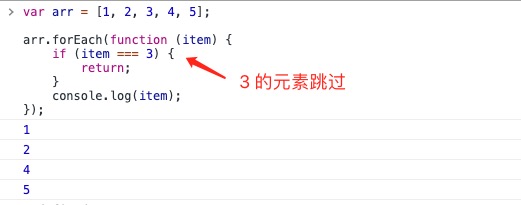
使用してreturn文で実装しますcontinueキーワードの効果:
continue の実装
例
var arr = [1, 2, 3, 4, 5];
arr.forEach(function (item) {
if (item === 3) {
return;
}
console.log(item);
});
arr.forEach(function (item) {
if (item === 3) {
return;
}
console.log(item);
});
var arr = [1, 2, 3, 4, 5];
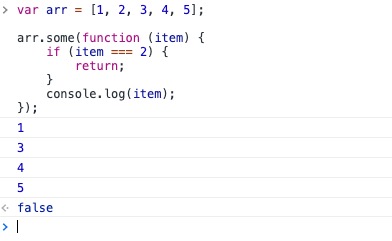
arr.some(function (item) {
if (item === 2) {
return; // return false は使用できません
}
console.log(item);
});
arr.some(function (item) {
if (item === 2) {
return; // return false は使用できません
}
console.log(item);
});
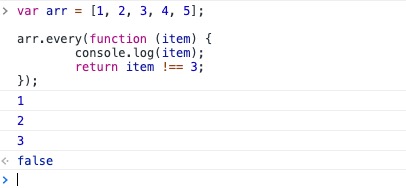
break の実装
例
var arr = [1, 2, 3, 4, 5];
arr.every(function (item) {
console.log(item);
return item !== 3;
});
arr.every(function (item) {
console.log(item);
return item !== 3;
});
その他の拡張