jQuery UI Download
Once you have a basic understanding of jQuery UI, you can try it yourself. Please, from the jQuery UI website'sDownload Builderpage, download a copy of jQuery UI.
Creating a Custom jQuery UI Download
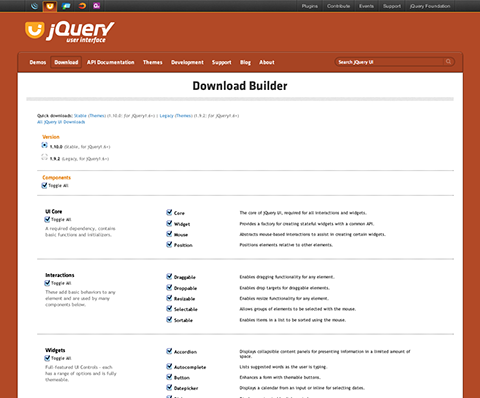
jQuery UI's Download Builder allows you to select the components you need to download and get a custom library version for your project. Creating a custom jQuery UI download requires the following three steps:
Step 1: Select the components you need
The first column of the Download Builder page lists all of jQuery UI's JavaScript component categories: UI Core, Interactions, Widgets, and Effects. Some components in jQuery UI depend on other components; when you select these components, the components they depend on will also be automatically selected. The components you select will be merged into a single jQuery UI JavaScript file.
Step 2: Choose a theme or customize a theme
On the Download Builder page, you will see a text box that lists a series of pre-designed themes for jQuery UI widgets. You can choose one of these provided themes, or use ThemeRoller to customize a theme (see the following chapters for an explanation).
Advanced Theme Settings: The theme section of the Download Builder also provides some advanced configuration settings for themes. If you plan to use multiple themes on a page, these fields will come in handy. If you plan to use only one theme on a page, you can skip these settings entirely.
Step 3: Choose the version of jQuery UI
In the Download Builder, the final step is to choose a version number. This step is important because jQuery UI versions are designed to work with specific jQuery versions. The current versions are:
- jQuery UI 1.10.2 – Requires jQuery 1.6 and above.
- jQuery UI 1.9.2 – Requires jQuery 1.6 and above.
Click the Download button to download!
Click the Download button to complete the download. You will get a custom zip file containing the components you selected.
Other Extensions