jQuery outerWidth()Method
 jQuery HTML/CSS Methods
Example
Return the outer width of a <div> element:
$("button").click(function(){
alert($("div").outerWidth());
});
Try it yourself »
Definition and Usage
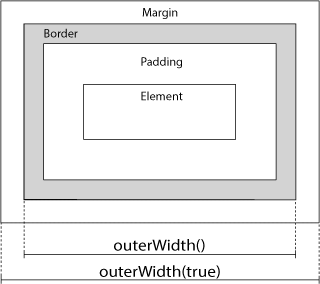
The outerWidth() method returnsthe first matched element'souter width.
As shown in the image below, this method includes padding and border.
Tip:To include margin, use outerWidth(true).
Related methods:
- width()- Set or return the width of an element
- height()- Set or return the height of an element
- innerWidth()- Return the width of an element (includes padding)
- innerHeight()- Return the height of an element (includes padding)
- outerHeight()- Return the height of an element (includes padding and border)
Syntax
$(selector).outerWidth(includeMargin)
| Parameter | Description |
|---|---|
| includeMargin | Optional. A boolean value specifying whether to include margin.
|

More Examples
Include margin
Specify whether to include margin.
Display dimensions using related methods
How to use width(), height(), innerHeight(), innerWidth(), outerWidth() and outerHeight().
Other extensions