jQuery Growl Plugin (Message Notification)
The jQuery Growl plugin (message notification) allows you to easily display feedback messages in an overlay. The messages disappear automatically after a period of time, without needing to click an "OK" button. Users can also speed up hiding the information by moving the mouse or clicking the close button.
The current version of this plugin is 1.0.0.
VisitjQuery Growlthe official website, downloadjQuery Growlthe plugin.
The effect is as follows:
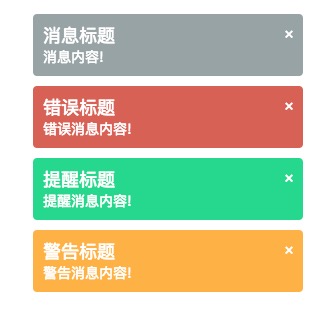
Usage
After downloading the plugin, import the jQuery library, jquery.growl.js, and jquery.growl.css files, for example:
<script src="https://cdn.bootcss.com/jquery/2.0.2/jquery.min.js" type="text/javascript"></script>
<script src="https://static.jyshare.com/assets/jquery/jquery.growl/javascripts/jquery.growl.js" type="text/javascript"></script>
<link href="https://static.jyshare.com/assets/jquery/jquery.growl/stylesheets/jquery.growl.css" rel="stylesheet" type="text/css" />
To use the Growl plugin, select the display text element you want to set, and pass the text to it as a parameter:
$.growl({ title: "Message Title", message: "Message content!" });
$.growl.error({ title: "Error Title", message: "Error message content!" });
$.growl.notice({title: "Notice Title", message: "Notice message content!" });
$.growl.warning({title: "Warning Title", message: "Warning message content!" });
There are several default options available. If you are interested, you can see the complete demo below.
Example Demo
jQuery Message plugin demo.
$(function() {
$.growl({
title: "Message Title",
message: "Message content!"
});
$('.error').click(function(event) {
event.preventDefault();
event.stopPropagation();
return $.growl.error({
title: "Error Title",
message: "Error message content!"
});
});
$('.notice').click(function(event) {
event.preventDefault();
event.stopPropagation();
return $.growl.notice({
title: "Notice Title",
message: "Notice message content!"
});
});
return $('.warning').click(function(event) {
event.preventDefault();
event.stopPropagation();
return $.growl.warning({
title: "Warning Title",
message: "Warning message content!"
});
});
});
Try it yourself »
Other Extensions