HTTP Message Structure
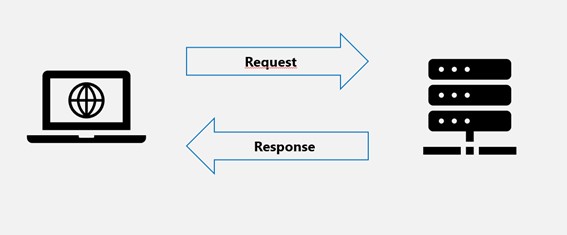
HTTP is a client/server (C/S) architecture model that exchanges information over a reliable connection, and is a stateless request/response protocol.
HTTP messages are the foundation of communication between clients and servers. They consist of a series of text lines that follow a specific format and structure.
HTTP messages are divided into two types: request messages and response messages.
An HTTP client is an application (a web browser or any other client) that connects to a server in order to send one or more HTTP requests to the server.
An HTTP server is also an application (usually a web service, such as Nginx, Apache server, or IIS server, etc.) that receives client requests and sends HTTP response data to the client.
Client Request Message
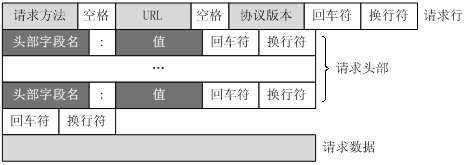
A request message sent by a client to the server via an HTTP request consists of four parts: the request line, request headers, a blank line, and request data. The figure below shows the general format of a request message.
-
Request Line(Request Line):
- Method: such as GET, POST, PUT, DELETE, etc., specifying the operation to be performed.
- Request URI(Uniform Resource Identifier): the path of the requested resource, usually including the hostname, port number (if non-default), path, and query string.
- HTTP Version: such as HTTP/1.1 or HTTP/2.
Example of the request line format:
GET /index.html HTTP/1.1 -
Request Headers(Request Headers):
- Contains client environment information, the size of the request body (if any), the compression types supported by the client, etc.
- Common request headers include
Host、User-Agent、Accept、Accept-Encoding、Content-Lengthetc.
-
Blank Line:
- The separator between the request headers and the request body, indicating the end of the request headers.
-
Request Body(Optional):
- In certain types of HTTP requests (such as POST and PUT), the request body contains the data to be sent to the server.
Server Response Message
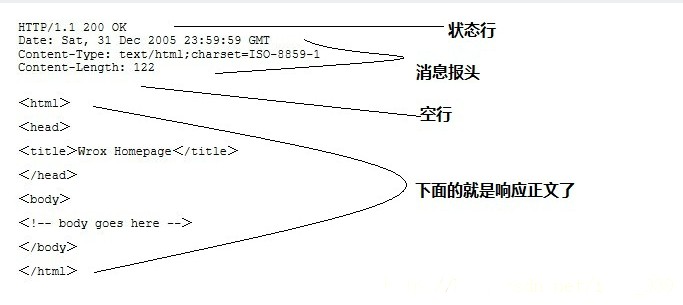
An HTTP response also consists of four parts: the status line, message headers, a blank line, and the response body.
-
Status Line(Status Line):
- HTTP Version: Matches the version in the request message.
- Status Code: A three-digit number indicating the result of processing the request, e.g., 200 means success, 404 means resource not found.
- Status Information: A brief description of the status code.
Example of the status line format:
HTTP/1.1 200 OK -
Response Headers(Response Headers):
- Contains server environment information, the size of the response body, the compression types supported by the server, etc.
- Common response headers include
Content-Type、Content-Length、Server、Set-Cookieetc.
-
Blank Line:
- The separator between the response headers and the response body, indicating the end of the response headers.
-
Response Body(Optional):
- Contains the data returned by the server, such as the requested web page content, images, JSON data, etc.
Example
The following example is a typical example of using GET to pass data:
Client Request:
GET /index.html HTTP/1.1
Host: www.example.com
User-Agent: Mozilla/5.0 (Windows NT 10.0; Win64; x64; rv:91.0) Gecko/20100101 Firefox/91.0
Accept: text/html,application/xhtml+xml,application/xml;q=0.9,image/webp,*/*;q=0.8
Accept-Encoding: gzip, deflate
Connection: keep-alive
Server Response:
HTTP/1.1 200 OK
Date: Wed, 18 Apr 2024 12:00:00 GMT
Server: Apache/2.4.1 (Unix)
Last-Modified: Wed, 18 Apr 2024 11:00:00 GMT
Content-Length: 12345
Content-Type: text/html; charset=UTF-8

<!DOCTYPE html>
<html>
<head>
    <title>Example Page</title>
</head>
<body>
    <h1>Hello, World!</h1>
    <!-- The rest of the HTML content -->
</body>
</html>
In practical applications, HTTP messages can contain more header fields, and the sizes of the request body and response body will vary depending on the data being transmitted.
Other Extensions