Codex CLI Skills
Skills are an extension mechanism for Codex CLI that allows you to create custom workflows and automated tasks. Through skills, you can define how Codex behaves in specific scenarios.
What is a Skill?
A skill is a configurable behavior pattern that tells Codex how to handle specific types of tasks. You can create your own skills to:
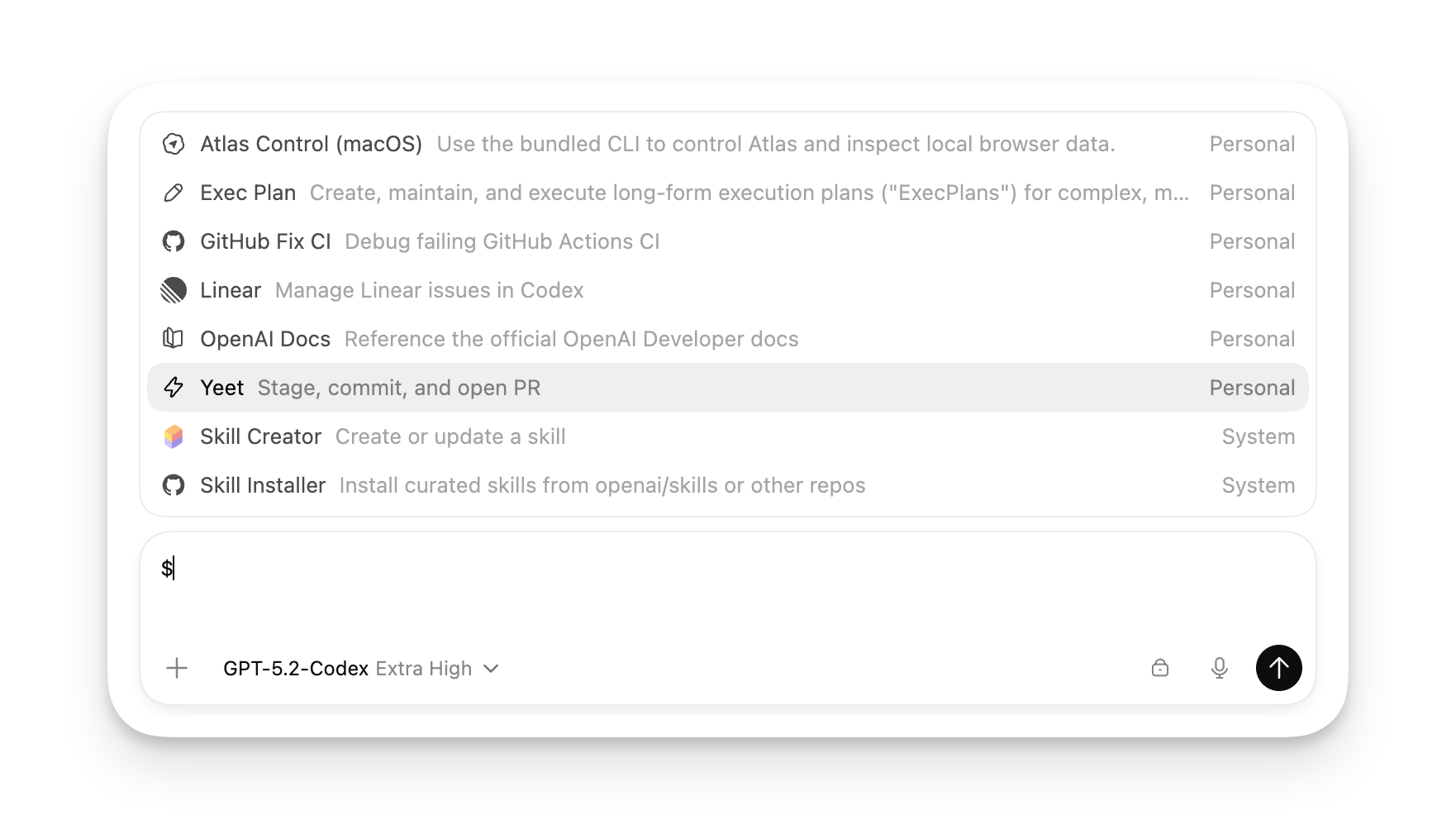
- Automate common development tasks
- Define domain-specific processing workflows
- Customize code review standards
- Create project-specific templates and rules
The skill system allows Codex to adapt to the needs of different projects and workflows, just like assigning a dedicated development assistant to your team.
Skill Directories
Codex loads skills from the following locations:
| Location | Description |
|---|---|
~/.codex/skills/ | Global skill directory, available to all projects |
{项目目录}/.codex/skills/ | Project-level skill directory |
Configure the specified directory | Specified via skills.directory in config.toml |
Configuring Skill Directories
Customizing Skill Directories
enabled = true
directory = "~/my-codex-skills"
Skill File Structure
Each skill is a standalone folder containing the following files:
skill-name/
├── skill.md          # 技能定义文件(必需)
└── (可选的辅助文件)
skill.md File Format
Skill Definition Example
name: Code Review
description: Perform in-depth code review and provide improvement suggestions
trigger: /review
---
# Code Review Skill
When a user requests a code review, perform the following steps:
## Review Standards
1. Code readability
2. Performance issues
3. Security risks
4. Adherence to best practices
5. Test coverage
## Output Format
Provide the following structured report:
- List of issues (sorted by severity)
- Improvement suggestions
- Code score (1-10)
Skill Metadata
The beginning of each skill file must contain YAML-formatted metadata:
| Field | Type | Description | Required |
|---|---|---|---|
name | string | Skill name | Yes |
description | string | Skill description | Yes |
trigger | string | Trigger keywords | no |
When your input matches the skill's trigger, Codex will automatically use that skill to handle the task.
Creating Custom Skills
Let's create a simple skill as an example:
Step 1: Create a Skill Directory
Create the Skill Folder
Step 2: Write the Skill Definition
Create skill.md
name: Generate Tests
description: Generate unit tests for code
trigger: test
---
# Generate Test Skill
When a user requests generating tests, perform the following steps:
## Steps
1. Analyze the functionality of existing code
2. Identify edge cases that need testing
3. Choose an appropriate testing framework
4. Generate test cases
## Test Standards
- Coverage should include normal cases, edge cases, and error cases
- Each test case should be independent and not depend on the execution order of other tests
- Use clear naming for test functions
## Output Format
Generate test code that can run directly, and include necessary test data.
Step 3: Using the Skill
Now, when you enter content related to "test", Codex will automatically use this skill:
Triggering Skills
Help me generate tests for this function
Please test this module
Built-in Skills
Codex comes with some common built-in skills:
| Skill Name | Trigger Words | Description |
|---|---|---|
| Code Review | review, audit | Perform code review and provide improvement suggestions |
| Debugging | debug, debugging | Help locate and fix problems |
| Refactoring | refactor, refactoring | Optimize code structure without changing functionality |
| Documentation | doc, documentation | Generate code documentation |
You can override the behavior of built-in skills to create versions that meet project needs.
Skill Priority
When multiple skills match, Codex selects according to the following priority:
- Exact match (identical trigger words)
- Contains match (input contains the trigger word)
- Semantic match (AI judges relevance)
Forcing Specific Skills
You can force the use of a specific skill using a slash command:
Force Using a Skill
@skill-name your task description
Advanced Skill Configuration
Conditional Triggers
You can configure skills to trigger under specific conditions:
Conditional Trigger Example
name: Python Skill
description: Python project-specific handling
trigger: python
when:
file_pattern: "*.py"
directory: "src/"
---
# Python Project Skill
This skill only takes effect when processing Python files.
Multi-step Tasks
Skills can define complex multi-step workflows:
Multi-step Skills
name: Full Feature Development
description: Complete workflow from requirements to implementation
trigger: develop feature
---
# Full Feature Development Workflow
## Phase 1: Requirements Analysis
- Understand functional requirements
- Identify edge cases
- Design data structures
## Phase 2: Design
- Design function/class structure
- Define interfaces
- Choose algorithms
## Phase 3: Implementation
- Write code
- Add comments
- Write documentation
## Phase 4: Testing
- Write unit tests
- Verify edge cases
- Check coverage
## Phase 5: Commit
- Create a Git commit
- Write commit message
Skill Best Practices
Naming Conventions
- Use clear, descriptive names
- Names should reflect the skill's functionality
- Avoid using Chinese names (may cause encoding issues)
Choosing Trigger Words
- Choose commonly used keywords
- Avoid overly broad trigger words
- Consider users' natural ways of expression
Skill Granularity
- Keep a skill's responsibility single-purpose
- One skill solves one type of problem
- Complex workflows can be realized through skill combinations
A good skill should make users feel "Codex understands my needs," rather than requiring them to learn special syntax.
Managing Skills
List Available Skills
View the Skill List
/skills
Disable Skills
If you don't want to use a skill, you can delete the corresponding file or move it to another directory.
Update Skills
After modifying a skill file, you need to restart Codex for changes to take effect.
Skill Example Library
OpenAI officially provides some pre-built skills for your reference and use:
Visit the GitHub repository to see more examples:https://github.com/openai/codex/tree/main/skills
FAQ
Q: Skill not triggering?
Check whether the skill file's metadata format is correct, ensure the YAML header format is correct and the file ends with.mdthe correct ending.
Q: How do I debug a skill?
You can use in Codex/debugcommand to view detailed information about skill matching.
Q: Will skills affect Codex's normal behavior?
Skills only provide guidelines; Codex still makes independent judgments. If skills are configured improperly, Codex will use default behavior.
Other extensions