Android Overview
What is Android?
 Android is an open source, Linux-based operating system for mobile devices such as smartphones and tablets. Android was developed by the Open Handset Alliance led by Google and other companies.
Android provides a unified approach to application development, meaning developers only need to develop for Android, and their applications can then run on different mobile devices powered by Android.
Google released the first test version of the Android Software Development Kit (SDK) in 2007, and the first commercial version, Android 1.0, was released in September 2008.
On June 27, 2012, at the Google I/O conference, Google announced the release of Android version 4.1 Jelly Bean. Jelly Bean is a progressive update in terms of functionality and performance, with the main goal of improving the user interface,
The Android source code is available under free and open source software licenses. Most of the code released by Google follows the Apache License version 2.0, and changes to the Linux kernel follow the GNU General Public License version 2.
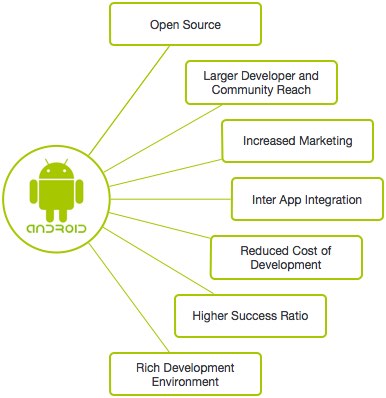
Advantages of Android Development
- Open source
- Many developers and a strong community
- Growing market
- Internationalized App integration
- Low development cost
- Higher chance of success
- Rich development environment
Features of Android
Android is a powerful operating system competing with Apple 4GS and supports some great features. The following lists some of the features:
| Feature | Description |
|---|---|
| Beautiful UI | The basic screen of the Android operating system provides a beautiful and intuitive user interface. |
| Connectivity | GSM/EDGE, IDEN, CDMA, EV-DO, UMTS, Bluetooth, Wi-Fi, LTE, NFC and WiMAX. |
| Storage | SQLite, a lightweight relational database for data storage |
| Media support | H.263, H.264, MPEG-4 SP, AMR, AMR-WB, AAC, HE-AAC, AAC 5.1, MP3, MIDI, Ogg Vorbis, WAV, JPEG, PNG, GIF, and BMP |
| Messaging | SMS and MMS |
| Web browser | Based on the open-source WebKit layout engine, plus Chrome's V8 JavaScript engine that supports HTML5 and CSS3. |
| Multi-touch | Android natively supports multi-touch, which has been available from the initial handheld devices, such as HTC Hero. |
| Multitasking | Users can jump from one task to another, and multiple applications can run simultaneously at the same time. |
| Resizable widgets | Widgets are resizable, so users can expand to show more content or shrink to save space. |
| Multi-language | Supports unidirectional and multi-directional text. |
| GCM | Google Cloud Messaging (GCM) is a service that enables developers to send short message data to users of Android devices without requiring a proprietary synchronization solution. |
| Wi-Fi Direct | A technology for directly discovering and pairing applications through high-bandwidth peer-to-peer network connections. |
| Android Beam | A popular NFC-based technology that enables users to instantly share by simply touching two phones together using NFC functionality. |
Android Applications
Android applications are generally developed using the Android Software Development Kit with the Java language.
Once development is complete, Android applications can be easily packaged and sold on platforms such as Google Play and the Amazon App Store.
Android has millions of mobile devices in over 190 countries around the world. It is the largest and fastest-growing installed base of any mobile platform. More than 1 million new Android devices are activated worldwide every day.
The purpose of this tutorial is to teach you how to develop and package Android applications. We will start with the setup of the Android application programming environment, and then dive into various aspects of Android application development.
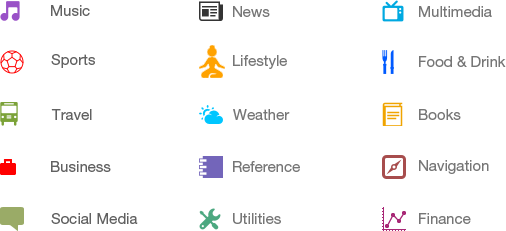
Categories of Android Applications
There are many Android applications in the market. The main categories are:
History of Android
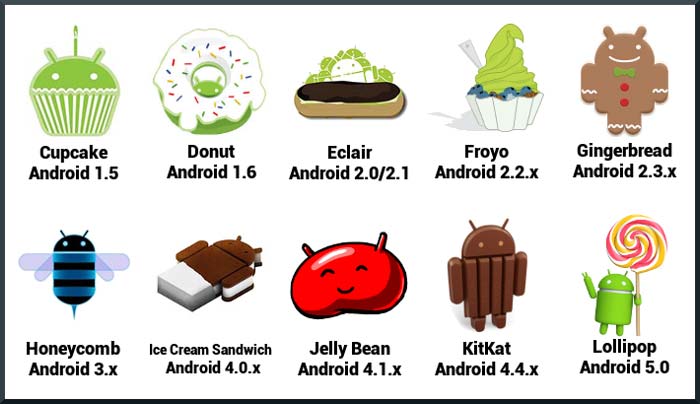
Android's code names now range from A to L, namely Aestro, Blender, Cupcake, Donut, Eclair, Froyo, Gingerbread, Honeycomb, Ice Cream Sandwich, Jelly Bean, KitKat and Lollipop. Let's understand the history of Android in order.
- Cupcake
- Donut
- Eclair
- Froyo
- Gingerbread
- Honeycomb
- Ice Cream Sandwich
- Jelly Bean
- KitKat
- Lollipop
What is an API Level?
An API level is an integer that uniquely identifies the version of the API framework provided by a particular version of the Android platform.
| Platform version | API level | VERSION_CODE | |
|---|---|---|---|
| Android 5.1 | 22 | LOLLIPOP_MR1 | |
| Android 5.0 | 21 | LOLLIPOP | |
| Android 4.4W | 20 | KITKAT_WATCH | KitKat for Wearables Only |
| Android 4.4 | 19 | KITKAT | |
| Android 4.3 | 18 | JELLY_BEAN_MR2 | |
| Android 4.2, 4.2.2 | 17 | JELLY_BEAN_MR1 | |
| Android 4.1, 4.1.1 | 16 | JELLY_BEAN | |
| Android 4.0.3, 4.0.4 | 15 | ICE_CREAM_SANDWICH_MR1 | |
| Android 4.0, 4.0.1, 4.0.2 | 14 | ICE_CREAM_SANDWICH | |
| Android 3.2 | 13 | HONEYCOMB_MR2 | |
| Android 3.1.x | 12 | HONEYCOMB_MR1 | |
| Android 3.0.x | 11 | HONEYCOMB | |
Android 2.3.4 Android 2.3.3 |
10 | GINGERBREAD_MR1 | |
|
Android 2.3.2 Android 2.3.1 Android 2.3 |
9 | GINGERBREAD | |
| Android 2.2.x | 8 | FROYO | |
| Android 2.1.x | 7 | ECLAIR_MR1 | |
| Android 2.0.1 | 6 | ECLAIR_0_1 | |
| Android 2.0 | 5 | ECLAIR | |
| Android 1.6 | 4 | DONUT | |
| Android 1.5 | 3 | CUPCAKE | |
| Android 1.1 | 2 | BASE_1_1 | |
| Android 1.0 | 1 | BASE |