AI Agent
You may be used to this kind of interaction: you ask a question, and the AI gives an answer.
-
You ask it to write an article, and it writes an article.
-
You ask it to translate a sentence, and it translates a sentence.
In this mode, the AI is more like a consultant — it gives you advice, but doesn't directly do things.
But what if the task is slightly more complex? For example: help me check tomorrow's weather in Beijing. If the temperature exceeds 25 degrees, recommend a short-sleeved shirt within a budget of 300 yuan, then compile the results into an email and send it to my boss.
With an ordinary conversational AI, you have to break it down into several steps:
-
Step 1: Check tomorrow's weather in Beijing.
-
Step 2: If it exceeds 25 degrees, recommend a short-sleeved shirt within 300 yuan.
-
Step 3: Write an email to my boss with the content ...
Each step requires you to manually move forward.
andAI AgentThe idea is: you just say "help me do this" once, and it will handle the rest by itself.
It will automatically determine what needs to be done, which tools to call, in what order to execute them, and how to adjust when problems arise, until the task is complete.
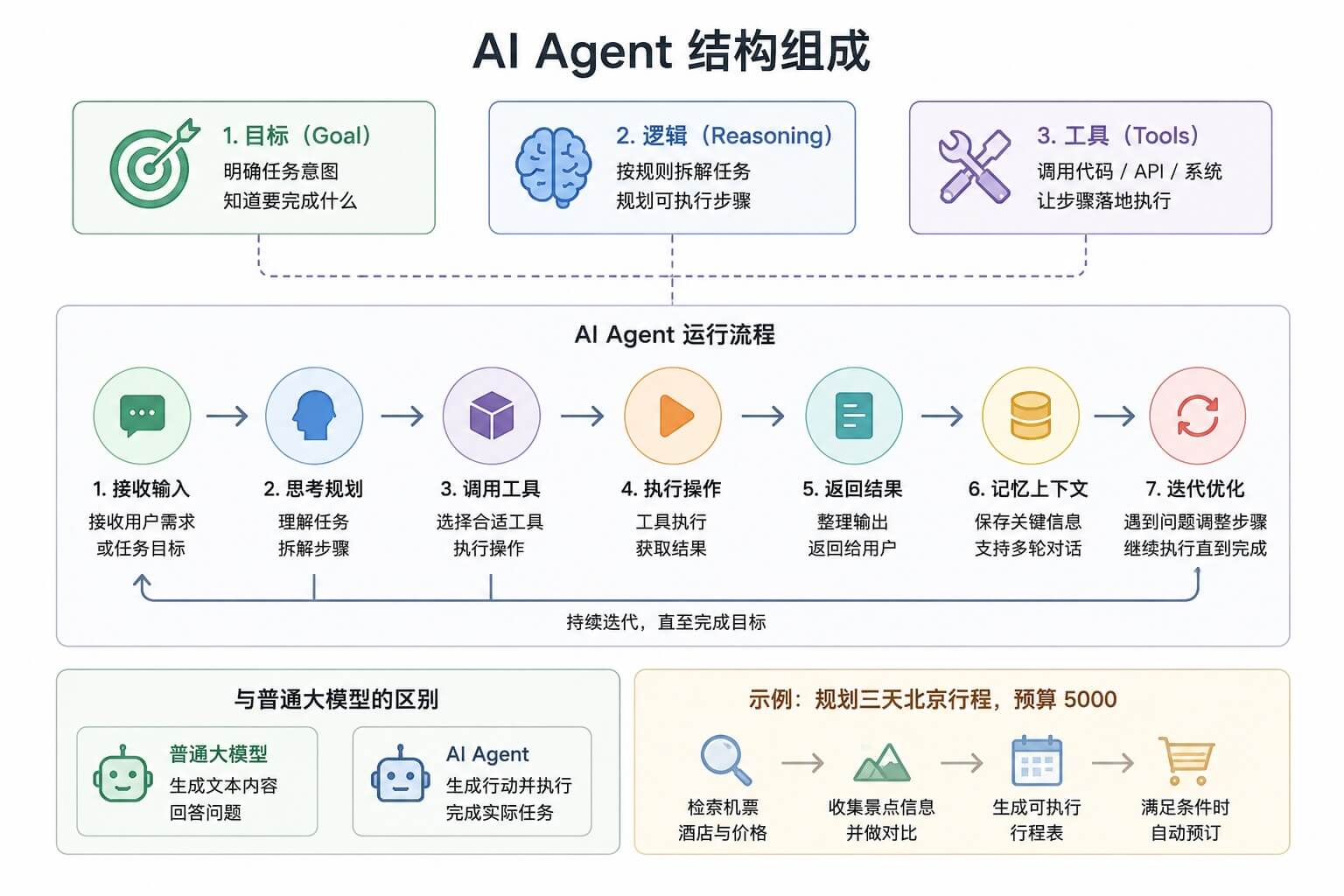
Simple understanding: a regular LLM is a strategist that gives you advice; an AI Agent is an executor that takes the goal and goes get things done on its own.
What is an AI Agent?
An AI Agent is an autonomous system that can perceive its environment, make decisions, and take actions.
A more academic definition is:An Agent is an entity situated in an environment; it perceives the environment through sensors and acts upon the environment through actuators to achieve a set of goals.。
This definition sounds a bit abstract, so let's break it down in plain language.
Agent vs. Regular LLM
First, take a look at a comparison table:
| Feature | Regular LLM | AI Agent |
|---|---|---|
| Interaction mode | Question-and-answer, user-driven | Autonomous execution, goal-driven |
| Capability boundary | Only built-in model capabilities | Can extend capabilities through tools |
| Memory | Conversation context (limited) | Short-term + long-term memory |
| Planning | None (or requires user guidance) | Autonomous task decomposition and planning |
| Feedback loop | None (single generation) | Observe-think-act loop |
Take a concrete example: "Help me book a flight from Shanghai to Beijing tomorrow, with a price under 1,500 yuan."
A regular LLM might answer: "Okay, I can write you a snippet of code to query flight prices, or tell you which website to check." But it won't actually search for flights, let alone book one for you.
A qualified Agent, on the other hand, will:
-
1. Understand the goal: Book a flight from Shanghai to Beijing tomorrow, under 1,500 yuan.
-
2. Decide on an action: I need to call a flight query API.
-
3. Execute the action: Call the API and get the list of flights.
-
4. Observe the results: Got 10 flights, 3 of which are under 1,500 yuan.
-
5. Think again: Which one to choose? Maybe need to check departure and arrival times, or ask the user for preferences.
-
6. Continue acting: Maybe call another API to check on-time rates, or directly recommend options to the user.
-
7. Complete the task: Help the user lock in a seat and generate an order link.
See the difference?A regular LLM gives you answers; an Agent gives you results.。
Core Capabilities of an Agent
A complete Agent typically possesses the following three core capabilities:
| Capability | Description | Analogy |
|---|---|---|
| Perception | Obtain environmental information and feedback | Eyes, ears |
| Decision | Think about what to do and how to do it | Brain |
| Action | Execute specific operations | Hands, feet |
-
Perception, means the Agent can see what's happening. For example, a user sends a message, an API returns a result, or a new file is added to the file system—these are all perception inputs.
-
Decision, means the Agent decides what to do next based on the perceived information. Should it answer the user directly? Does it need to call a tool? Does it need to break a big task into smaller subtasks? These are all decisions.
-
Action, means the Agent actually carries out the decisions. Calling a search API, reading a file, sending an email, operating a database—these are all actions.
Basic Architecture of an Agent
Now let's look at the Agent's standard "four-piece puzzle": brain, tools, memory, and planning.
First, let's look at an architecture diagram:

Brain: LLM as the Reasoning Core
An Agent's brain is typically a large language model, such as GPT-4, Claude, Llama, etc.
This LLM is responsible for:
-
1. Understanding the user's intent: when the user says "help me book a ticket," what does he really want?
-
2. Making decisions: what should I do next?
-
3. Generating tool call parameters: what parameters are needed to call a flight query API?
-
4. Organizing the final answer: now that enough information has been collected, how do we give the user a clear summary?
The LLM is the core of an Agent, but not everything—just like the human brain is important, but you still need hands and feet to get things done.
Tools: Expanding the Boundaries of AI Capabilities
Native LLMs have two obvious limitations:
-
1. Knowledge cutoff: it doesn't know what happened after training concluded.
-
2. No interaction capability: it can't directly read files, query databases, or call APIs.
Tools are designed to solve these problems.
Common tool types:
| Tool Type | Function | Example |
|---|---|---|
| Search Tools | Obtain the latest information | Google Search、Bing Search |
| Calculation Tools | Perform mathematical operations | Calculator, Wolfram Alpha |
| File Operations | Read/Write Local Files | Read PDF, Write CSV |
| API Calls | Interact with External Systems | Book flights, send emails, check weather |
| Database Queries | Store and retrieve structured data | SQL queries, vector retrieval |
| Code Execution | Run code to solve problems | Python REPL、Jupyter |
Giving tools to an Agent is like equipping a person with a computer—it instantly goes from only being able to think to being able to act.
Memory: Short-term vs. Long-term Memory
LLMs are naturally amnesic—every conversation starts fresh unless you stuff the context in.
And an Agent needs to remember a lot:
Short-term memory: What did the user just say? What tool did I call in the last step? What result did I get?
-
Long-term memory: What are the user's preferences? How were similar tasks handled in the past? What lessons have been learned?
Common implementation approaches for memory systems:
| Memory Type | Stored Content | Implementation Method |
|---|---|---|
| Short-Term Memory | Conversation history and intermediate steps of the current session | Directly placed in the LLM context window |
| Long-Term Memory | User preferences, historical tasks, knowledge documents | Vector database + similarity retrieval |
| Summary Memory | Compressed historical summaries | Have the LLM generate summaries periodically |
A good memory system can make an Agent seem like it remembers you, rather than acting like it's meeting you for the first time every time.
Planning: Task Decomposition
Complex tasks won't be completed in a single step; an Agent needs to be able to break a big goal down into smaller steps.
For example: Help me plan a birthday party for 10 people.
The Agent might plan it like this:
-
1. First clarify: What's the budget? When is it? Where is it? What are the preferences of the guest of honor?
-
2. Then: Look up nearby venues.
-
3. Next: Design the menu.
-
4. After that: Make a shopping list.
-
5. Finally: Generate a schedule.
Common planning strategies:
-
Chain-of-Thought: Think through step by step—what to do first, what to do next.
-
Tree-of-Thought: Consider multiple possible paths at the same time and choose the optimal one.
-
Reflection: After completing a step, look back and check whether there are any issues and whether adjustments are needed.
Tool Use / Function Calling
Tool calling is the most fundamental and important capability of an Agent.
Let's start by explaining what it is.
What is Function Calling?
Simply put:Function Calling is when the LLM outputs a structured JSON telling you which function it wants to call and what parameters to pass.。
It's not that the LLM actually executes the function—it just tells you that it wants to call it, and you still have to do the execution.
The whole process usually goes like this:
-
1. You tell the LLM: "Here are some functions you can call. Each function's name, parameters, and purpose are..."
-
2. The user sends a message: "Help me check tomorrow's weather in Beijing."
-
3. The LLM replies: "I want to call the get_weather function, with parameters city='Beijing', date='tomorrow'."
-
4. You call the function (actually querying the weather API) and get the result.
-
5. You feed the result back to the LLM: "The previous function call returned: temperature 25 degrees, sunny."
-
6. Based on this result, the LLM gives the user a natural language answer: "Beijing will be sunny tomorrow, 25 degrees, very comfortable."
See? The LLM does the thinking, and you do the executing.
Defining a Tool's JSON Schema
To make the LLM call tools, you first need to tell it what tools are available.
This process of telling is describing the functions with JSON Schema.
Let's look at a standard function definition format:
Example
tool_definition = {
"type": "function",
"function": {
"name": "get_weather", # Function name
"description": "Query the weather for a specified city on a specified date", # Function purpose description; the LLM will look at this
"parameters": {
"type": "object",
"properties": {
"city": {
"type": "string",
"description": "City name, e.g., 'Beijing', 'Shanghai', 'Shenzhen'",
},
"date": {
"type": "string",
"description": "Date, in YYYY-MM-DD format, e.g., '2024-06-18'",
},
"unit": {
"type": "string",
"enum": ["celsius", "fahrenheit"],
"description": "Temperature unit, Celsius or Fahrenheit, default Celsius",
},
},
"required": ["city", "date"], # Required parameters
},
},
}
# Another tool: Search
search_tool = {
"type": "function",
"function": {
"name": "web_search",
"description": "Search the internet for the latest information, suitable for checking news, real-time data, and unknown knowledge",
"parameters": {
"type": "object",
"properties": {
"query": {
"type": "string",
"description": "Search keyword or question",
},
"num_results": {
"type": "integer",
"description": "Number of results to return, default 5",
"default": 5,
},
},
"required": ["query"],
},
},
}
# Another tool: Calculator
calculator_tool = {
"type": "function",
"function": {
"name": "calculate",
"description": "Perform mathematical calculations, supporting addition, subtraction, multiplication, division, exponentiation, etc.",
"parameters": {
"type": "object",
"properties": {
"expression": {
"type": "string",
"description": "Mathematical expression, e.g., '25 * 4 + 10', 'sqrt(16)'",
},
},
"required": ["expression"],
},
},
}
print(fDefined {len([tool_definition, search_tool, calculator_tool])} tools: get_weather, web_search, calculate)
# Output: Defined 3 tools: get_weather, web_search, calculate
Key points:
-
description is very important — the LLM relies on this description to understand what the tool does and when to use it.
-
Parameters should also be described clearly — for example, if unit has an enum constraint, the LLM knows it can only choose from these two values.
-
required marks the required fields — the LLM will ensure these parameters always have values.
Hands-on Code: Adding Search and Calculation Tools to AI
Now let's write a complete, runnable example.
For demonstration, we use Python to simulate the complete Function Calling flow.
Example
# A simplified Agent tool call demo
# No real API key needed, demonstrate with mock data
# ============================================
import json
import random
from typing import Dict, Any, List, Optional
class SimpleAgent:
"""A simple Agent demo class"""
def __init__(self):
# Register available tools
self.tools = self._define_tools()
# Conversation history (memory)
self.messages: List[Dict] = []
def _define_tools(self) -> List[Dict]:
"""Define all available tools"""
return [
{
"name": "web_search",
"description": "Search the internet for the latest information",
"parameters": {
"query": {"type": "string", "description": "Search keyword"},
},
"required": ["query"],
},
{
"name": "calculate",
"description": "Perform mathematical calculations",
"parameters": {
"expression": {"type": "string", "description": "Mathematical expression"},
},
"required": ["expression"],
},
{
"name": "get_weather",
"description": "Query weather",
"parameters": {
"city": {"type": "string", "description": "City name"},
"date": {"type": "string", "description": "Date"},
},
"required": ["city", "date"],
},
]
def _call_tool(self, tool_name: str, parameters: Dict[str, Any]) -> str:
"""(Mock) Call the tool and return the result"""
print(f" [Tool call] {tool_name}({parameters})")
if tool_name == "web_search":
query = parameters["query"]
# Simulated search result
results = {
"example": Example (Rookie Tutorial) is a programming learning website that provides a large number of programming tutorials and examples.,
"Beijing weather on June 18, 2024": "Beijing 2024-06-18: Sunny, 25°C, humidity 45%.",
"Shanghai population": "Shanghai's resident population in 2024 is approximately 24.89 million.",
}
return results.get(query, f"Search results: No exact information found for '{query}', this is a simulated result.")
elif tool_name == "calculate":
expr = parameters["expression"]
try:
# Note: Do not use eval in production; this is just for demonstration
result = eval(expr, {"__builtins__": None}, {
"sqrt": lambda x: x**0.5,
"pow": pow,
})
return f"Calculation result: {expr} = {result}"
except Exception as e:
return f"Calculation error: {e}"
elif tool_name == "get_weather":
city = parameters["city"]
date = parameters["date"]
# Simulated weather data
weathers = ["Sunny", "Cloudy", "Light rain", "Overcast"]
temp = random.randint(15, 35)
return f"{city} {date}:{random.choice(weathers)},{temp}°C"
else:
return f"Unknown tool: {tool_name}"
def _decide_action(self, user_input: str) -> Dict[str, Any]:
"""
(Simulated) LLM decision process
In a real project, this is where the actual LLM API would be called
"""
# Here, simple rules are used for simulation; in real scenarios, an LLM should be used
if "Search" in user_input or "Look up" in user_input or "What is" in user_input:
# Extract the search term (simple simulation)
query = user_input.replace("Search", "").replace("Look up", "").replace("What is", "").strip()
if not query:
query = "example"
return {
"action": "call_tool",
"tool": "web_search",
"parameters": {"query": query},
}
elif "Calculate" in user_input or "equals" in user_input:
# Extract the expression (simple simulation)
return {
"action": "call_tool",
"tool": "calculate",
"parameters": {"expression": "25 * 4 + 10"}, # Example fixed values
}
elif "weather" in user_input:
return {
"action": "call_tool",
"tool": "get_weather",
"parameters": {"city": "Beijing", "date": "2024-06-18"},
}
else:
return {
"action": "respond",
"content": "Okay, let me help you with this." + user_input,
}
def run(self, user_input: str) -> str:
"""Run the Agent to process user input"""
print(f"[User input] {user_input}")
self.messages.append({"role": "user", "content": user_input})
# Step 1: Decide what to do
decision = self._decide_action(user_input)
if decision["action"] == "call_tool":
# Step 2: Call the tool
tool_result = self._call_tool(decision["tool"], decision["parameters"])
self.messages.append({"role": "tool", "content": tool_result})
# Step 3: Generate the final answer based on the tool result
# (Simply concatenating here; in reality, the LLM should generate it)
final_response = f"Based on my query: {tool_result}\n\nI hope this information is helpful to you!"
self.messages.append({"role": "assistant", "content": final_response})
return final_response
else:
# Answer directly
self.messages.append({"role": "assistant", "content": decision["content"]})
return decision["content"]
# ============================================
# Test this Agent
# ============================================
agent = SimpleAgent()
print("=" * 60)
response1 = agent.run("Search what example is")
print(f"[Agent reply]\n{response1}")
print("\n" + "=" * 60)
response2 = agent.run("Help me check the weather in Beijing on 2024-06-18")
print(f"[Agent reply]\n{response2}")
print("\n" + "=" * 60)
response3 = agent.run("Calculate what 25 * 4 + 10 equals")
print(f"[Agent reply]\n{response3}")
Although this example is simple, it demonstrates the complete closed loop of Function Calling:
Understand → Decide → Call the tool → Observe the result → Generate a response.
In a real project,_decide_actionthis step would be replaced with a real LLM call, letting the model decide which tool to use and what parameters to pass.
ReAct Planning Loop
With tool-calling capabilities in place, the next question is: when to stop?
Simple tasks can be completed in one step, but complex tasks often require multiple rounds of iteration.
This is the problem the ReAct framework aims to solve.
Thought → Action → Observation
The name ReAct comes from the combination of Reasoning and Acting.
Its core idea is simple: let the Agent, like a human, think one step, act one step, observe, and then repeat this loop until the task is complete.
Let's look at a flowchart:

Each cycle consists of three steps:
| Step | English | What it does |
|---|---|---|
| Thought | Thought | What do I need to do now? Why? |
| Action | Action | Call a tool to perform a specific operation |
| Observation | Observation | Record the result of the action |
Then return to Thought — based on the observed results, decide what to do next.
This loop continues until the Agent determines that the task is complete, at which point it exits the loop and provides the final answer.
Let's use a concrete example to see how ReAct works:
-
User question: In what year was SpaceX founded? What was the name of its first rocket to successfully reach orbit?
-
Thought 1: I need to find the founding year of SpaceX and the model of its earliest rocket to complete an orbital launch. This information may come from different sources, so it's best to search with keywords covering both at once.
-
Action 1: Call web_search to query "SpaceX founding time first orbital rocket".
-
Observation 1: The search result summary shows: "SpaceX (Space Exploration Technologies Corp.) was founded in 2002 by Elon Musk. Its first rocket to successfully enter Earth orbit was Falcon 1, which succeeded on its fourth test flight on September 28, 2008." (The information is complete and covers both sub-questions.)
-
Thought 2: The search results already provide both the founding year (2002) and the first orbital rocket (Falcon 1). There is no ambiguity and the information is credible. No additional search is needed.
-
Final answer: SpaceX was founded in 2002, and its first rocket to successfully reach orbit was Falcon 1, which achieved this milestone on September 28, 2008.
-
Note: See? Every step has a clear "Thought", "Action", and "Observation", and the Agent judges for itself when to stop — here it took only 1 round of action to collect all the needed information, so it went directly to the final answer without extra loops.
Loop Termination Conditions
The ReAct loop cannot run indefinitely; it needs a termination condition.
Common termination conditions:
| Termination condition | Description | Example |
|---|---|---|
| Task complete | The Agent determines that enough information has been collected to answer the user's question. | I found the answer, now I can answer. |
| Maximum steps reached. | To prevent infinite loops, set a maximum number of rounds (e.g., 10 steps). | Already iterated 10 times, forced stop. |
| User interrupt | The user proactively says "stop" or "enough". | No need to check, I know. |
| Certain failure. | Agent judges that this task cannot be completed. | I searched multiple times but couldn't find the relevant information. |
When designing an Agent, be sure to have a "maximum steps" safety valve — otherwise, it may spin in circles and never stop.
Memory System Design
When an agent works for a long time, it encounters a problem: the context window cannot hold all the conversation history.
At this point, a good memory system is needed.
Conversation History: Short-term Memory
The simplest memory is to completely save the conversation history.
Every time, all previous messages are stuffed into the LLM, so that it can remember what just happened.
But this approach has an obvious drawback: the context window of LLM is limited.
For example, GPT-4 is 8K or 32K, and Claude is 200K—though large, it's still not infinite.
It’s fine when the conversation is short, but once it gets very long, or each round of tool calls returns a lot of content, it quickly runs out of space.
Vector Database: Long-term Memory
When there is too much to remember and the context can't contain it, a common solution is:Store memories in a vector database, and "retrieve" the relevant ones when needed.。
This approach is called RAG (Retrieval-Augmented Generation), and it applies equally to Agents.
Workflow:
-
Whenever a memory is generated (what the user said, the result returned by the tool, the Agent's thinking), it is converted into a vector (Embedding).
-
2. Store this vector in the vector database.
-
3. When the Agent needs to recall, also convert the current question into a vector.
-
4. Search the vector database for the few "most similar" memories.
-
5. Only put these few relevant memories into the LLM context.
This way, even if there are ten thousand historical memories, only the most relevant ones need to be retrieved and used.
Summary-Based Memory Compression
Another memory optimization scheme:Do not store the full conversation texts; instead, a large model periodically generates concise summaries of historical sessions, and only the summaries are persistently saved.。
Original long dialogue:
User: Help me check the weather.
-
Agent: Which city to check?
-
User: Beijing.
-
Agent: Which day?
-
User: Tomorrow.
-
……
Compressed summary:
用户需要查询北京明日天气,Agent 先后确认城市与日期,用户明确查询时间为明天。
This approach can significantly reduce Token overhead: a full conversation that originally occupied 500 Tokens only needs a 50-Token summary to retain core information.
Production projects usually use multiple solutions together, managing conversation memory in layers:
- Recent latest dialogues: fully retained, directly sent into the model context;
- Distant historical dialogues: uniformly generate summaries, replacing the original text with summaries;
- Long-term key information: stored in a vector database, retrieved on demand.
Mainstream Agent Frameworks
After understanding the principles, you can write your own Agent, or use existing frameworks.
The most popular ones now are:
LangChain Agents
LangChain is currently the most popular LLM application development framework, and it has a built-in Agent system.
Core concepts:
Agent: the brain, decides what to do.
Tools: list of tools.
Toolkits: tool suites (for example, bundling several database-related tools together).
AgentExecutor: the executor, responsible for running the ReAct loop.
LangChain's advantage is its rich ecosystem — many ready-made tool integrations, out of the box.
The disadvantage is that it sometimes feels a bit heavy, with many layers of abstraction, making debugging difficult when problems arise.
LlamaIndex Agents
LlamaIndex (formerly called GPT Index) focuses more on data connection — connecting your private data (documents, databases, APIs) to the LLM.
Its Agent strengths are:
-
1. Querying structured and unstructured data.
-
2. Routing between multiple data sources.
-
3. Doing document question-answering (RAG).
If your Agent needs to work extensively with "your data," LlamaIndex is a good choice.
AutoGPT Principles
AutoGPT is a project that became popular in early 2023, and its characteristic is: full autonomy.
You give it a big goal (e.g., "help me build a website"), and it will itself:
-
1. Generate a task list.
-
2. Execute tasks.
-
3. Self-reflect.
-
4. Adjust the plan.
-
5. Continue moving forward.
AutoGPT let many people see the power of "autonomous Agents" for the first time, but it also exposed many problems with Agents:
It often keeps running in the wrong direction without stopping losses in time.
It is prone to falling into infinite loops and repeating the same actions.
High cost — one run may spend tens of dollars in API fees.
But AutoGPT is very instructive as a proof of concept.
CrewAI Multi-Agent
What we just talked about are single Agents, whereas CrewAI's approach is: let multiple Agents team up and collaborate.
For example, you can define:
Product Manager Agent: responsible for understanding requirements and writing PRDs.
Engineer Agent: responsible for writing code.
Reviewer Agent: responsible for Code Review and providing feedback.
Then let them collaborate like a real team — discuss with each other, assign tasks, and deliver results.
Multi-agent is a very promising direction: a single Agent may make mistakes, but multiple Agents can correct each other and complement one another.
Hands-on: Building an Automated Information-Gathering Agent
Now let's tie together the knowledge points from earlier and write a truly usable Agent.
The Agent we are going to make is calledexample-researcher— give it a topic, and it will automatically search, organize, and generate a research report.
Example
# Practical: Automatic Information Collection Agent
# ============================================
import json
import time
from typing import Dict, Any, List
class ResearchAgent:
"""
A simple research-oriented Agent:
Given a topic, automatically search for relevant information and organize it into a report
"""
def __init__(self, max_steps: int = 5):
self.max_steps = max_steps
self.memory: List[Dict] = [] # Memory
self.known_facts: List[str] = [] # Facts collected
self.queries_used: List[str] = [] # Search terms used
def _search_web(self, query: str) -> str:
"""(Simulated) web search"""
print(f" Search: {query}")
time.sleep(0.5) # Simulated delay
# Simulated knowledge base
knowledge_base = {
"Artificial Intelligence": "Artificial Intelligence (AI) is a branch of computer science dedicated to creating systems capable of performing tasks that typically require human intelligence.",
"Machine Learning": "Machine learning is a subset of artificial intelligence that enables computers to learn from data without being explicitly programmed.",
"Deep Learning": "Deep learning is a subset of machine learning, based on multi-layer neural networks, particularly adept at processing unstructured data such as images and text.",
"Large Language Model": "A large language model (LLM) is an AI model based on the Transformer architecture, trained on vast amounts of text, capable of understanding and generating human language.",
"Agent": "An AI Agent is a system that can autonomously perceive its environment, make decisions, and take actions, typically composed of four parts: LLM, tools, memory, and planning.",
"Transformer": Transformer is a neural network architecture proposed by Google in 2017, and is the foundation of modern LLMs, with the core being the attention mechanism.,
"example": Example (example) was founded in 2013 and is a website focused on programming tutorials, providing learning resources for multiple programming languages.,
}
# Find the most relevant knowledge
for key, value in knowledge_base.items():
if key in query:
return value
return fSearch results for '{query}': This is a very interesting topic, involving multiple technical fields. (Simulated result)
def _think(self, step: int, user_topic: str) -> Dict[str, Any]:
"""
Think about what to do next
(In a real project, an LLM should be called here)
"""
# Simple heuristic rules to simulate the thinking process
if step == 1:
# Step 1: First search for the topic itself
return {
"thought": fI need to first understand the basic definition and background of '{user_topic}'.,
"action": "search",
"query": user_topic,
}
elif step == 2:
# Step 2: Search for related technologies
return {
"thought": Now that I have the basic definition, I need to search for related technologies and concepts.,
"action": "search",
"query": fRelated technologies for {user_topic},
}
elif step < self.max_steps:
# Intermediate step: Continue to go deeper
return {
"thought": Let me search for more information from more dimensions to make the report richer.,
"action": "search",
"query": fApplication scenarios for {user_topic},
}
else:
# Final step: Compile the report
return {
"thought": I have collected enough information, and now I can compile the final report.,
"action": "finish",
}
def _observe(self, action_result: str):
"""Observe the results, record to memory"""
self.known_facts.append(action_result)
self.memory.append({
"role": "observation",
"content": action_result,
})
def _generate_report(self, topic: str) -> str:
"""Generate a report based on the collected information"""
report = f"# {topic} Research Report\n\n"
report += f"> This report was automatically generated by example-researcher\n\n"
report += "---\n\n"
report += "## Key Points\n\n"
for i, fact in enumerate(self.known_facts, 1):
report += f"{i}. {fact}\n\n"
report += "---\n\n"
report += "## Summary\n\n"
report += f"The above is the main information compiled about '{topic}'."
report += "If you need more in-depth research, you can further search for relevant academic papers or technical documentation.\n"
return report
def run(self, topic: str) -> str:
"""Run Research Agent"""
print(f" example-researcher started!")
print(f" Research topic: {topic}")
print("-" * 50)
for step in range(1, self.max_steps + 1):
print(f"\nStep {step} / {self.max_steps} steps)
# 1. Thought
decision = self._think(step, topic)
print(f" Thought: {decision['thought']}")
if decision["action"] == "finish":
print(" Collection complete, starting to compile the report...")
break
# 2. Action
if decision["action"] == "search":
result = self._search_web(decision["query"])
print(f" Result: {result[:60]}...")
# 3. Observation
self._observe(result)
# Generate the final report
print("\n" + "-" * 50)
print(" Generating the research report...")
final_report = self._generate_report(topic)
return final_report
# ============================================
# Try it out
# ============================================
agent = ResearchAgent(max_steps=4)
report = agent.run("Agent")
print("\n" + "=" * 50)
print(report)
print("=" * 50)
Although this Agent simplifies LLM calls (simulated with rules), the entire workflow is genuinely usable.
You just need to_thinkreplace the method with real LLM API calls, and_search_webreplace it with a real search API, and it can truly help you do research.
Limitations and Failure Modes of Agents
AI Agents are powerful, but they are not omnipotent.
Understanding its limitations helps you use it in the right scenarios and avoid pitfalls.
Common Failure Modes
1. Wrong Tool Selection
When a user asks about the weather, the Agent calls a search; when a user wants to search, the Agent calls a calculator.
This kind of error is very common, especially when tool definitions are not clear enough.
2. Parameter Passing Errors
Wrong date format, missing required parameters, wrong parameter types—these can all cause tool calls to fail.
3. Infinite Loop
The Agent gets stuck in an infinite loop of "search A → not found → search A again → still not found → search A once more…"
4. Premature Stopping
Before collecting enough information, the Agent decides it's "enough" and gives an incomplete answer.
5. Hallucination
The Agent may fabricate tools that don't exist, parameters that don't exist, or make up fake search results.
6. Lack of Common Sense
Sometimes the Agent does things that seem foolish to humans—for example, when a user says "book me a flight for tomorrow," the Agent looks up what "tomorrow" is, but it should actually use today's date plus one day.
How to Make Agents More Reliable
To address these problems, the industry has some commonly used mitigation strategies:
| Strategy | What problem it solves | How to do it |
|---|---|---|
| Human-in-the-loop | Prevent the Agent from going down the wrong path | Have humans confirm key steps, rather than being fully autonomous |
| Clearer tool definitions | Wrong tool selection | Make the description as detailed as possible and provide examples |
| Retry + fault tolerance | Tool call failure | Automatically retry on failure, or give the LLM clear error feedback |
| Enforce output format | Parameter parsing failure | Use JSON Schema constraints, or use an Output Parser |
| Reflection mechanism | Infinite loop | Have the Agent periodically review: "Am I repeating useless work?" |
Other extensionsA practical suggestion: don't aim for full autonomy from the start. Begin with a human-in-the-loop mode—the agent proposes what to do, and a human confirms before it executes. Once you're confident in it, gradually delegate more authority.