Data Model
In zookeeper, it can be said that all stored data in zookeeper consists of znodes. Nodes are also called znodes, and data is stored in key/value form.
The overall structure is similar to the Linux file system pattern, stored in a tree structure. The root path starts with/at the beginning.
Enter the bin directory of the zookeeper installation, open the command line terminal via sh zkCli.sh, and execute the "ls /" command to display:$ ls / $ ls /zookeeper $ ls /zookeeper/quota
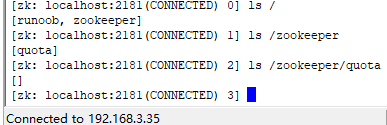
We can intuitively see that the stored data currently has two nodes, example and zookeeper, under the root directory, and under the zookeeper node there is a node called quota.
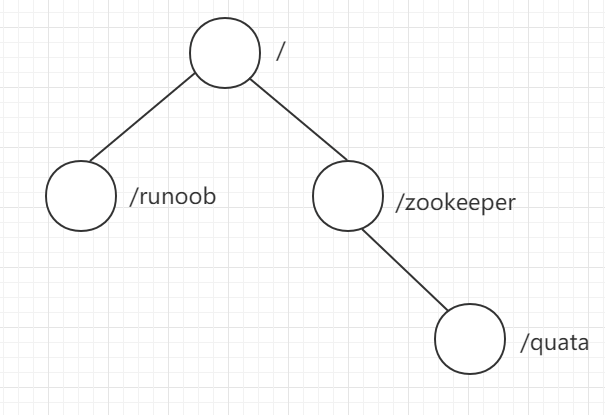
The example node was created in our previous chapter, and its value was set to 0 through the Java client. Now we execute in the command line terminalget /exampleto display the attributes of this node.
$ get /example
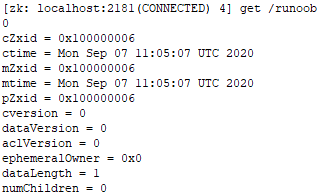
The 0 displayed in the first line is the value of this node.
Znode Status Attributes
| cZxid | The transaction ID when the node was created |
|---|---|
| ctime | The time when the node was created |
| mZxid | The transaction ID when the node was last modified |
| mtime | The time when the node was last modified |
| pZxid | Indicates the transaction ID of the last modification to the child node list of this node. Adding or deleting child nodes affects the child node list, but modifying the data content of a child node does not affect this ID.(Note: only changes to the child node list will change pzxid; changes to child node content do not affect pzxid) |
| cversion | Child node version number; the version number increases by 1 each time the child node is modified |
| dataversion | Data version number; the version number increases by 1 each time the data is modified |
| aclversion | Permission version number; the version number increases by 1 each time the permission is modified |
| ephemeralOwner | The session ID of the session that created this ephemeral node.(**If the node is a persistent node, then this attribute value is 0)** |
| dataLength | The data length of this node |
| numChildren | The number of child nodes this node has(Only counts the number of direct child nodes) |
With the above status attribute values understood, we will/examplemake a modification to the node, execute the commandset /example 1, as shown in the figure below:
$ set /example 1
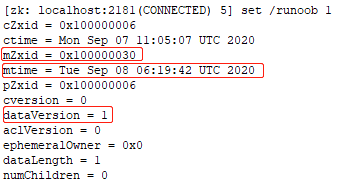
Comparing the above results, it can be seen that mZxid, mtime, and dataVersion have all changed.
In/exampleUnder the node, we add another child node, execute:
$ create -e  /example/child  0
$ get /example
Note:More command usage will be explained in detail in later chapters.
After execution, the terminal command line displays:
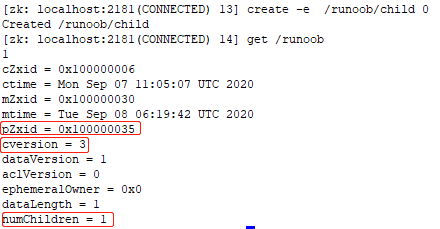
It can be seen that/examplethe pZxid, cversion, and numChildren of the node have all changed accordingly.