Table of Contents
- Goal of This Article
- How to Use This Tutorial
- What Exactly Is a Regular Expression?
- Getting Started
- Testing Regular Expressions
- Metacharacters
- Character Escapes
- Repetition
- Character Classes
- Branching Conditions
- Negation
- Grouping
- Backreferences
- Zero-Width Assertions
- Negative Zero-Width Assertions
- Comments
- Greedy and Lazy
- Processing Options
- Balanced Groups / Recursive Matching
- What Else Has Not Been Mentioned
Goal of This Article
Within 30 minutes, let you understand what a regular expression is and gain some basic understanding of it, so you can use it in your own programs or web pages.
How to Use This Tutorial
Don't be intimidated by the complex expressions below. Just follow me step by step, and you will find that regular expressions are actually not as difficult as imagined. Of course, if after reading this tutorial you find that you understand a lot but can hardly remember anything, that is also normal — I think that for someone who has never been exposed to regular expressions, the possibility of remembering more than 80% of the mentioned syntax after reading this tutorial is zero. This is only to let you understand the basic principles. Later, you need to practice more and use it more in order to master regular expressions.
In addition to being a beginner tutorial, this article also attempts to become a reference manual for regular expression syntax that can be used in daily work. From the author's own experience, this goal has been accomplished quite well — you see, I myself haven't been able to memorize everything, have I?
What Exactly Is a Regular Expression?
When writing programs or web pages that process strings, there is often a need to find strings that match certain complex rules.Regular expressionis a tool used to describe these rules. In other words, a regular expression is code that records text rules.
You have probably used the one under Windows/DOS for file searching:wildcard, that is,*and?. If you want to find all Word documents in a directory, you would search*.doc. Here,*would be interpreted as any string. Similar to wildcards, regular expressions are also tools for text matching, except that compared to wildcards, they can describe your needs more precisely — of course, at the cost of being more complex — for example, you can write a regular expression to findall strings that start with 0, followed by 2-3 digits, then a hyphen "-", and finally 7 or 8 digits.(like010-12345678or0376-7654321)。
Note: a characteris the most basic unit when computer software processes text. It may be a letter, digit, punctuation mark, space, newline character, Chinese character, etc.Stringis a sequence of zero or more characters.Textis also words, strings. Saying that a stringmatchesa certain regular expression usually means that a part (or several parts separately) of this string can satisfy the conditions given by the expression.
Getting Started
The best way to learn regular expressions is to start with examples. After understanding examples, modify and experiment with them yourself. Many simple examples are given below with detailed explanations.
Suppose you are searching forhiin an English novel, you can use the regular expressionhi。
This is almost the simplest regular expression. It can exactly match a string like this:consisting of two characters: the first character is h, and the second is i.. Usually, tools that process regular expressions provide an option to ignore case. If this option is selected, it can matchhi,HI,Hi,hIany of these four cases.
Unfortunately, many words containhithese two consecutive characters, such ashim,history,highetc. Usinghito search, thehiinside them will also be found. If you want toexactly find the word "hi", we should use\bhi\b。
\bis a special code defined by regular expressions (well, some people call itmetacharacter), representingthe beginning or end of a word, that is, the boundary of a word.. Although English words are usually separated by spaces, punctuation, or newlines,\bdoes not match any of these word-separating characters; itonly matches a position.。
Note: If you need a more precise statement,\bmatches a position such that its preceding character and following character are not both word characters (one is, one is not, or one does not exist).\w。
If what you want to find is"hi" not far behind followed by "Lucy", you should use\bhi\b.*\bLucy\b。
Here,.is another metacharacter that matchesany character except newline characters.。*is also a metacharacter, but it does not represent a character or a position; rather, it represents quantity — it specifies that *the content before it can be continuously repeated any number of times to make the whole expression match.. Therefore,.*when connected together meansany number of characters not containing newlines.. Now\bhi\b.*\bLucy\bthe meaning is very obvious:first is the word "hi", then any number of any characters (but not newlines), and finally the word "Lucy".。
Note: The newline character is '\n', the character with ASCII code 10 (hexadecimal 0x0A).
If we use other metacharacters together, we can construct more powerful regular expressions. For example, the following example:
0\d\d-\d\d\d\d\d\d\d\dMatch a string like this:starting with 0, then two digits, then a hyphen "-", and finally 8 digits.(This is a Chinese phone number. Of course, this example can only match the case where the area code is 3 digits).
Here,\dis a new metacharacter that matchesa single digit (0, or 1, or 2, or ...)。-is not a metacharacter; it only matches itself — the hyphen (or minus sign, or dash, or however you call it).
To avoid so much annoying repetition, we can also write this expression like this:0\d{2}-\d{8}. Here\dafter the{2}({8}) means that the preceding\dmust be continuously repeated and matched 2 times (8 times).。
Testing Regular Expressions
If you don't find regular expressions hard to read and write, then either you are a genius, or you are not from Earth. The syntax of regular expressions is a headache, even for those who use them frequently. Because they are hard to read and write and prone to errors, it is necessary to find a tool to test regular expressions.
Some details of regular expressions differ in different environments. Here are two available testing tools:
- RegexBuddy
- JavaScript Regular Expression Online Testing Tool
Metacharacters
Now you already know several very useful metacharacters, such as\b,.,*, and\d. There are more metacharacters in regular expressions, for example\smatchesany whitespace character, including spaces, tabs (Tab), newline characters, Chinese full-width spaces, etc.。\wmatchesletters, digits, underscores, or Chinese characters, etc.。
Note: The special handling of Chinese/Chinese characters is supported by the regular expression engine provided by .NET. For specific situations in other environments, please refer to the relevant documentation.
Let's look at more examples below:
\ba\w*\bmatcheswords starting with the lettera— first at the start of a word (\b), then the lettera, then any number of letters or digits (\w*), and finally the end of the word (\b)。
Note: Well, now let's talk about what a word means in regular expressions: it is one or more consecutive\w. Indeed, this really has little to do with the thousands of same-named things you had to memorize when learning English :)
\d+matches1 or more consecutive digits. Here+is a metacharacter similar to*, the difference being that*matchesrepeated any number of times (possibly zero), while+matchesrepeated one or more times。
\b\w{6}\bmatchesa word of exactly 6 characters。
| Code | Description |
|---|---|
| . | Matches any character except a newline |
| \w | Matches a letter, digit, underscore, or Chinese character |
| \s | Matches any whitespace character |
| \d | Matches a digit |
| \b | Matches the beginning or end of a word |
| ^ | Matches the beginning of a string |
| $ | Matches the end of a string |
Note: regex engines usually provide a method to "test whether a specified string matches a regular expression", such as RegExp.test() in JavaScript or Regex.IsMatch() in .NET. Matching here means whether there is a part of the string that conforms to the expression’s rules. If you do not use^and$, then for\d{5,12}, using such a method only guarantees that the stringcontains 5 to 12 consecutive digits, rather than the entire string being 5 to 12 digits.
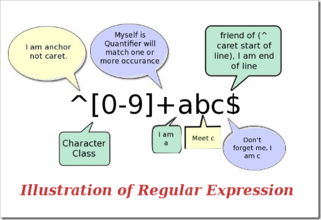
The metacharacter^(the symbol on the same key as the number 6) and$both match a position, which is\bsomewhat similar to^Matches the beginning of the string you are searching,$matches the end. These two codes are very useful when validating input; for example, if a website requires the QQ number you enter to be 5 to 12 digits, you can use:^\d{5,12}$。
This{5,12}and the previously introduced{2}are similar, except that{2}matchesrepeated exactly 2 times,{5,12}whereasthe number of repetitions must be no fewer than 5 and no more than 12, otherwise it will not match.
Because of using^and$the entire input string must be\d{5,12}used to match, that is, the entire inputmust be 5 to 12 digits, so if the entered QQ number can match this regex, it meets the requirement.
Similar to the case-insensitive option, some regex processing tools also have a multi-line option. If this option is selected,^and$the meaning ofmatch the beginning and end of a line。
Character Escapes
If you want to search for a metacharacter itself, for example you search for., or*, there is a problem: you cannot specify them because they will be interpreted as something else. Then you have to use\to cancel the special meaning of these characters. Therefore, you should use\.and\*. Of course, to search for\itself, you also need to use\\.
For example:deerchao\.netmatchesdeerchao.net,C:\\WindowsmatchesC:\Windows。
Repetition
You have already seen the*,+,{2},{5,12}earlier ways of matching repetition. Below are all the quantifiers in regex (codes that specify quantity, such as *, {5,12}, etc.):
| Code/Syntax | Description |
|---|---|
| * | Repeat zero or more times |
| + | Repeat one or more times |
| ? | Repeat zero or one time |
| {n} | Repeat exactly n times |
| {n,} | Repeat n or more times |
| {n,m} | Repeat between n and m times |
Here are some examples of repetition:
Windows\d+matchesWindows followed by one or more digits
^\w+matchesthe first word of a line (or the first word of the entire string; which meaning applies depends on the option settings)
Character Classes
Searching for digits, letters or digits, and whitespace is simple, because there are already metacharacters for these character sets, but what should you do if you want to match a character set without a predefined metacharacter (such as the vowel letters a, e, i, o, u)?
Very simple: you just list them in square brackets, like[aeiou]matchesany one of the English vowel letters,[.?!]matchesa punctuation mark (. or ? or !)。
We can also easily specify a characterrange, like[0-9]the meaning represented by\dis exactly the same:a digit; similarly[a-z0-9A-Z_]is also completely equivalent to\w(if only considering English).
Here is a more complex expression:\(?0\d{2}[) -]?\d{8}。
Note: "(" and ")" are also metacharacters; in the latergrouping sectionthis will be mentioned, so here you need to useescaping。
This expression can matchseveral formats of phone numbers, such as(010)88886666, or022-22334455, or02912345678, etc. Let’s analyze it: first is an escaped character\(, which can appear 0 or 1 times (?), then a0, followed by 2 digits (\d{2}), then one of)or-orspace, which appears 1 time or not at all (?), and finally 8 digits (\d{8})。
Branching Conditions
Unfortunately, that previous expression can also match010)12345678or(022-87654321such an "incorrect" format. To solve this problem, we need to usebranching conditions. Branching conditions in regexbranching conditionsmean that there are several rules, and if any one of them is satisfied, it should be considered a match. The specific method is to use|to separate the different rules. Don’t understand? It doesn’t matter, look at the example:
0\d{2}-\d{8}|0\d{3}-\d{7}This expression canmatch two kinds of hyphen-separated phone numbers: one is a 3-digit area code with an 8-digit local number (such as 010-12345678), and one is a 4-digit area code with a 7-digit local number (0376-2233445)。
\(?0\d{2}\)?[- ]?\d{8}|0\d{2}[- ]?\d{8}This expressionmatches phone numbers with a 3-digit area code, where the area code may or may not be enclosed in parentheses, and the area code and local number may be separated by a hyphen or space, or may have no separator. You can try extending this expression to also support 4-digit area codes using branching conditions.
\d{5}-\d{4}|\d{5}This expression is used to match US postal codes. The rule for US ZIP codes is 5 digits, or 9 digits separated by a hyphen. The reason for giving this example is that it illustrates a problem:When using branching conditions, pay attention to the order of the conditions. If you change it to\d{5}|\d{5}-\d{4}, then it will only match 5-digit ZIP codes (and the first 5 digits of 9-digit ZIP codes). The reason is that when matching branching conditions, each condition is tested from left to right; if one branch is satisfied, the other conditions will not be considered.
Grouping
We have already mentioned how to repeat a single character (just add a quantifier directly after the character); but what should you do if you want to repeat multiple characters? You can use parentheses to specifya subexpression(also calleda group), and then you can specify the number of repetitions for this subexpression, and you can also perform other operations on the subexpression (described later).
(\d{1,3}\.){3}\d{1,3}is asimple IP address matchingexpression. To understand this expression, analyze it in the following order:\d{1,3}matches1 to 3 digits,(\d{1,3}\.){3}matchesthree digits plus an English period (the whole thing is thisgroup) repeated 3 times, and finally adda number with 1 to 3 digits(\d{1,3})。
Note: each number in an IP address cannot be greater than 255. People often ask me whether numbers with leading zeros, such as 01.02.03.04, are valid IP addresses. The answer is: yes, numbers in IP addresses can contain leading zeros (leading zeroes).
Unfortunately, it will also match256.300.888.999this kind of impossible IP address. If arithmetic comparison could be used, perhaps this problem could be solved simply, but regex does not provide any mathematical functionality, so we can only use lengthy grouping, alternation, and character classes to describe a correct IP address:((2[0-4]\d|25[0-5]|[01]?\d\d?)\.){3}(2[0-4]\d|25[0-5]|[01]?\d\d?)。
The key to understanding this expression is understanding2[0-4]\d|25[0-5]|[01]?\d\d?. I won’t go into detail here; you should be able to analyze its meaning yourself.
Negation
Sometimes you need to search for characters that do not belong to a simply defined character class. For example, when you want to match any character other than digits, you need to usenegation:
| Code/Syntax | Description |
|---|---|
| \W | Matches any character that is not a letter, digit, underscore, or Chinese character |
| \S | Match any character that is not a whitespace character |
| \D | Match any non-digit character |
| \B | Match a position that is not the start or end of a word |
| [^x] | Match any character except x |
| [^aeiou] | Match any character except the letters a, e, i, o, u |
Example:\S+Matcha string that contains no whitespace characters。
<a[^>]+>Matcha string enclosed in angle brackets that starts with a。
Backreferences
After using parentheses to specify a subexpression,the text matched by this subexpression(that is, the content captured by this group) can be further processed in the expression or in other programs. By default, each group automatically has agroup number, and the rule is: from left to right, using the left parenthesis of the group as a marker, the first group to appear has group number 1, the second has 2, and so on.
Um... Actually, group number assignment is not as simple as I just said:
- Group 0 corresponds to the entire regular expression.
- Actually, the group number assignment process involves scanning from left to right twice: the first pass assigns numbers only to unnamed groups, and the second pass assigns numbers only to named groups -- therefore all named groups have greater group numbers than unnamed groups.
- You can use(?:exp)syntax like this to deprive a group of participation in group number assignment.
A backreferenceis used to repeatedly search for text matched by a previous group. For example,\1representsthe text matched by group 1.Hard to understand? See the example:
\b(\w+)\b\s+\1\bcan be used to matchrepeated words,likego go, orkitty kitty. This expression first isa word,that is,more than one letter or digit between the start and end of a word(\b(\w+)\b), this word will be captured into the group numbered 1, thenone or more whitespace characters(\s+), and finallythe content captured in group 1 (that is, the word matched earlier).(\1)。
You can also specify the subexpression'sgroup name. To specify a group name for a subexpression, use this syntax:(?<Word>\w+)(or replace the angle brackets with'is also fine:(?'Word'\w+)), this makes\w+the group name of [something] specified asWord. To backreference this groupcapturedcontent, you can use\k<Word>, so the previous example can also be written as:\b(?<Word>\w+)\b\s+\k<Word>\b。
When using parentheses, there are many other special-purpose syntaxes. The most common ones are listed below:
| Category | Code/Syntax | Description |
|---|---|---|
| Capture | (exp) | Match exp and capture the text into an automatically named group. |
| (?<name>exp) | Match exp and capture the text into a group named name; can also be written as (?'name'exp). | |
| (?:exp) | Match exp, do not capture the matched text, and do not assign a group number to this group. | |
| Zero-width assertions | (?=exp) | Match the position before exp. |
| (?<=exp) | Match the position after exp. | |
| (?!exp) | Match a position where what follows is not exp. | |
| (?<!exp) | Match a position where what precedes is not exp. | |
| Comment | (?#comment) | This type of grouping has no effect on regular expression processing; it is used to provide comments for people to read. |
We have already discussed the first two syntaxes. The third one(?:exp)does not change how the regular expression is processed; it's just that the content matched by such a groupwill not be captured into a group like the first two, nor will it have a group number."Why would I want to do this?" -- Good question, why do you think?
Zero-Width Assertions
The next four are used to find things before or after certain content (but not including that content); that is, they are like\b,^,$used to specify a position, and this position should satisfy a certain condition (that is, an assertion), so they are also calledzero-width assertions.It's best to use examples to illustrate:
Note: An assertion is used to declare a fact that should be true. In a regular expression, matching continues only when the assertion is true.
(?=exp)Also calledzero-width positive lookahead assertion, itasserts that after its own position, the expression exp can be matched.For example,\b\w+(?=ing\b), matchesthe front part of words ending with ing (the part other than ing),such as when searchingI'm singing while you're dancing., it will matchsinganddanc。
(?<=exp)Also calledzero-width positive lookbehind assertion, itasserts that before its own position, the expression exp can be matched.For example,(?<=\bre)\w+\bwill matchthe latter part of words starting with re (the part other than re),, for example, when searchingreading a book, it matchesading。
If you want to add a comma every three digits in a long number (of course, starting from the right), you can use this to find the parts where commas need to be added before and inside:((?<=\d)\d{3})+\b, using it on1234567890the result of searching is234567890。
The following example uses both of these assertions at the same time:(?<=\s)\d+(?=\s)Matchdigits separated by whitespace (again, not including the whitespace)。
Negative Zero-Width Assertions
Earlier we mentioned how to findcharacters that are not a certain character or are not in a certain character classmethod for characters (negation). But if we just want toensure that a certain character does not appear, but do not want to match itwhat should we do? For example, if we want to find words like this -- they contain the letter q, but q is not followed by the letter u, we can try this:
\b\w*q[^u]\w*\bMatchwords containingthe letter q not followed by the letter u.But if you test more (or your thinking is sharp enough to see it directly), you will find that if q appears at the end of a word, likeIraq,Benq, this expression will go wrong. This is because[^u]always has to match a character, so if q is the last character of a word, the following[^u]will match the word separator after q (which could be a space, or a period, or something else), and the following\w*\bwill match the next word, so\b\w*q[^u]\w*\bcan match the entireIraq fighting。negative zero-width assertioncan solve this problem, because it only matches a position and does notconsumeany characters. Now, we can solve this problem like this:\b\w*q(?!u)\w*\b。
zero-width negative lookahead assertion(?!exp),asserts that after this position, the expression exp cannot be matched.For example:\d{3}(?!\d)Matchthree digits, and these three digits cannot be followed by a digit.;\b((?!abc)\w)+\bMatchwords that do not contain the continuous string abc.。
Similarly, we can use(?<!exp),zero-width negative lookbehind assertioncometo assert that before this position, the expression exp cannot be matched.:(?<![a-z])\d{7}Matchseven digits not preceded by a lowercase letter.。
A more complex example:(?<=<(\w+)>).*(?=<\/\1>)Matchthe content inside simple HTML tags that do not contain attributes.。(?<=<(\w+)>)specifies such aprefix:a word enclosed in angle brackets(such as possibly <b>), then.*(an arbitrary string), and finally asuffix(?=<\/\1>). Note that in the suffix,\/, it uses the character escaping mentioned earlier;\1is a backreference, referring exactly tothe first group captured,matched by the preceding(\w+)content, so if the prefix is actually <b>, then the suffix is </b>. The entire expression matches the content between <b> and </b> (again, excluding the prefix and suffix themselves).
Note: Please analyze the expression in detail(?<=<(\w+)>).*(?=<\/\1>); this expression best demonstrates the true purpose of zero-width assertions.
Comments
Another use of parentheses is to include comments via the syntax(?#comment). For example:2[0-4]\d(?#200-249)|25[0-5](?#250-255)|[01]?\d\d?(?#0-199)。
If you want to include comments, it's best to enable the "ignore whitespace in pattern" option, so that when writing the expression you can freely add spaces, tabs, and line breaks, but in actual use these will all be ignored. After enabling this option, all text from # to the end of that line will be ignored as comments. For example, we can write a previous expression like this:
      (?<=    # 断言要匹配的文本的前缀
      <(\w+)> # 查找尖括号括起来的字母或数字(即HTML/XML标签)
      )       # 前缀结束
      .*      # 匹配任意文本
      (?=     # 断言要匹配的文本的后缀
      <\/\1>  # 查找尖括号括起来的内容:前面是一个"/",后面是先前捕获的标签
      )       # 后缀结束
Greedy and Lazy
When a regular expression contains a quantifier that can accept repetition, the usual behavior is (on the premise that the entire expression can be matched) to matchas manycharacters as possible. Take this expression as an example:a.*b, it will matchthe longest string that starts with a and ends with b.If you use it to searchaabab, it will match the entire stringaabab. This is calledgreedymatching.
Sometimes, we needlazymatching, that is, matchingas fewcharacters as possible. The quantifiers given earlier can be converted into lazy matching mode by adding a question mark after them?. In this way,.*?it meansto match any number of repetitions, but use the fewest repetitions possible while still allowing the entire match to succeed. Now let's look at an example of the lazy version:
a.*?bMatchthe shortest string starting with a and ending with b. If you apply it toaabab, it will matchaab (the first to third characters)andab (the fourth to fifth characters)。
Note: Why is the first match aab (first to third characters) rather than ab (second to third characters)? Simply put, because regular expressions have another rule that has higher priority than the lazy/greedy rule: the match that begins earliest has the highest priority — The match that begins earliest wins.
| Code/Syntax | Description |
|---|---|
| *? | Repeat any number of times, but as few times as possible |
| +? | Repeat one or more times, but as few times as possible |
| ?? | Repeat zero or one time, but as few times as possible |
| {n,m}? | Repeat n to m times, but as few times as possible |
| {n,}? | Repeat n or more times, but as few times as possible |
Processing Options
The above introduced several options such as ignoring case, handling multiple lines, etc. These options can be used to change the way regular expressions are processed. The following are common regular expression options in .Net:
| Name | Description |
|---|---|
| IgnoreCase (ignore case) | Does not distinguish case when matching. |
| Multiline (multiline mode) | Change^and$the meaning of `^` and `$` so that they match at the beginning and end of any line respectively, not just at the beginning and end of the entire string. (In this mode,$the exact meaning of `$` is: match the position before \n and the position before the end of the string.) |
| Singleline (single-line mode) | Change.the meaning of `.` so that it matches every character (including the newline character \n). |
| IgnorePatternWhitespace (ignore whitespace) | Ignore unescaped whitespace in the expression and enable#comments marked by `#`. |
| ExplicitCapture (explicit capture) | Capture only groups that have been explicitly named. |
A frequently asked question is: can only one of multiline mode and single-line mode be used at a time? The answer is: no. These two options have nothing to do with each other, except that their names are similar (which is confusing).
Note: In C#, you can usethe Regex(String, RegexOptions) constructorto set the handling options for a regular expression. For example: Regex regex = new Regex(@"\ba\w{6}\b", RegexOptions.IgnoreCase);
Balanced Groups / Recursive Matching
Note: The balanced group syntax introduced here is supported by the .Net Framework; other languages/libraries may not support this feature, or may support it but require different syntax.
Sometimes we need to match( 100 * ( 50 + 15 ) ) such nestable hierarchical structures, at this time simply using\(.+\)will only match the content between the leftmost left parenthesis and the rightmost right parenthesis (here we are discussing greedy mode; lazy mode also has the following problem). If the number of left and right parentheses in the original string is not equal, for example( 5 / ( 3 + 2 ) ) ), then the numbers of the two in our match result will also not be equal. Is there a way to match the longest paired-parentheses content in such a string?
In order to avoid(and\(thoroughly confusing your brain, let's use angle brackets instead of parentheses. Now our problem becomes how to capturexx <aa <bbb> <bbb> aa> yythe longest paired angle-bracket content in such a string?
The following syntax constructs are needed here:
- (?'group')Name the captured content as group, and push it ontothe stack (Stack)
- (?'-group')Pop the last captured content named group that was pushed onto the stack; if the stack was originally empty, the match of this group fails
- (?(group)yes|no)If there is a capture named group on the stack, continue matching the expression in the yes part; otherwise continue matching the no part
- (?!)Zero-width negative lookahead assertion. Since there is no suffix expression, an attempted match always fails
Note: If you are not a programmer (or you claim to be a programmer but don't know what a stack is), then understand the above three syntax constructs this way: the first is to write a "group" on the blackboard, the second is to erase a "group" from the blackboard, and the third is to see whether there is still a "group" written on the blackboard; if there is, continue matching the yes part, otherwise match the no part.
What we need to do is: every time we encounter a left parenthesis, push an "Open"; every time we encounter a right parenthesis, pop one; at the end, see whether the stack is empty -- if it is not empty, that proves there are more left parentheses than right parentheses, and the match should fail. The regex engine will backtrack (giving up some characters at the very beginning or end) to try to make the entire expression match.
<                         #最外层的左括号
    [^<>]*                #最外层的左括号后面的不是括号的内容
    (
        (
            (?'Open'<)    #碰到了左括号,在黑板上写一个"Open"
            [^<>]*        #匹配左括号后面的不是括号的内容
        )+
        (
            (?'-Open'>)   #碰到了右括号,擦掉一个"Open"
            [^<>]*        #匹配右括号后面不是括号的内容
        )+
    )*
    (?(Open)(?!))         #在遇到最外层的右括号前面,判断黑板上还有没有没擦掉的"Open";如果还有,则匹配失败

>                         #最外层的右括号
One of the most common applications of balanced groups is matching HTML. The following example can matchnested <div> tags:<div[^>]*>[^<>]*(((?'Open'<div[^>]*>)[^<>]*)+((?'-Open'</div>)[^<>]*)+)*(?(Open)(?!))</div>.
What Else Has Not Been Mentioned
The above has described many elements for constructing regular expressions, but there are still many things not mentioned. Below is a list of unmentioned elements, including syntax and simple descriptions.
| Code/Syntax | Description |
|---|---|
| \a | Bell character (when printed, it makes the computer beep once) |
| \b | Usually a word boundary position, but if used in a character class, it represents backspace |
| \t | Tab character, Tab |
| \r | Carriage return |
| \v | Vertical tab |
| \f | Form feed |
| \n | Newline character |
| \e | Escape |
| \0nn | Character with octal code nn in ASCII |
| \xnn | Character with hexadecimal code nn in ASCII |
| \unnnn | Character with hexadecimal code nnnn in Unicode |
| \cN | ASCII control character. For example, \cC represents Ctrl+C |
| \A | Start of string (similar to ^, but not affected by the multiline handling option) |
| \Z | End of string or end of line (not affected by the multiline handling option) |
| \z | End of string (similar to $, but not affected by the multiline handling option) |
| \G | Start of the current search |
| \p{name} | Character class named name in Unicode, for example \p{IsGreek} |
| (?>exp) | Greedy subexpression |
| (?<x>-<y>exp) | Balanced group |
| (?im-nsx:exp) | Change handling options in subexpression exp |
| (?im-nsx) | Change handling options for the part after the expression |
| (?(exp)yes|no) | Treat exp as a zero-width positive lookahead assertion. If it can match at this position, use yes as the expression for this group; otherwise use no |
| (?(exp)yes) | Same as above, except that an empty expression is used as no |
| (?(name)yes|no) | If the group named name has captured content, use yes as the expression; otherwise use no |
| (?(name)yes) | Same as above, except that an empty expression is used as no |
More Tutorials
For a more detailed tutorial, see:Regular Expression - Tutorial
Source: http://deerchao.net/tutorials/regex/regex.htm