The so-called index is to perform some specific algorithm sorting for specific MySQL fields, such as binary tree algorithm and hash algorithm. The hash algorithm establishes feature values and then quickly finds based on the feature values. The most used, and MySQL default, is the binary tree algorithm BTREE. For fields indexed using the BTREE algorithm, for example, scanning 20 rows can obtain results that would require scanning 2^20 rows without BTREE.
Explain Optimize Query Detection
EXPLAIN can help developers analyze SQL problems. explain shows how MySQL uses indexes to process SELECT statements and join tables, and can help choose better indexes and write more optimized query statements.
Usage: just add EXPLAIN before the SELECT statement:
Explain select * from blog where false;
Before executing a query, MySQL analyzes every SQL statement sent to decide whether to use an index or perform a full table scan. If you send a `select * from blog where false`, MySQL will not execute the query, because after analysis by the SQL analyzer, MySQL already knows that no rows will match the condition.
Example
mysql> EXPLAIN SELECT `birday` FROM `user` WHERE `birthday` < "1990/2/2";
-- 结果:
id: 1

select_type: SIMPLE -- 查询类型(简单查询、联合查询、子查询)

table: user -- 显示这一行的数据是关于哪张表的 。

type: range -- 区间索引(在小于1990/2/2区间的数据),这是重要的列,显示连接使用了何种类型。从最好到最差的连接类型为system > const > eq_ref > ref > fulltext > ref_or_null > index_merge > unique_subquery > index_subquery > range > index > ALL,const代表一次就命中,ALL代表扫描了全表才确定结果。一般来说,得保证查询至少达到range级别,最好能达到ref。

possible_keys: birthday  -- 指出MySQL能使用哪个索引在该表中找到行。如果是空的,没有相关的索引。这时要提高性能,可通过检验WHERE子句,看是否引用某些字段,或者检查字段不是适合索引。

key: birthday -- 实际使用到的索引。如果为NULL,则没有使用索引。如果为primary的话,表示使用了主键。

key_len: 4 -- 最长的索引宽度。如果键是NULL,长度就是NULL。在不损失精确性的情况下,长度越短越好。

ref: const -- 显示哪个字段或常数与key一起被使用。

rows: 1 -- 这个数表示mysql要遍历多少数据才能找到,在innodb上是不准确的。

Extra: Using where; Using index -- 执行状态说明,这里可以看到的坏的例子是Using temporary和Using
select_type
- simple: simple SELECT (does not use UNION or subqueries).
- primary: the outermost SELECT.
- union: the second or subsequent SELECT statement in a UNION.
- dependent union: the second or subsequent SELECT statement in a UNION, dependent on the outer query.
- union result: the result of a UNION.
- subquery: the first SELECT in a subquery.
- dependent subquery: the first SELECT in a subquery, dependent on the outer query.
- derived: the SELECT of a derived table (subquery in the FROM clause).
Other Notes
- Distinct: Once MySQL finds a row that matches the join, it no longer searches.
- Not exists: MySQL optimizes LEFT JOIN; once it finds a row matching the LEFT JOIN criteria, it no longer searches.
- Range checked for each Record (index map:#): No ideal index was found, so for each row combination from the previous table, MySQL checks which index to use and uses it to return rows from the table. This is one of the slowest joins using indexes.
- Using filesort: When you see this, the query needs optimization. MySQL needs an extra step to figure out how to sort the returned rows. It sorts all rows based on the join type and the row pointers for all rows that store sort key values and match conditions.
- Using index: Column data is returned from a table using only information in the index without reading actual rows. This happens when all requested columns for the table are part of the same index.
- Using temporary: When you see this, the query needs optimization. Here, MySQL needs to create a temporary table to store results, which usually happens when ORDER BY is on a different set of columns than GROUP BY.
- Where used: The WHERE clause is used to restrict which rows will match the next table or be returned to the user. This occurs if you do not want to return all rows from the table and the join type is ALL or index, or there is a problem with the query. Explanation of different join types (ordered from high to low efficiency).
- system: The table has only one row: system table. This is a special case of the const join type.
- const: At most one record in the table can match this query (the index can be a primary key or unique index). Because there is only one row, this value is actually a constant, because MySQL reads this value first and then treats it as a constant.
- eq_ref: In a join, MySQL reads one record from the table for each record combination from the previous table during the query. It is used when the query uses an index that is a primary key or a unique key entirely.
- ref: This join type only occurs when the query uses a key that is not unique or a primary key, or a partial part of these types (for example, using the leftmost prefix). For each row combination from the previous table, all matching records will be read from the table. This type depends heavily on how many records the index matches; the fewer, the better.
- range: This join type uses an index to return rows in a range, such as when using > or < to look up things.
- index: This join type performs a full scan for each record combination from the previous table (better than ALL, because the index is generally smaller than table data).
- ALL: This join type performs a full scan for each record combination from the previous table. This is generally bad and should be avoided as much as possible.
Among them, type:
- If it is 'Only index', it means the information is retrieved using only the information in the index tree, which is faster than scanning the entire table.
- If it is 'where used', it means the WHERE restriction is used.
- If it is 'impossible where', it means WHERE is unnecessary; generally nothing was found.
- If this information shows Using filesort or Using temporary, it will be very strenuous. Indexes for WHERE and ORDER BY often cannot both be satisfied. If you determine the index based on WHERE, then when doing ORDER BY, it will inevitably cause Using filesort. This depends on whether filtering first and then sorting is more cost-effective, or sorting first and then filtering is more cost-effective.
Index Types
UNIQUE index
Duplicated values are not allowed, but NULL values are allowed.
INDEX normal index
Duplicated index content is allowed.
PRIMARY KEY index
Duplicated values are not allowed, and NULL values are also not allowed. A table can only have one primary_key index.
fulltext index
The above three types of indexes work on the values of columns, but the fulltext index can target a certain word in the value, such as a word in an article. However, it is useless, because only MyISAM and English are supported, and the efficiency is not impressive. But third-party applications such as Coreseek and Xunsearch can be used to accomplish this requirement.
Index CURD
Creating Indexes
ALTER TABLE
Suitable for adding after the table has been created.
`ALTER TABLE table_name ADD index_type (unique, primary key, fulltext, index) [index_name] (field_name)`
ALTER TABLE `table_name` ADD INDEX `index_name` (`column_list`) -- 索引名,可要可不要;如果不要,当前的索引名就是该字段名。
ALTER TABLE `table_name` ADD UNIQUE (`column_list`)
ALTER TABLE `table_name` ADD PRIMARY KEY (`column_list`)
ALTER TABLE `table_name` ADD FULLTEXT KEY (`column_list`)
CREATE INDEX
`CREATE INDEX` can add a normal index or a UNIQUE index to a table.
--例:只能添加这两种索引
CREATE INDEX index_name ON table_name (column_list)
CREATE UNIQUE INDEX index_name ON table_name (column_list)
In addition, you can also add when creating the table:
CREATE TABLE `test1` (
  `id` smallint(5) UNSIGNED AUTO_INCREMENT NOT NULL, -- 注意,下面创建了主键索引,这里就不用创建了
  `username` varchar(64) NOT NULL COMMENT '用户名',
  `nickname` varchar(50) NOT NULL COMMENT '昵称/姓名',
  `intro` text,
  PRIMARY KEY (`id`),
  UNIQUE KEY `unique1` (`username`), -- 索引名称,可要可不要,不要就是和列名一样
  KEY `index1` (`nickname`),
  FULLTEXT KEY `intro` (`intro`)
) ENGINE=MyISAM AUTO_INCREMENT=4 DEFAULT CHARSET=utf8 COMMENT='后台用户表';
Deleting Indexes
DROP INDEX `index_name` ON `talbe_name`
ALTER TABLE `table_name` DROP INDEX `index_name`
-- 这两句都是等价的,都是删除掉table_name中的索引index_name;

ALTER TABLE `table_name` DROP PRIMARY KEY -- 删除主键索引,注意主键索引只能用这种方式删除
Viewing Indexes
show index from tablename;
Modifying Indexes
Change? No way. Just drop it and recreate one.
Tips for Creating Indexes
- Create indexes for columns with high cardinality.
- In a data column,the number of non-duplicated valuesappearing. The higher this number, the higher the cardinality.
- For example, if there are 8 rows of data a,b,c,d,a,b,c,d in the table, the cardinality of this table is 4.
- Indexes should be created for columns with high cardinality, such as age and gender; age has higher cardinality than gender.
- Columns like gender are not suitable for indexing because the cardinality is too low.
- Use indexes for columns that appear in WHERE, ON, GROUP BY, and ORDER BY.
- Use indexes on smaller data columns, which makes the index file smaller and also allows more index keys to be loaded into memory.
- Use prefix indexes for longer strings.
- Do not create too many indexes. Besides increasing extra disk space, it greatly affects the speed of DML operations, because every insert, delete, or update requires rebuilding the index.
- Using composite indexes can reduce index file size and is faster than multiple single-column indexes when in use.
Composite Index and Prefix Index
Note: These two terms are names for indexing techniques, not types of indexes.
Composite Index
What exactly is the difference between MySQL single-column indexes and composite indexes?
To vividly compare the two, first create a table:
CREATE TABLE `myIndex` (
  `i_testID` INT NOT NULL AUTO_INCREMENT,
  `vc_Name` VARCHAR(50) NOT NULL,
  `vc_City` VARCHAR(50) NOT NULL,
  `i_Age` INT NOT NULL,
  `i_SchoolID` INT NOT NULL,
  PRIMARY KEY (`i_testID`)
);
Suppose the table already has 1000 rows of data. Among these 10,000 records, 5 records with vc_Name="erquan" are scattered here and there, but the combinations of city, age, and school are each different. Take a look at this T-SQL:
SELECT `i_testID` FROM `myIndex` WHERE `vc_Name`='erquan' AND `vc_City`='郑州' AND `i_Age`=25; -- 关联搜索;
First consider creating a MySQL single-column index:
An index was created on the vc_Name column. When executing T-SQL, MySQL quickly locked onto the 5 records with vc_Name='erquan', took them out, and placed them in an intermediate result set. In this result set, it first excluded records where vc_City was not equal to "Zhengzhou", then excluded records where i_Age was not equal to 25, and finally filtered out the only matching record. Although an index was created on vc_Name, MySQL does not need to scan the entire table during queries, so efficiency has improved, but it is still some distance from our requirements. Similarly, the efficiency of single-column indexes created separately on vc_City and i_Age is similar.
To further squeeze efficiency out of MySQL, we need to consider creating a composite index. That is, put vc_Name, vc_City, and i_Age into one index:
ALTER TABLE `myIndex` ADD INDEX `name_city_age` (vc_Name(10),vc_City,i_Age);
When creating the table, the length of vc_Name is 50. Why use 10 here? This is the prefix index mentioned below, because under normal circumstances a name's length will not exceed 10. This speeds up index query performance, reduces the size of the index file, and improves the speed of INSERT updates.
When executing T-SQL, MySQL can find the only record without scanning any records!
If single-column indexes are created separately on vc_Name, vc_City, and i_Age, giving the table 3 single-column indexes, will the query efficiency be the same as the composite index above? The answer is completely different, far lower than our composite index. Although there are now three indexes, MySQL can only use the one it considers the most efficient single-column index; the other two cannot be used. In other words, it is still a full table scan process.
Creating such a composite index is actually equivalent to creating separately:
- vc_Name,vc_City,i_Age
- vc_Name,vc_City
- vc_Name
These three composite indexes! Why isn't there a composite index like vc_City, i_Age? This is because of the "leftmost prefix" result of MySQL composite indexes. A simple understanding is that combination only starts from the leftmost side. Not every query that includes these three columns will use the composite index. The following T-SQL statements will use it:
SELECT * FROM myIndex WHREE vc_Name=”erquan” AND vc_City=”郑州” SELECT * FROM myIndex WHREE vc_Name=”erquan”
But the following ones will not use it:
SELECT * FROM myIndex WHREE i_Age=20 AND vc_City=”郑州” SELECT * FROM myIndex WHREE vc_City=”郑州”
That is, name_city_age(vc_Name(10), vc_City, i_Age) performs indexing from left to right. If there is no left prefix index, MySQL does not execute an index query.
Prefix index
If the indexed column is too long, indexing such a column will produce a very large index file and is inconvenient to operate. You can use the prefix index method. The prefix index should be controlled at an appropriate point, around the golden value of 0.31 (if greater than this value, you can create it).
SELECT COUNT(DISTINCT(LEFT(`title`,10)))/COUNT(*) FROM Arctic; — If this value is greater than 0.31, you can create a prefix index. DISTINCT removes duplicates. ALTER TABLE `user` ADD INDEX `uname`(title(10)); — Add a prefix index SQL, setting the index for the name on the first 10 characters. This reduces the index file size and speeds up index queries.
What kind of SQL does not use indexes
Try to avoid these SQL statements that do not use indexes.
SELECT `sname` FROM `stu` WHERE `age`+10=30;-- 不会使用索引,因为所有索引列参与了计算

SELECT `sname` FROM `stu` WHERE LEFT(`date`,4) <1990; -- 不会使用索引,因为使用了函数运算,原理与上面相同

SELECT * FROM `houdunwang` WHERE `uname` LIKE'后盾%' -- 走索引

SELECT * FROM `houdunwang` WHERE `uname` LIKE "%后盾%" -- 不走索引

-- 正则表达式不使用索引,这应该很好理解,所以为什么在SQL中很难看到regexp关键字的原因

-- 字符串与数字比较不使用索引;
CREATE TABLE `a` (`a` char(10));
EXPLAIN SELECT * FROM `a` WHERE `a`="1" -- 走索引
EXPLAIN SELECT * FROM `a` WHERE `a`=1 -- 不走索引

select * from dept where dname='xxx' or loc='xx' or deptno=45 --如果条件中有or,即使其中有条件带索引也不会使用。换言之,就是要求使用的所有字段,都必须建立索引,我们建议大家尽量避免使用or 关键字

-- 如果mysql估计使用全表扫描要比使用索引快,则不使用索引
Index efficiency in multi-table joins
- SELECT `sname` FROM `stu` WHERE LEFT(`date`,4) < 1990; — This will not use the index because a function operation is used; the principle is the same as above.
- SELECT * FROM `houdunwang` WHERE `uname` LIKE 'after盾%' — uses the index
- SELECT * FROM `houdunwang` WHERE `uname` LIKE '%after盾%' — does not use the index
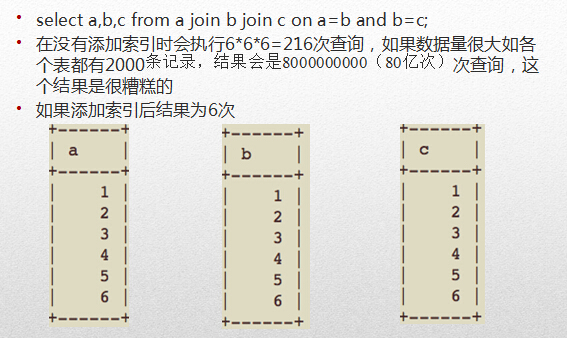
From the figure above, we can see that the type of all tables is "all", indicating a full table scan. That is, 6 6 6, for a total of 216 traversal queries.
Except for the first table, which is a full table scan (necessary, as it is used to associate the other tables), the rest are "range" (obtained via index range), i.e., 6+1+1+1, for a total of 9 traversal queries.
Therefore, we suggest joining as few tables as possible in multi-table joins, because if you are not careful, it becomes a terrifying Cartesian product scan. In addition, we also suggest using LEFT JOIN as much as possible, associating from the smaller table to the larger one. Because when using JOIN, the first table must be fully scanned, and using the smaller table to drive the larger one can reduce this number of scans.
Disadvantages of Indexes
Do not blindly create indexes. Only create indexes on columns that are frequently used in query operations. Creating an index makes query operations faster, but it slows down insert, delete, and update operations, because performing these operations also requires re-sorting or updating the index file.
However, in Internet applications, query statements far outnumber DML statements, even accounting for 80% to 90%. So don't worry too much about it. When importing large amounts of data, you can first delete the index, then batch insert the data, and finally add the index again.