The foreach loop is used to enumerate all elements in a collection. The expression in the foreach statement consists of two items separated by the keyword in. The item on the right of in is the collection name, and the item on the left of in is the variable name, which is used to store each element in the collection.
The execution process of this loop is as follows: at each loop, a new element value is taken from the collection and placed into a read-only variable. If the entire expression in parentheses returns true, the statements in the foreach block can be executed. Once all elements in the collection have been accessed, the value of the entire expression becomes false, and control flow transfers to the execution statement after the foreach block.
The foreach statement is often used with arrays. The following example will use the foreach statement to read and display array values.
Array property: Array.Length — the capacity of the array.
With this property, we can obtain the capacity value that the array object can store, that is, the length of the array, the number of elements. This is easy to understand. Arrays also have other properties, such as the dimension of the array, etc. The usage of properties is relatively simple; once you learn one, the format of others is basically the same, so we won't give examples here.
When the array has many dimensions or a large capacity, C# provides the foreach statement, which is specially used to read all elements in a collection/array. We call this function traversal. The syntax is written as follows:
Traversing an array: foreach (type objName in collection/Array)
This statement will check the variable values stored in the array one by one and take them out one by one. Here, type is the data type of the array object you want to read, which will be stored in the variable objName. objName defines a variable name of type type, representing the element obtained from the collection and array (collection/Array) each time. collection/Array is the array object to be accessed. With this method, you only need to write one foreach to traverse arrays of all dimensions except jagged arrays.
Note:The data type type of objName must be the same as or larger than the type of the collection/Array object.
Below we give an example of using foreach and for to traverse a regular array, which involves a method of obtaining the dimension of an array, and compares the advantage of foreach in traversing a regular array at one time.
Example
for (int i = 0; i < a.GetLength (0) ;i++ ) // Use Array.GetLength(n) to get the number of elements in the dimension at [0,1,,,n] of the array; 0 represents rows, 1 represents columns, and n represents that this array is n+1 dimensional
{
for (int j = 0; j < a.GetLength(1); j++)
{
for (int z = 0; z < a.GetLength(2);z++ )// 2 represents getting the number of elements in the depth dimension. If the array has n dimensions, you have to write n for loops.
{
Console.WriteLine(a[i,j,z]);
}
}
}
Traverse the a array at once with a foreach loop
Example
foreach(int i in a)
{
Console .WriteLine (i);
}
The execution results of these two pieces of code are the same: one element per line, 8 lines in total, and the elements are 1 2 3 4 5 6 7 8.
Let's make another example below. It is an example of accessing array elements using for and foreach loops. First, prompt the user to enter the number of students, then use the number of students as the element count of the array names, which stores the students' names. Use a for loop to start from index i = 0, output the prompt "Enter student name" in turn, and store the student names entered by the user into the names array according to their index in the array, i.e., names[i]. The maximum number of for loop iterations (i.e., the maximum index) is obtained through the array property .Length. We have said that the relationship between capacity and index is index = Array.Length - 1; in this problem, it is the maximum value of i. It must be noted that with foreach, you can only get the elements in the array one by one, and cannot use this statement to change the elements stored in the array.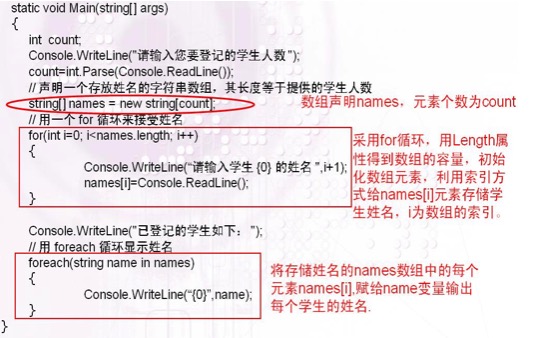
Example
class Program
{
static void Main()
{
int count;
Console.WriteLine("Enter the number of students to register");
count = int.Parse(Console.ReadLine());
string[]names = new string[count];
for (int i = 0; i < names.Length; i++)
{
Console.WriteLine("Please enter the name of student {0}", i + 1);
names[i] = Console.ReadLine();
}
Console.WriteLine("The registered students are as follows");
foreach (string name in names)
{
Console.WriteLine("{0}", name);
}
Console.ReadKey();
}
}