The 404 page is an essential page for a website; it carries the heavy responsibility of user experience and SEO optimization. A 404 page typically appears when a user visits a page that does not exist or has been deleted, and the server returns a 404 error. If the webmaster has not set up a 404 page, dead links will appear, and when spiders crawl such URLs, it is not conducive to search engine indexing.

Two major benefits of setting up a 404 page
- 1: Guide users not to close the website, enhancing user experience.
- 2: Prevent the website from having dead links.
You can follow the following principles when designing a 404 page
-
1: Return to the homepage in 5 seconds like a portal

The error pages of portal sites like NetEase, Sina, and Tencent are all similar - after entering the error page, a prompt tells you to return to the channel homepage in 5 seconds.
Never return to the homepage immediately after entering a 404 error page. These redirects make search engines mistakenly think the page exists, yet they return duplicate content.
-
2: Bring out the "brick experts" like Webmaster Home

A 404 page should maintain a style similar to your own website, making it look like it's still your site. Add some humorous and funny phrases, invite the "brick experts" to analyze for you, and tell users where they are when confused. Give errors a humorous storyline - it turns out errors can also be beautiful...
Never set the 404 to a 301 redirect to the homepage. This is an unfriendly setting for search engines and will make them think the website has a large number of pages with the same content as the homepage. However, you can 301 redirect the error page to the correct page.
-
3: You can also be like Yahoo and stuff everything in
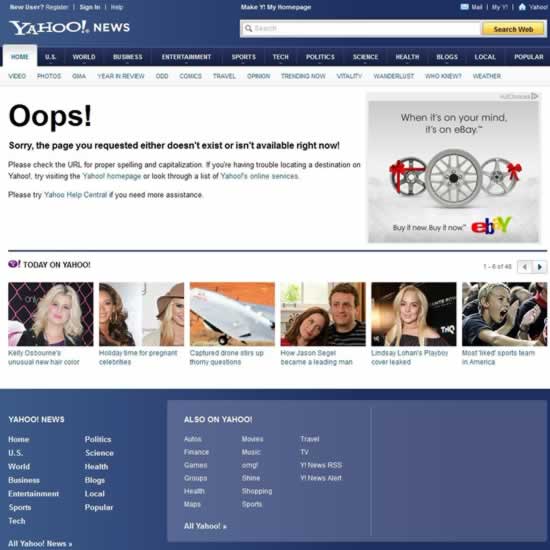
On the 404 page, provide as many useful links to users as possible, use rich content to bring users back, and avoid overly simple pages that cause users to leave.
Even though there is lots of content, the most prominent position should still display the error message, informing users that the page they want to visit does not exist. Then, add navigation at the top, put ads on the right, squeeze in some illustrated articles at the bottom, and that's still not enough - throw some navigation links at the very bottom, so users can't help but click.
-
4: You can also put a little game on it for fun

A 404 error is not scary; what's scary is that the default "404 Not Found" leaves users confused - what's going on here? At this point, you can put a Flash mini-game on it, labeled "Oops, this is the 404 error page. Take a break and play this game."
404 page setup methods
-
1: Virtual hosting setup method
Most IDC providers now offer 404 configuration functionality; you can simply upload the file and configure it.
-
2: Setting up a 404 page under IIS
In IIS Manager, right-click the website you want to manage, open "Custom Error Information" in "Properties", and set the corresponding error information page for "404". However, in "Message Type", you must select "File" or "Default Value", not "URL", otherwise it will result in a "200" status code.
-
3: Setting up a 404 error page under Apache
Add the following content to the .htaccess file: ErrorDocument 404 /notfound.php. Be sure not to use an absolute URL; if you use an absolute URL, the returned status code will be "302" + "200".
Source:Lu Songsong Blog