PHP Connecting to Memcached Service
In the previous chapters, we introduced how to install the Memcached service. Next, we will introduce how PHP uses the Memcached service.
PHP Memcache Extension Installation
PHP Memcache extension package download address:http://pecl.php.net/package/memcache, you can download the latest stable package.
wget http://pecl.php.net/get/memcache-2.2.7.tgz
tar -zxvf memcache-2.2.7.tgz
cd memcache-2.2.7
/usr/local/php/bin/phpize
./configure --with-php-config=/usr/local/php/bin/php-config
make && make install
Note:/usr/local/php/ is the installation path of PHP, and you need to adjust it according to your actual installation directory.
After successful installation, the location of your memcache.so extension will be displayed, for example mine:
Installing shared extensions: /usr/local/php/lib/php/extensions/no-debug-non-zts-20090626/
Finally, we need to add this extension to PHP. Open your php.ini file and add the following content at the end:
[Memcache]
extension_dir = "/usr/local/php/lib/php/extensions/no-debug-non-zts-20090626/"
extension = memcache.so
After adding it, restart PHP. I use the nginx + php-fpm process, so the command is as follows:
kill -USR2 `cat /usr/local/php/var/run/php-fpm.pid`
If using Apache, use the following command:
/usr/local/apache2/bin/apachectl restart
Check the installation result
/usr/local/php/bin/php -m | grep memcache
If the installation is successful, it will output: memcache.
Or access the phpinfo() function through a browser to view it, as shown below:
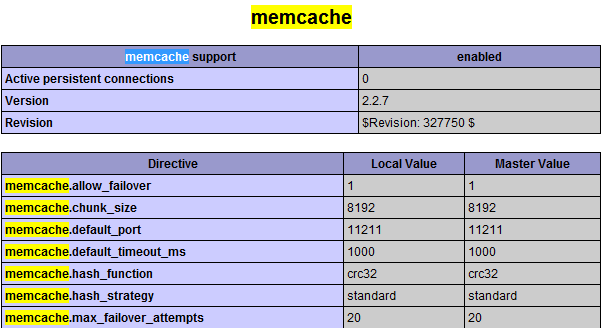
PHP Connecting to Memcached
<?php
$memcache = new Memcache;             //创建一个memcache对象
$memcache->connect('localhost', 11211) or die ("Could not connect"); //连接Memcached服务器
$memcache->set('key', 'test');        //设置一个变量到内存中,名称是key 值是test
$get_value = $memcache->get('key');   //从内存中取出key的值
echo $get_value;
?>
For more PHP operations on Memcached, please refer to:http://php.net/manual/zh/book.memcache.php
Other Extensions