HTML DOM offsetLeft Property
 Element Object
Examples
Get the left offset of a div element:
var testDiv = document.getElementById("test");
document.getElementById("demo").innerHTML = testDiv.offsetLeft;
Try it Yourself »
Definition and Usage
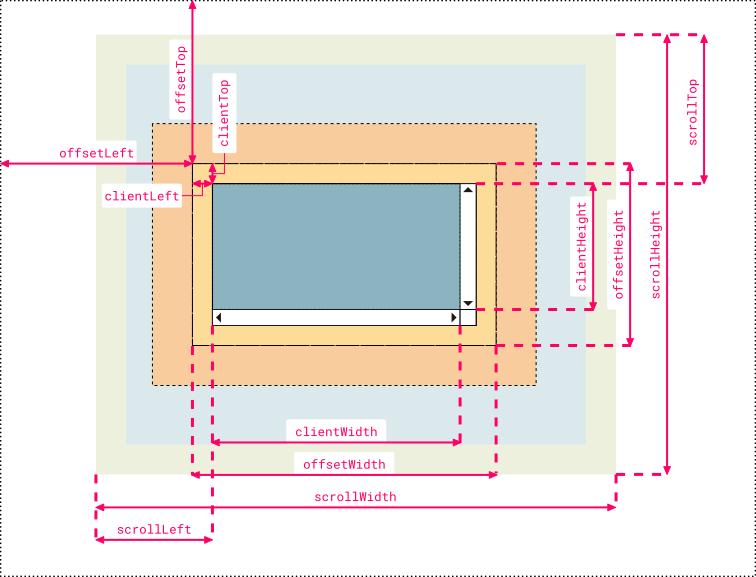
offsetLeft is a read-only property that returns the pixel offset of the current element relative to the left boundary of the offsetParent node.
The return value includes:
- The pixel value of the element's leftward offset, and the element's margin
- The left padding, border, and scrollbar of the offsetParent element.
Note: offsetParentThe element refers to the nearest positioned element (i.e., the nearest in the containing hierarchy) that contains the element, or the nearest element.
Tip:To get the top offset of an element, use theoffsetTopproperty.
Browser Support
| Property | |||||
|---|---|---|---|---|---|
| offsetLeft | Yes | Yes | Yes | Yes | Yes |
Syntax
element.offsetLeft
Technical Details
| Return value: | Returns an integer representing the left offset of the element, in pixels (px). |
|---|
More Examples
Example
Get the position of a div element:
var testDiv = document.getElementById("test");
var demoDiv = document.getElementById("demo");
demoDiv.innerHTML = "offsetLeft: " + testDiv.offsetLeft + "<br>offsetTop: " + testDiv.offsetTop;
Try it Yourself »
Other Extensions