HTML canvas translate()Method
 Canvas Object
Example
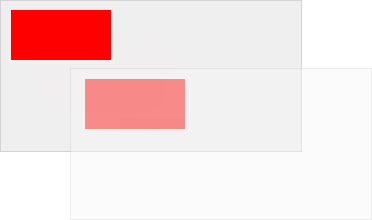
Draw a rectangle at position (10,10), set the new (0,0) position to (70,70). Draw the new rectangle again (note that the rectangle now starts drawing at position (80,80)):
JavaScript:
var c=document.getElementById("myCanvas");
var ctx=c.getContext("2d");
ctx.fillRect(10,10,100,50);
ctx.translate(70,70);
ctx.fillRect(10,10,100,50);
var ctx=c.getContext("2d");
ctx.fillRect(10,10,100,50);
ctx.translate(70,70);
ctx.fillRect(10,10,100,50);
Try it Yourself »
Browser Support


Internet Explorer 9, Firefox, Opera, Chrome, and Safari support the translate() method.
Note:Internet Explorer 8 and earlier versions do not support the <canvas> element.
Definition and Usage
The translate() method remaps the (0,0) position on the canvas.
Note:When you call a method such as fillRect() after translate(), the values are added to the x and y coordinate values.
| JavaScript Syntax: | context.translate(x,y); |
|---|
Parameter Values
Note: You can specify one or both parameters.
| Parameter | Description |
|---|---|
| x | The value to add to the horizontal coordinate (x). |
| y | The value to add to the vertical coordinate (y). |
Other Extensions