HTML canvas drawImage()Method
 Canvas Object
Image to use:
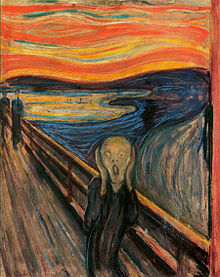
Example
Draw the image onto the canvas:
JavaScript:
var ctx=c.getContext("2d");
var img=document.getElementById("scream");
ctx.drawImage(img,10,10);
Try it Yourself »
Browser Support


Internet Explorer 9, Firefox, Opera, Chrome, and Safari support the drawImage() method.
Note:Internet Explorer 8 and earlier versions do not support the <canvas> element.
Definition and Usage
The drawImage() method draws an image, canvas, or video onto the canvas.
The drawImage() method can also draw parts of an image, and/or increase or decrease the image size.
JavaScript Syntax
Position an image on the canvas:
| JavaScript syntax: | context.drawImage(img,x,y); |
|---|
Position an image on the canvas, and specify the width and height of the image:
| JavaScript syntax: | context.drawImage(img,x,y,width,height); |
|---|
Clip an image, and position the clipped part on the canvas:
| JavaScript syntax: | context.drawImage(img,sx,sy,swidth,sheight,x,y,width,height); |
|---|
Parameter Values
| Parameter | Description | |
|---|---|---|
| img | Specifies the image, canvas, or video to use. | |
| sx | Optional. The x coordinate position to start clipping. | |
| sy | Optional. The y coordinate position to start clipping. | |
| swidth | Optional. The width of the clipped image. | |
| sheight | Optional. The height of the clipped image. | |
| x | The x coordinate position to place the image on the canvas. | |
| y | The y coordinate position to place the image on the canvas. | |
| width | Optional. The width of the image to use (stretch or shrink the image). | |
| height | Optional. The height of the image to use (stretch or shrink the image). |

More Examples
Example
Position an image on the canvas, and then specify the width and height of the image:
JavaScript:
var ctx=c.getContext("2d");
var img=document.getElementById("scream");
ctx.drawImage(img,10,10,150,180);
Try it Yourself »
Example
Clip an image, and position the clipped part on the canvas:
JavaScript:
var ctx=c.getContext("2d");
var img=document.getElementById("scream");
ctx.drawImage(img,90,130,50,60,10,10,50,60);
Try it Yourself »
Example
Video to use (please press the play button to start the demo):
Canvas:
JavaScript (every 20 milliseconds, the code draws the current frame of the video):
var c=document.getElementById("myCanvas");
ctx=c.getContext('2d');
v.addEventListener('play',function() {var i=window.setInterval(function() {ctx.drawImage(v,5,5,260,125)},20);},false);
v.addEventListener('pause',function() {window.clearInterval(i);},false);
v.addEventListener('ended',function() {clearInterval(i);},false);
Try it Yourself »
Other Extensions