JavaScript toPrecision()Method
 JavaScript Number Object
Example
Format a number to a specified length:
nOutput:
Try it Yourself »
Definition and Usage
The toPrecision() method returns a numeric string of the specified length.
The toPrecision() method returns the string representation of the numeric object with the specified precision, rounding to the number of displayed digits specified by the precision parameter.
Browser Support
| Method | |||||
|---|---|---|---|---|---|
| toPrecision() | Yes | Yes | Yes | Yes | Yes |
Syntax
Parameter Values
| Parameter | Description |
|---|---|
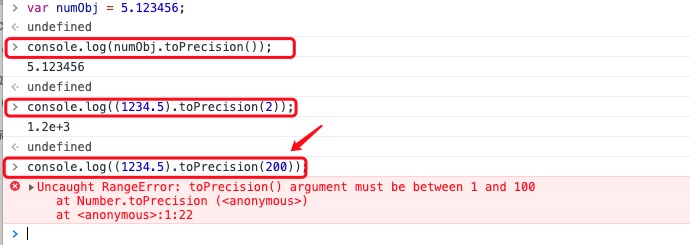
| x | Optional. Specifies the number of digits to convert to. This parameter is a value between 1 and 100 (inclusive). If this parameter is omitted, the toString() method is called, returning the string form of the original number. If the precision parameter is not between 1 and 100 (inclusive), a RangeError will be thrown. |
Return Value
| Type | Description |
|---|---|
| String | A number formatted to the specified precision |
Technical Details
| JavaScript Version: | 1.5 |
|---|
More Examples
Example
Format a number to a specified length using different bases:
a、b、canddOutput:
Try it Yourself »
Example
An error is reported if the parameter exceeds 100:
Test result:
Other extensions