JavaScript replaceAll()Method
 JavaScript String Object
Examples
In this example, we will replace all "Microsoft" with "Example":
var str="Visit Microsoft! Visit Microsoft!";
var n=str.replaceAll("Microsoft","Example");
nOutput:
Visit Example!Visit Example!
Try it Yourself »
Definition and Usage
The replaceAll() method is used to replace some characters with other characters in a string, or to replace a substring that matches a regular expression. This function replaces all matched substrings.
If you want to learn more about regular expression tutorials, please check out this site's:RegExp Tutorialand ourRegExp Object Reference Manual.
This method does not change the original string.
Browser Support
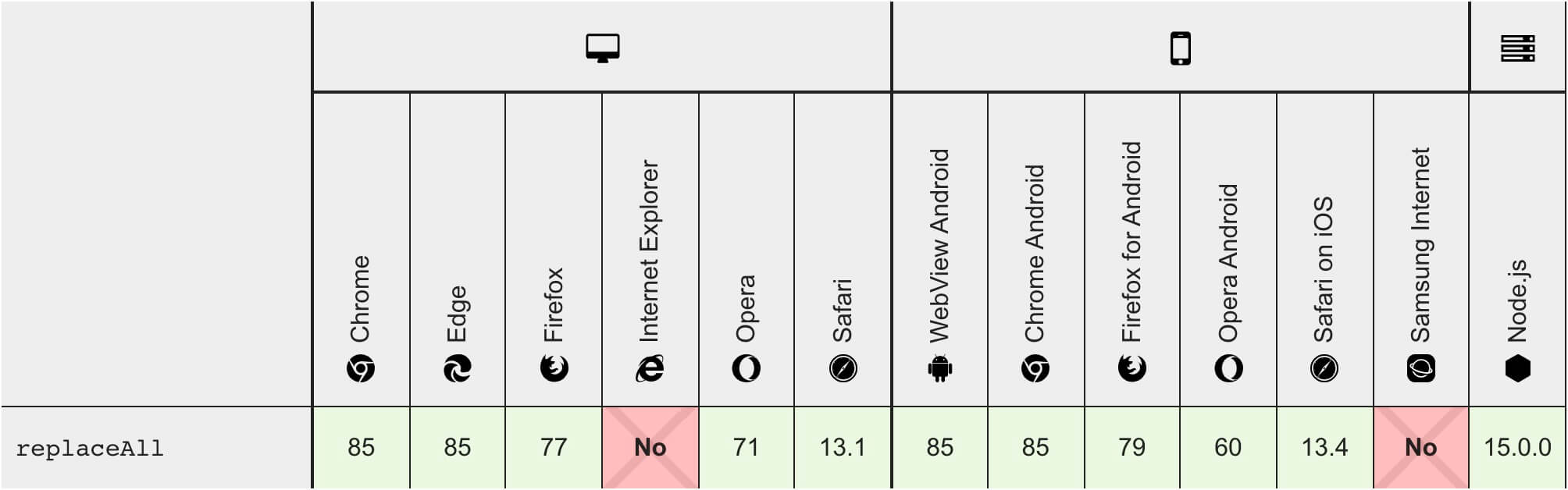
Internet Explorer browsers on PC do not support this function.
Syntax
const newStr = str.replaceAll(regexp|substr, newSubstr|function)
Parameter Values
| Parameter | Description |
|---|---|
| regexp|substr | Required. Specifies a substring or a RegExp object of the pattern to be replaced. Please note that if the value is a string, it is used as a literal text pattern to be retrieved, rather than being first converted to a RegExp object. When using a regex, you must set the global ("g") flag; otherwise, it will throw a TypeError: "replaceAll must be called with a global RegExp". |
| newSubstr|function | Required. A string value. Specifies the replacement text or a function that generates the replacement text. |
Return Value
| Type | Description |
|---|---|
| String | A new string, obtained after replacing all matches of regexp with newSubstr. |
Technical Details
| JavaScript Version: | 1.2 |
|---|
More Examples
Examples
Perform a global replacement:
var str="Mr Blue has a blue house and a blue car";
var n=str.replaceAll(/blue/ig,"red");
nOutput:
Mr red has a red house and a red car.
Try it Yourself »
Other Extensions