Maven プロジェクトテンプレート
Maven は archetype(原型)を使用してカスタムのプロジェクト構造を作成し、Maven プロジェクトテンプレートを形成します。
前の章で、Maven が以下のコマンドを使用して Java プロジェクトをすばやく作成することを学びました。
mvn archetype:generate
archetype とは?
archetype つまり原型は、Maven プラグインであり、正確にはプロジェクトテンプレートです。そのタスクは、テンプレートに基づいてプロジェクト構造を作成することです。quickstart アーキタイププラグインを使用して、単純な Java アプリケーションを作成します。
プロジェクトテンプレートを使用する
コマンドコンソールを開き、C:\> MVN ディレクトリに移動して、次の mvn コマンドを実行しましょう。
C:\MVN> mvn archetype:generate
Maven が処理を開始し、必要な archetype を選択するよう求めます。
[INFO] Scanning for projects...
[INFO] Searching repository for plugin with prefix: 'archetype'.
[INFO] -------------------------------------------------------------------
[INFO] Building Maven Default Project
[INFO]task-segment: [archetype:generate] (aggregator-style)
[INFO] -------------------------------------------------------------------
[INFO] Preparing archetype:generate
...
600: remote -> org.trailsframework:trails-archetype (-)
601: remote -> org.trailsframework:trails-secure-archetype (-)
602: remote -> org.tynamo:tynamo-archetype (-)
603: remote -> org.wicketstuff.scala:wicket-scala-archetype (-)
604: remote -> org.wicketstuff.scala:wicketstuff-scala-archetype
Basic setup for a project that combines Scala and Wicket,
depending on the Wicket-Scala project.
Includes an example Specs test.)
605: remote -> org.wikbook:wikbook.archetype (-)
606: remote -> org.xaloon.archetype:xaloon-archetype-wicket-jpa-glassfish (-)
607: remote -> org.xaloon.archetype:xaloon-archetype-wicket-jpa-spring (-)
608: remote -> org.xwiki.commons:xwiki-commons-component-archetype
(Make it easy to create a maven project for creating XWiki Components.)
609: remote -> org.xwiki.rendering:xwiki-rendering-archetype-macro
(Make it easy to create a maven project for creating XWiki Rendering Macros.)
610: remote -> org.zkoss:zk-archetype-component (The ZK Component archetype)
611: remote -> org.zkoss:zk-archetype-webapp (The ZK wepapp archetype)
612: remote -> ru.circumflex:circumflex-archetype (-)
613: remote -> se.vgregion.javg.maven.archetypes:javg-minimal-archetype (-)
614: remote -> sk.seges.sesam:sesam-annotation-archetype (-)
Choose a number or apply filter
(format: [groupId:]artifactId, case sensitive contains): 203:
押すEnterデフォルトオプションを選択 (203:maven-archetype-quickstart)
Maven は archetype のバージョンを尋ねます
Choose org.apache.maven.archetypes:maven-archetype-quickstart version:
1: 1.0-alpha-1
2: 1.0-alpha-2
3: 1.0-alpha-3
4: 1.0-alpha-4
5: 1.0
6: 1.1
Choose a number: 6:
押すEnterデフォルトオプションを選択 (6:maven-archetype-quickstart:1.1)
Maven はプロジェクトの詳細を尋ねます。要求に従ってプロジェクトの詳細を入力してください。デフォルト値を使用する場合は、Enter キーを押します。独自の値を入力することもできます。
Define value for property 'groupId': : com.companyname.insurance
Define value for property 'artifactId': : health
Define value for property 'version': 1.0-SNAPSHOT
Define value for property 'package': com.companyname.insurance
Maven はプロジェクトの詳細の確認を求めます。押してくださいEnterまたは Y を押します
Confirm properties configuration:
groupId: com.companyname.insurance
artifactId: health
version: 1.0-SNAPSHOT
package: com.companyname.insurance
Y:
これで Maven はプロジェクト構造の作成を開始し、次のように表示されます。
[INFO] -----------------------------------------------------------------------
[INFO] Using following parameters for creating project
from Old (1.x) Archetype: maven-archetype-quickstart:1.1
[INFO] -----------------------------------------------------------------------
[INFO] Parameter: groupId, Value: com.companyname.insurance
[INFO] Parameter: packageName, Value: com.companyname.insurance
[INFO] Parameter: package, Value: com.companyname.insurance
[INFO] Parameter: artifactId, Value: health
[INFO] Parameter: basedir, Value: C:\MVN
[INFO] Parameter: version, Value: 1.0-SNAPSHOT
[INFO] project created from Old (1.x) Archetype in dir: C:\MVN\health
[INFO] -----------------------------------------------------------------------
[INFO] BUILD SUCCESSFUL
[INFO] -----------------------------------------------------------------------
[INFO] Total time: 4 minutes 12 seconds
[INFO] Finished at: Fri Jul 13 11:10:12 IST 2012
[INFO] Final Memory: 20M/90M
[INFO] -----------------------------------------------------------------------
作成されたプロジェクト
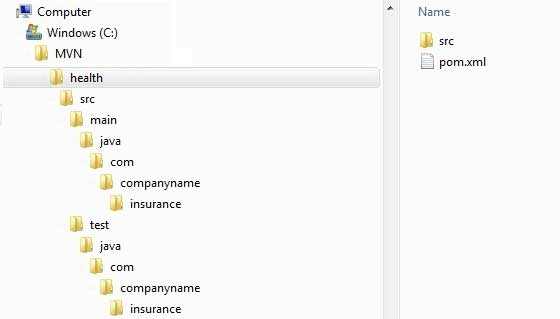
次に C:\ > MVN ディレクトリに移動します。プロジェクト作成時に設定した artifactId 名と同じ、health という名前の Java アプリケーションプロジェクトが表示されます。Maven は以下に示すように、標準のディレクトリレイアウトを持つプロジェクトを作成します。
pom.xml を作成する
Maven はプロジェクト用の pom.xml ファイルを自動生成します。次のようになります。
App.java
Maven はテスト用の Java ファイル App.java を自動生成します。
パス:C:\MVN\consumerBanking\src\main\java\com\companyname\bank
AppTest.java
Maven は Java ファイル AppTest.java を自動生成します。
パスは:C:\MVN\consumerBanking\src\test\java\com\companyname\bank
これで完了です。Maven の強力さがおわかりいただけたでしょう。Maven の簡単なコマンドを使用して、あらゆる種類のプロジェクトを作成でき、そして、開発を開始できます。
その他の拡張機能