Algorithm Basics
An algorithm is a clear, finite set of steps for solving a specific problem.
Understanding the basic concepts of algorithms and efficiency analysis methods is an important prerequisite for learning data structures and algorithms.
Definition and Characteristics of Algorithms
In computer science, an algorithm is a finite sequence of instructions, each of which represents one or more operations.
A qualified algorithm must possess the following five basic characteristics:
| Characteristic | Meaning | Counterexample |
|---|---|---|
| Input | There are zero or more external inputs | No input is also valid, such as generating random numbers |
| Output | Produces at least one result | An "algorithm" without any output is meaningless |
| Definiteness | The meaning of each step must be clear and unambiguous | Vague descriptions like "increase appropriately" are unacceptable |
| Finiteness | Must terminate within a finite number of steps; it cannot loop indefinitely | An operating system itself is not an algorithm because it theoretically runs forever |
| Feasibility | Each step can be implemented using basic operations | "Dividing by zero" is infeasible, and "sorting in one step" is also infeasible |
The "finiteness" of an algorithm does not contradict the "infinite loop" of a program. A program can fall into an infinite loop due to a bug, but an algorithm itself must finish within a finite number of steps. The difference is: an algorithm is a concept at the "design intent" level, while a program is a concept at the "actual execution" level.
Algorithm Representation Methods
When designing and communicating algorithms, two representation methods are commonly used.
Pseudocode
Pseudocode uses text that is close to natural language but has a certain structured format to describe algorithm logic.
It does not depend on the syntax of any specific programming language, making it convenient for quickly expressing ideas.
For example, pseudocode for finding the maximum value in a set of numbers:
算法:FindMax
输入:数组 A,长度 n
输出:A 中的最大值

1. max = A[0]
2. for i = 1 to n-1:
3.     if A[i] > max:
4.         max = A[i]
5. return max
Flowchart
A flowchart visually displays the execution process of an algorithm through graphics.
The figure above shows the complete execution process of the FindMax algorithm: starting from the input array, initialize the current maximum, then compare each element in turn, update the maximum if a larger value is found, and output the result after the traversal is complete.
Symbol conventions in flowcharts:
| Symbol shape | Meaning |
|---|---|
| Rounded rectangle (or ellipse) | Start / End |
| Rectangle | Processing step |
| Diamond | Decision / Branch |
| Parallelogram | Input / Output |
| Arrow | Flow direction |
Algorithm Efficiency Analysis
After designing an algorithm, its efficiency also needs to be evaluated. This is mainly measured along two dimensions.
Time Complexity
Time complexity describes the growth trend of the number of basic operations required by the algorithm as the input size n increases.
Note that we care about the "growth trend" rather than the "exact number of executions." Because for large-scale inputs, differences of constant multiples are far less important than differences in growth trends.
Space Complexity
Space complexity describes the growth trend of the additional memory space required during algorithm execution as the input size n increases.
The emphasis on "additional" space here means how much auxiliary space the algorithm needs other than the space used to store the input data itself.
Time and space are often a pair of trade-offs — trading space for time, or trading time for space, is a common trade-off strategy in algorithm design. For example: a hash table uses extra storage space in exchange for O(1) lookup time; while in-place sorting algorithms use slightly more computation steps to avoid extra space consumption.
Big O Notation
Big O NotationIt is the most commonly used mathematical tool for measuring time complexity and space complexity.
It describes the upper bound of the growth trend of running time or space usage as the input size n increases, in the worst-case scenario for an algorithm.
Definition: If there exist positive constants c and n0 such that for all n ≥ n0, T(n) ≤ c × f(n), then it is denoted asT(n) = O(f(n))。
Intuitive understanding: Big O notation ignores constant factors and lower-order terms, focusing only on the fastest-growing term.
For example: If an algorithm requires 3n² + 100n + 500 operations, when n is large enough, the n² term dominates the growth, so we say it is O(n²).
Common Complexity Levels
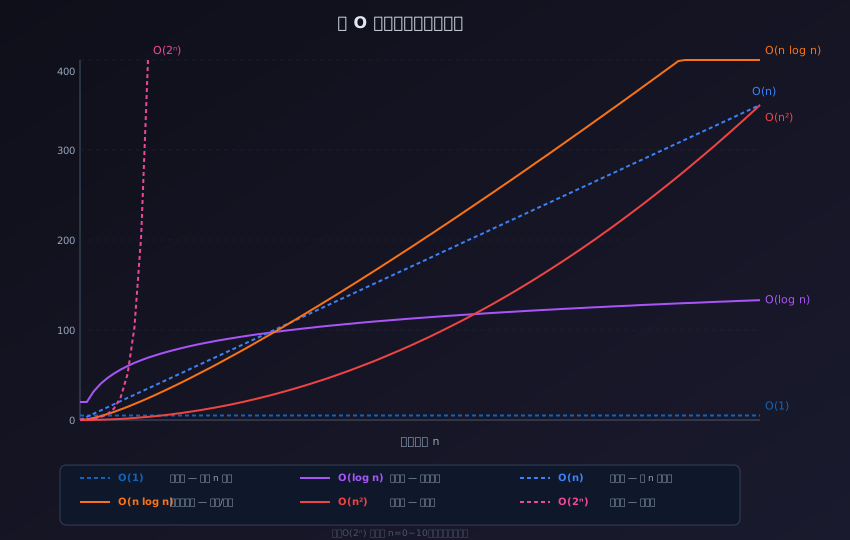
The figure above intuitively shows how each complexity level changes as the input size n grows.
| Notation | Name | n=10 | n=1000 | Typical algorithms |
|---|---|---|---|---|
| O(1) | Constant order | 1 | 1 | Array access by index, hash table lookup |
| O(log n) | Logarithmic order | ~3 | ~10 | Binary search, balanced BST operations |
| O(n) | Linear order | 10 | 1000 | Linear search, traversing an array |
| O(n log n) | Linearithmic order | ~30 | ~10000 | Merge sort, quick sort (average) |
| O(n²) | Quadratic order | 100 | 1000000 | Bubble sort, selection sort |
| O(2ⁿ) | Exponential order | 1024 | Astronomical number | Brute-force solving subset problems |
From the table, we can see that when n=1000, O(1) still requires only 1 operation, O(n) requires 1000 operations, and O(n²) requires 1 million operations.
In large-scale data scenarios, choosing an algorithm with appropriate complexity can lead to performance differences of orders of magnitude.
In actual programming, try to ensure that the complexity of core algorithms does not exceed O(n log n). When complexity reaches O(n²) or higher, special attention must be paid to whether the input size is controllable and whether there are better alternatives.
Time Complexity Calculation Examples
Below is a simple C code snippet and its time complexity analysis:
Example
/* Function: calculate the sum of array elements
Time complexity: O(n)
n is the array length, the loop runs n times, and each iteration performs a constant number of operations */
int sumArray(int arr[], int n) {
int total = 0; /* O(1) — assignment operation, executed once */
for (int i = 0; i < n; i++) { /* Loop body */
total += arr[i]; /* O(1) — addition and assignment, executed n times */
}
return total; /* O(1) — return operation, executed once */
}
/* Overall time complexity: O(1 + n + 1) = O(n)
Lower-order constant terms are ignored */
int main() {
int nums[] = {5, 10, 15, 20, 25};
int size = sizeof(nums) / sizeof(nums[0]);
int result = sumArray(nums, size);
printf("Sum of array elements: %d\n", result); /* Output: Sum of array elements: 75 */
return 0;
}
Now look at another example with nested loops:
Example
/* Function: print an n×n multiplication table
Time complexity: O(n²)
The outer loop runs n times, the inner loop runs n times, for a total of n×n times */
void printMulTable(int n) {
for (int i = 1; i <= n; i++) { /* Outer loop O(n) */
for (int j = 1; j <= n; j++) { /* Inner loop O(n), total n² iterations after nesting */
printf("%d\t", i * j); /* O(1) operation */
}
printf("\n");
}
}
/* Overall time complexity: O(n × n) = O(n²) */
int main() {
printMulTable(5); /* Output a 5×5 multiplication table */
return 0;
}
Space Complexity Calculation Examples
Space complexity focuses on the additional memory space allocated during the execution of an algorithm.
Example
#include <stdlib.h> /* Header file for malloc/free */
/* Function: create a new array storing the squares of the original array
Space complexity: O(n) — allocates a new array of length n */
int* squareArray(int arr[], int n) {
int* result = (int*)malloc(n * sizeof(int)); /* Allocate additional space for n ints */
if (result == NULL) {
return NULL; /* Return NULL if malloc fails */
}
for (int i = 0; i < n; i++) {
result[i] = arr[i] * arr[i];
}
return result;
}
/* Space complexity O(n):
- The input array arr is not counted (it is part of the input itself)
- The result array additionally allocates n ints, which is extra space
- Variable i uses constant space O(1), dominated by O(n) */
int main() {
int nums[] = {1, 2, 3, 4, 5};
int n = 5;
int* squared = squareArray(nums, n);
if (squared != NULL) {
for (int i = 0; i < n; i++) {
printf("%d ", squared[i]); /* Output: 1 4 9 16 25 */
}
printf("\n");
free(squared); /* Manually free the dynamically allocated memory */
}
return 0;
}
Other extensionsCommon beginner misconceptions: Time complexity and space complexity analyze "growth trends" rather than exact values. Constant coefficients, lower-order terms, and differences between programming languages are all ignored by Big O notation. Therefore O(2n) and O(n) are equivalent—they both represent linear growth.