<AppML>Architecture
MVC Architecture
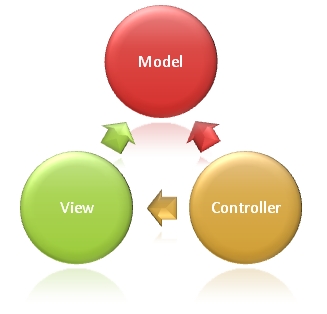
<AppML> adopts the MVC architecture. MVC stands for Model View Controller, an abbreviation of Model – View – Controller, a software design paradigm. ModelDescribes your application. ViewDisplays your data. ControllerControls your application.
Wikipedia: Model, View, Controller
|
 |
Model (MODEL) - Just a simple XML file
The model describes your application and can be reused on different hardware and software platforms (PC, iPhone, Tablets, etc.). It does not care about the user interface (UI) or presentation.
The model is written in XML and stored on a web server.
<datasource>
<database>
<connection>Northwind</connection>
<sql>SELECT CustomerName,ContactName,City,Country FROM Customers</sql>
</database>
</datasource>
<filters>
<query>
<field label="Customer">CustomerName</field>
<field>City</field>
<field>Country</field>
</query>
<order>
<field label="Customer">CustomerName</field>
<field>City</field>
<field>Country</field>
</order>
</filters>
</appml>
The above example defines the data source from the Northwind database.
The model allows using predefined SQL to fetch data. It also allows querying and sorting data by Customer, City, and Country.
View (VIEW) - Just a plain HTML file
The view is the UI (User Interface). It is usually an HTML page that displays and (optionally) inputs data:
<html>
<head>
<link rel="stylesheet" href="appml.css.html" />
</head>
<body>
<h1>My First Web Application</h1>
<div id="Place01"></div>
<script src="appml.js.html"></script>
<script>
customers=new
AppML("appml.html","Customers.xml");
customers.run("Place01");
</script>
</body>
</html>
The above HTML page uses a scripting language to create an AppML object, and displays the data in the div with id="Place01".
Uses the "appml.js" script file.
CONTROLLER (Controller) - Just a browser and server-side script
Server-side scripts control the application in the following ways:
- Receive request data from the browser
- Return the model and data to the browser
- Receive updated data from the browser
- Update data on the server
- During data communication, please perform data security validation.
Browser scripts control the application in the following ways:
- When the page loads, you can load the <AppML> controller into the page.
- Using the controller, you can create <AppML> objects on the page.
- When executing the <AppML> object, it requests data from the server.
- The <AppML> object receives data from the server (using the data model).
- The <AppML> object (or your code) displays your data on the page.
- (Optional) Web users modify data.
- (Optional) <AppML> can send modification requests to the server.
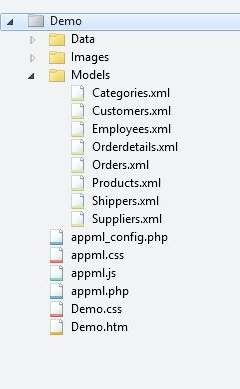
Typical Web files and folders:
|
|
Data folder:Data Image folder:Images Model folder: Models Application:Demo.htm Styles:Demo.css
<AppML> configuration file:appml_config.php (or .htmlx) <AppML> style file:appml.css <AppML> browser controller:appml.js <AppML> server controller:appml.php(or .htmlx) |
Rapid, flexible application development
Rapid Application Development (RAD) is not only a requirements elicitation method, it is also a methodology integrating software development. The goal of rapid application development is to quickly release system solutions, while technical elegance is secondary to the speed of release.
<AppML> provides ultra-fast prototyping, 100 times faster than traditional software development methods.
Application prototypes can run directly from the application model without any coding.
Wikipedia: Rapid Application Development
Agile software development is a methodology developed step by step based on the collaboration between users and developers.
<AppML> applications can be implemented incrementally from prototype to full application step by step.
Wikipedia: Agile Software Development
Declarative programming
Software development often cannot be completed within the expected time and budget. Software coding errors are also common. This is because computer code is difficult to develop, test, and maintain.
Coding hasbecome outdated. You should describe more about what to do, rather than how to implement it.
Using <AppML> you need todeclareyour application in the model.
Use<AppML>canwrite less or no code。
Wikipedia: Declarative Programming
Code First
Web application development can use the following two different approaches:
1. Code First: Use pre-programmed, pre-tested code, and only add new application specifications.
2. Contract First: Write the application from scratch using the complete application specification requirements.
<AppML>Adopt the most reasonable concept:Code First。
Service-Oriented Architecture (SOA)
Web Serviceis a data interface, specified by URL, just like a web page. But it is different from a web page; it is only a way to convey information.
A typicalWeb Serviceprovides data for the page.
Using <AppML>, HTML is displayed as the user interface, and <AppML> provides the data.
Original Web ServicesDesign uses XML standards such as SOAP, WSDL, and UDDI.
Modern Web ServicesFor example, <AppML> applications are simpler.
- Easier to understand - can be read by us
- Lightweight - no unnecessary code or markup
- Easy to implement - no required development tools
Service-Oriented Architecture (SOA) is a component model that connects different functional units of an application (called services) through well-defined interfaces and contracts between these services. The interface is defined in a neutral way, and it should be independent of the hardware platform, operating system, and programming language that implement the service. This allows services built in various such systems to interact in a unified and universal way.
Advantages of Web Services
- Web services require only a small amount of code
- Web services are designed to handle a limited set of tasks
- Web services use HTTP-based communication protocols
- Web services are independent of the operating system
- Web services are independent of the programming language
- Web services can connect different applications, systems, and devices
- Web services can easily publish information
- Web services are beneficial for rapid application development
For example, a Web service can be designed as a small program that provides an application with the latest stock trading prices.
Web services use the HTTP protocol to communicate with other systems. Web services are independent of the operating system and programming language.
Applications that call Web services will always send requests using the HTTP protocol. The calling application will never care about the operating system or programming language running on other computers.
Web services can create new possibilities for more enterprises because they provide a simple way to distribute large amounts of information.
For example: flight schedules and ticket reservation systems.
Cloud Computing
Cloud Computing is an extension of SOA: Application-as-a-Service, Storage-as-a-Service, Data-as-a-Service.
For most people, cloud computing is storing data on the web:
- Email and calendars
- Documents and spreadsheets
- Books, notes, to-do lists
- Music, pictures and movies
- Databases and applications
The reasons are obvious:
- Access data from all over the world
- Share my data with others
- Hardware upgrades or crashes
<AppML> can easily put databases and applications in the cloud.
Other extensions