AngularJS Routing
In this chapter, we will introduce AngularJS routing.
AngularJS routing allows us to access different content through different URLs.
With AngularJS, multi-view single page web applications (SPA) can be implemented.
Usually our URL is in the form ofhttp://example.com/first/page, but in single-page web applications AngularJS uses#! + markerto implement it, for example:
http://example.com/#!/first
http://example.com/#!/second
http://example.com/#!/third
Note: In versions before Angular 1.6, routing is implemented through# + marker.
When we click any of the links above, the address requested from the server is the same (http://example.com/). Because the content after the #! sign is ignored by the browser when making a request to the server. So we need to implement the functionality of the content after the #! sign on the client side. AngularJS routing uses#! + markerto help us distinguish different logical pages and bind different pages to the corresponding controllers.
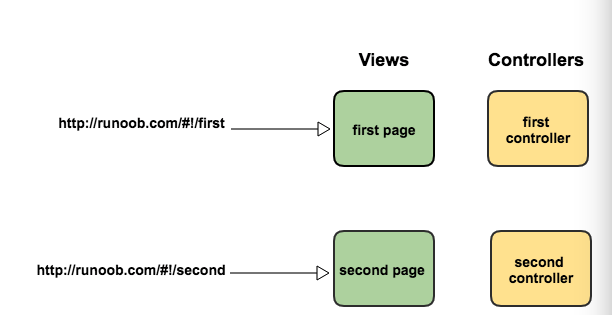
In the above diagram, we can see that two URLs are created: /ShowOrders and /AddNewOrder. Each URL has a corresponding view and controller.
Now let's look at a simple example:
AngularJS Examples
Try it »
Example analysis:
1. Load the JS file that implements routing: angular-route.js.
2. Include the ngRoute module as a dependency module of the main application module.
angular.module('routingDemoApp',['ngRoute'])3. Use the ngView directive.
<div ng-view></div>
The HTML content inside this div will change according to the route changes.
4. Configure $routeProvider. AngularJS $routeProvider is used to define routing rules.
module.config(['$routeProvider', function($routeProvider){
    $routeProvider
        .when('/',{template:'这是首页页面'})
        .when('/computers',{template:'这是电脑分类页面'})
        .when('/printers',{template:'这是打印机页面'})
        .otherwise({redirectTo:'/'});
}]);
The config function of an AngularJS module is used to configure routing rules. By using the config API, we request to inject $routeProvider into our configuration function and use the $routeProvider.when API to define our routing rules.
$routeProvider provides us with the when(path,object) & otherwise(object) functions to define all routes in order. The when function contains two parameters:
- The first parameter is a URL or URL regex rule.
- The second parameter is the routing configuration object.
Routing Configuration Object
AngularJS routing can also be implemented through different templates.
The first parameter of the $routeProvider.when function is a URL or URL regex rule, and the second parameter is the routing configuration object.The syntax rules of the routing configuration object are as follows:
$routeProvider.when(url, {
    template: string,
    templateUrl: string,
    controller: string, function 或 array,
    controllerAs: string,
    redirectTo: string, function,
    resolve: object<key, function>
});
Parameter description:
template:
If we only need to insert simple HTML content into ng-view, use this parameter:
.when('/computers',{template:'这是电脑分类页面'})templateUrl:
If we only need to insert an HTML template file into ng-view, use this parameter:
$routeProvider.when('/computers', {
    templateUrl: 'views/computers.html',
});
The above code will fetch the contents of the views/computers.html file from the server and insert it into ng-view.
controller:
Function, string, or array type; the controller function executed on the current template, generating a new scope.
controllerAs:
String type; specifies an alias for the controller.
redirectTo:
The redirect address.
resolve:
Specify other modules that the current controller depends on.
Example
AngularJS Example
Try it »