To understand the value range and calculation precision of float and double, you must first understand how decimals are stored in computers:
For example: 78.375 is a positive decimal. To store this number in a computer, it needs to be represented in floating-point format. First perform the binary conversion:
PS: The binary decimal point is different from the decimal point. After the binary decimal point are negative powers of 2; after the decimal point are negative powers of 10.
1. Binary conversion of decimals (floating-point numbers)
The integer part of 78.375:

The fractional part:

So, the binary form of 78.375 is 1001110.011
Then, usingbinary scientific notation,we have

Note that after conversion, the number represented in binary scientific notation has a base, an exponent, and a fractional part. This is calledfloating-point number.
2. Storage of floating-point numbers in computers
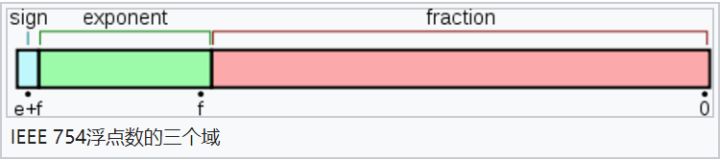
In computers, storing this number uses floating-point representation, which is divided into three main parts:
The first part is used to store thesign bit,used to distinguish positive from negative. Here it is 0, indicating a positive number.
The second part is used to store theexponent,here the exponent is 6 in decimal.
The third part is used to store thefraction,here the fractional part is 001110011.
Note that the exponent can also be positive or negative; this will be discussed later.As shown in the figure below:
For example, the float type is 32 bits and uses single-precision floating-point representation:
The sign bit occupies 1 bit and is used to represent positive and negative numbers.
The exponent bits occupy 8 bits and are used to represent the exponent.
The fraction bits occupy 23 bits and are used to represent the fraction, with insufficient bits padded with 0.
The double type is 64 bits and uses double-precision floating-point representation:
The sign bit occupies 1 bit, the exponent bits occupy 11 bits, and the fraction bits occupy 52 bits.
At this point, you can already faintly see that:
The exponent bits determine the value range,because the larger the numbers the exponent bits can represent, the larger the numbers that can be represented!
The fraction bits determine the calculation precision,because the larger the numbers the fraction bits can represent, the greater the calculation precision!
It may still not be clear enough, so let's take examples:
float has only 23 fraction bits, i.e., 23 binary bits. The maximum decimal number it can represent is 2 to the 23rd power, which is 8,388,608, i.e., 7 decimal digits. Strictly speaking, precision can only guarantee 6 decimal digits of calculation with 100% certainty.
double has 52 fraction bits, corresponding to a maximum decimal value of 4,503,599,627,370,496. This number has 16 digits, so calculation precision can only guarantee 15 decimal digits of calculation with 100% certainty.
PS: Common scientific calculators, such as those used in high school, generally support a maximum of 15 digits of calculation; beyond that, accuracy is insufficient. In actual programming, the double type is also used more often because it can guarantee 15 digits of calculation. If even higher precision calculation is needed, other data types are required, such as BigDecimal in Java, which supports higher-precision calculation.
3. Offset of the exponent bits and unsigned representation
Note that the exponent may be negative or positive, that is,the exponent is a signed integer.Calculations with signed integers are more troublesome than with unsigned integers. Therefore, to reduce unnecessary trouble, when actually storing the exponent, the exponent needs to be converted toan unsigned integer.So how is the conversion done?
Note that the exponent part of a float is 8 bits, so the exponent range is -126 to +127. To eliminate the impact of negative numbers on actual calculations (such as comparisons, addition and subtraction, etc.), a simple mapping can be applied to the exponent when actually storing it, by adding anoffset.For example, the offset for float's exponent is 127, so no negative numbers appear.
For example:
If the exponent is 6, what is actually stored is 6+127=133, i.e., 133 is converted to binary and then stored.
If the exponent is -3, what is actually stored is -3+127=124, i.e., 124 is converted to binary and then stored.
When we need to calculate the actual decimal number represented, just subtract the offset from the exponent.
For the corresponding double type, the exponent offset during storage is 1023.
4. Finally
So to save the decimal fraction 78.375 using the float type, you first need to convert it to a floating-point number, obtaining thesign bit,andexponent,andand fractional part.This example has already been analyzed above, so:
The sign bit is 0, the exponent bits are 6+127=133, whose binary representation is 10 000 101, and the fractional part is 001110011. Please automatically pad with 0 for the insufficient part.
Connected together and represented as float, the bold part is the exponent bits, and the leftmost bit is the sign bit 0, representing a positive number:
0 10000101 001110011 00000 00000 0000
If you use double to store it... calculate it yourself; there are too many 0s.
Author: Boss呱呱
Link: https://www.zhihu.com/question/46432979/answer/221485161