Introduction to HTTPS
Hypertext Transfer Protocol Secure (English: Hypertext Transfer Protocol Secure, abbreviated HTTPS, often referred to as HTTP over TLS, HTTP over SSL, or HTTP Secure) is a network security transmission protocol. Before introducing it in detail, let's first introduce the common HTTP protocol. HTTP is a protocol used when we normally browse web pages. The data transmitted by the HTTP protocol is unencrypted, i.e., plaintext, so using HTTP to transmit private information is very insecure. HTTP uses port 80 for communication, while HTTPS uses port 443 for communication. On computer networks, HTTPS communicates via the Hypertext Transfer Protocol (HTTP), but uses SSL/TLS to encrypt data packets. The main purpose of developing HTTPS is to provide identity authentication for web servers and protect the privacy and integrity of exchanged data. This protocol was first proposed by Netscape in 1994, and later extended to the Internet.
How HTTPS Works
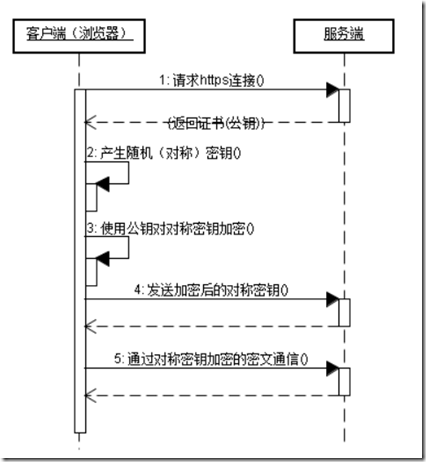
Before transmitting data, HTTPS requires a handshake between the client (browser) and the server (website). During the handshake, the password information used by both parties to encrypt transmitted data is established. The TLS/SSL protocol is not just a set of encrypted transmission protocols; it is a work of art carefully designed by artists. TLS/SSL uses asymmetric encryption, symmetric encryption, and HASH algorithms. The detailed handshake process is described as follows:
- 1) The browser sends a set of encryption rules it supports to the website.
- 2) The website selects a set of encryption algorithms and HASH algorithms from them, and sends its own identity information back to the browser in the form of a certificate. The certificate contains information such as the website address, the encryption public key, and the certificate issuer.
- 3) After the browser obtains the website certificate, it must do the following: a) Verify the legitimacy of the certificate (whether the issuing organization is legitimate, whether the website address contained in the certificate matches the address being visited, etc.). If the certificate is trusted, a small padlock will appear in the browser bar; otherwise, a prompt indicating that the certificate is untrusted will be given. b) If the certificate is trusted, or the user accepts an untrusted certificate, the browser generates a password made of a string of random numbers, and encrypts it with the public key provided in the certificate. c) Use the agreed HASH algorithm to calculate the handshake message, encrypt the message with the generated random number, and finally send all the previously generated information to the website.
- 4) After receiving the data sent by the browser, the website must perform the following operations: a) Use its own private key to decrypt the information and extract the password, use the password to decrypt the handshake message sent by the browser, and verify whether the HASH matches the one sent by the browser. b) Use the password to encrypt a handshake message and send it to the browser.
- 5) The browser decrypts and calculates the HASH of the handshake message. If it is consistent with the HASH sent by the server, the handshake process ends. After that, all communication data will be encrypted using the symmetric encryption algorithm with the random password previously generated by the browser.
Here, the browser and the website send encrypted handshake messages to each other and verify them. The purpose is to ensure that both parties have obtained the same password and can encrypt and decrypt data normally, serving as a test for the subsequent transmission of real data. In addition, the encryption and HASH algorithms commonly used by HTTPS are as follows:
- Asymmetric encryption algorithms: RSA, DSA/DSS
- Symmetric encryption algorithms: AES, RC4, 3DES
- HASH algorithms: MD5, SHA1, SHA256
The communication sequence diagram for HTTPS is as follows:
Differences between the HTTPS protocol and the HTTP protocol:
- The HTTPS protocol requires applying for a certificate from a CA. Generally, there are very few free certificates, and a fee is required.
- HTTP is the Hypertext Transfer Protocol, and information is transmitted in plaintext, while HTTPS is a secure SSL encrypted transmission protocol.
- HTTP and HTTPS use completely different connection methods and different ports: the former uses 80, the latter uses 443.
- HTTP connections are very simple and stateless.
- The HTTPS protocol is a network protocol built with SSL + HTTP, capable of encrypted transmission and identity authentication, and is more secure than the HTTP protocol.
SSL Certificate
From the above, we can understand that a core part of HTTPS is the handshake before data transmission, during which the password for data encryption is determined. During the handshake, the website sends an SSL certificate to the browser. Similar to the ID card we use in daily life, the SSL certificate is the identity proof of a website that supports HTTPS. The SSL certificate contains information such as the website's domain name, certificate validity period, certificate issuer, and the public key used to encrypt the transmission password. Since the password encrypted with the public key can only be decrypted by the private key generated when applying for the certificate, the browser must first check whether the currently visited domain name matches the domain name bound to the certificate before generating the password, and also verify the certificate issuer. If verification fails, the browser will display a certificate error prompt. In this section, I will describe the verification process of SSL certificates and the security issues that individual users need to pay attention to when using SSL certificates when visiting HTTPS websites.
Types of Certificates
In fact, the certificates we use come in many types, and SSL certificates are just one of them. The certificate format is defined by the X.509 standard. SSL certificates are responsible for transmitting public keys and are a type of PKI (Public Key Infrastructure) certificate. The common certificates we encounter can be roughly classified into the following types according to their purposes:
- 1. SSL certificates, used to encrypt the HTTP protocol, i.e., HTTPS.
- 2. Code signing certificates, used to sign binary files, such as Windows kernel drivers, Firefox plugins, Java code signing, etc.
- 3. Client certificates, used to encrypt email.
- 4. Two-factor certificates. The USB Key used in professional online banking uses this type of certificate.
These certificates are all issued by certified certificate authorities, which we call CA (Certificate Authority) organizations. Depending on whether the applicant is an enterprise or an individual, the types of certificates that can be applied for are different, and the prices are also different. Certificates issued by CA organizations are trusted certificates. For SSL certificates, if the website being visited matches the website bound to the certificate, it can pass browser verification without showing an error.
SSL Certificate Application and Rules
SSL certificates can be applied for from CA organizations by paying a fee, or they can be self-made. Certificates issued by CA organizations are very expensive, and their validity period generally ranges from one to three years (different year counts, different prices). After expiration, you need to pay again to apply, so generally only enterprises apply for certificates. However, with the increase in personal websites, there are now SSL certificate services for individuals, which are relatively cheaper. In China, you can apply for one for a little over 400 yuan, and abroad there are even free SSL certificates available for application. When applying for an SSL certificate, you need to provide the website domain name, business license, and the applicant's identity information to the CA organization. The website domain name is very important; the applicant must prove that they own the domain name. If SSL certificates supporting Hotmail.com and Gmail.com could be applied for casually, hackers would not need to use fake certificates to deceive.
In addition, a certificate is generally bound to only one domain name. If the CA organization is in a good mood, it may bind one more for free. For example, if the domain name bound when you apply is www.example.com, then the certificate is trusted only when the browser address is https://www.example.com. If the address is https://tt.example.com or https://login.example.com, then because the visited domain name is different from the domain name bound to the certificate, it will still be displayed as untrusted by the browser.
CA organizations also offer applications for wildcard domains (for example, *.example.com). A wildcard domain is equivalent to binding all subdomains under the main domain, so it is very convenient to use, but the price is also extremely expensive. A wildcard domain costs about 5,000 yuan per year, and only enterprises can apply for it.
Now let's take a look at the information in a certificate:
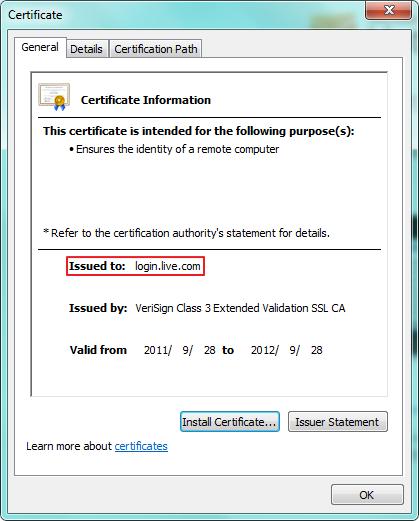
When visiting Hotmail, it redirects to login.live.com. At this time, there is a small padlock in the IE browser. Click that small padlock and then click "View Certificate" to see the certificate window shown above. Here we can see that this certificate has only one purpose - to prove identity information to a remote computer. Certificates have many uses, and SSL is just one of them. In the "Issued to" field is the domain name bound when the certificate was applied for; the "Issued by" below is the certificate issuer. The two dates at the bottom are the certificate application time and expiration time. Here we can pay attention to the information in "Issued by". It contains the words "Extended Validation SSL", indicating that this certificate is an EV SSL certificate (Extended Validation SSL certificate). EV SSL certificates have a feature: they can make the browser's address bar turn green and display the name of the company to which the certificate belongs, as shown below:

Compared with other certificates, EV SSL certificates are more expensive.
The above describes the situation of applying for certificates from CA organizations. If a personal website only needs encrypted transmission, it can also make its own SSL certificate. A self-made certificate will not be trusted by the browser, and a warning will be given when accessing because certificate verification fails.
Certificate Verification Process
Certificates are organized in the form of a certificate chain. When issuing a certificate, there must first be a root certificate issued by a root CA, then the root CA issues an intermediate CA certificate, and finally the intermediate CA issues the specific SSL certificate. We can understand it this way: a root CA is like a company, and the root certificate is its identity credential. Each company has different departments that issue certificates for different purposes. These different departments are the intermediate CAs, and they use intermediate certificates as their identity credentials. One of the departments is specifically responsible for issuing SSL certificates. When the root certificate, the intermediate certificate, and the finally requested SSL certificate are linked together, they form a certificate chain, also called a certificate path. When verifying a certificate, the browser calls the system's certificate manager interface to verify all certificates in the certificate path level by level. Only if all certificates in the path are trusted will the overall verification result be trusted. Let us still use the login.live.com certificate as an example. When viewing the certificate, click the "Certificate Path" tab and the display will be as shown below:
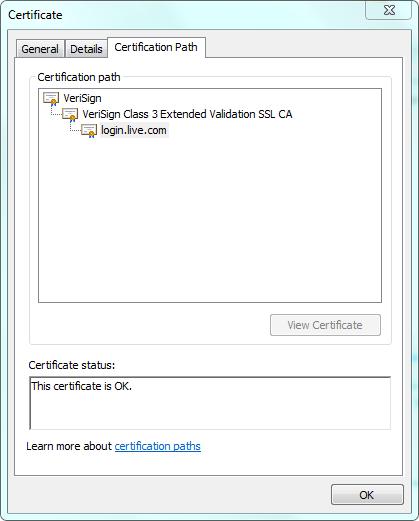
The root certificate is the most critical certificate. If the root certificate is not trusted, then all certificates issued under it are not trusted. During installation, the operating system installs some trusted CA root certificates by default. You can run "certmgr.msc" in the "Run" dialog to start the Certificate Manager, as shown below:
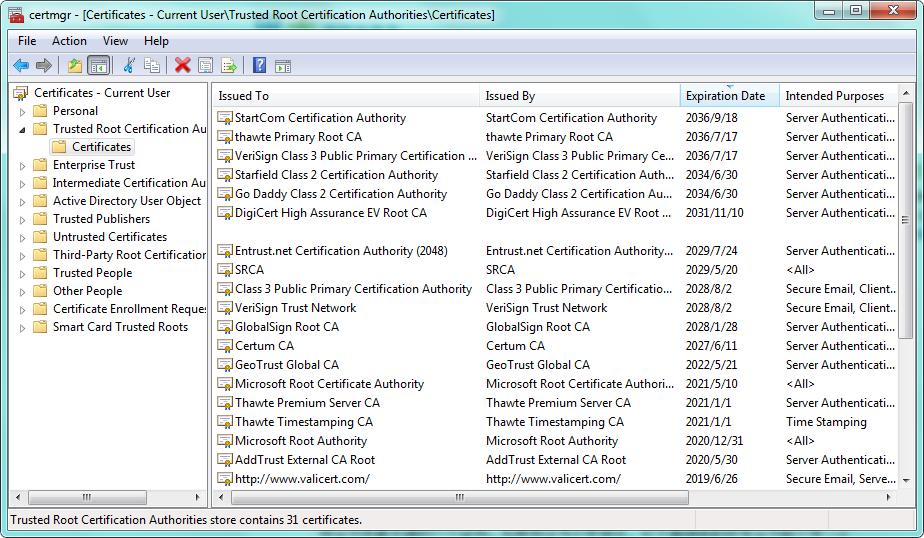
Root certificates have a long validity period and support many uses, making it convenient to issue intermediate certificates of different purpose types. Intermediate certificates have a single purpose and a relatively shorter validity period, but much longer than specific SSL certificates.
If SSL certificate verification fails, different browsers will show the following error messages:
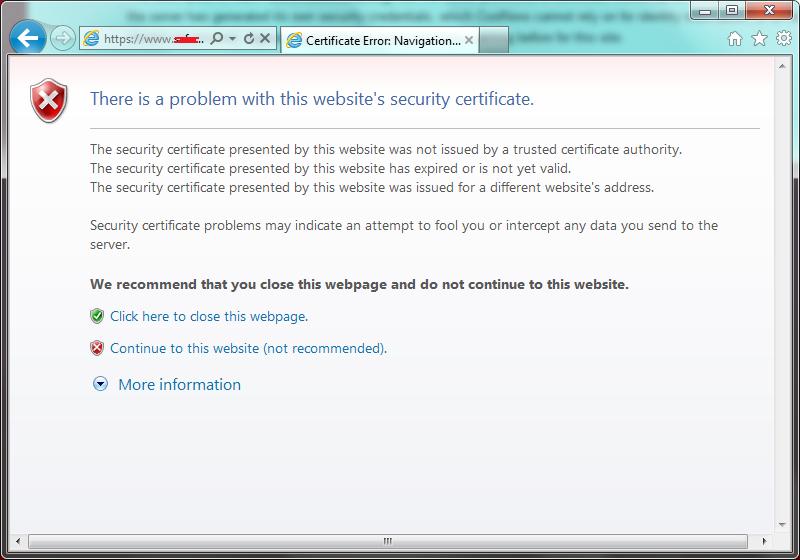
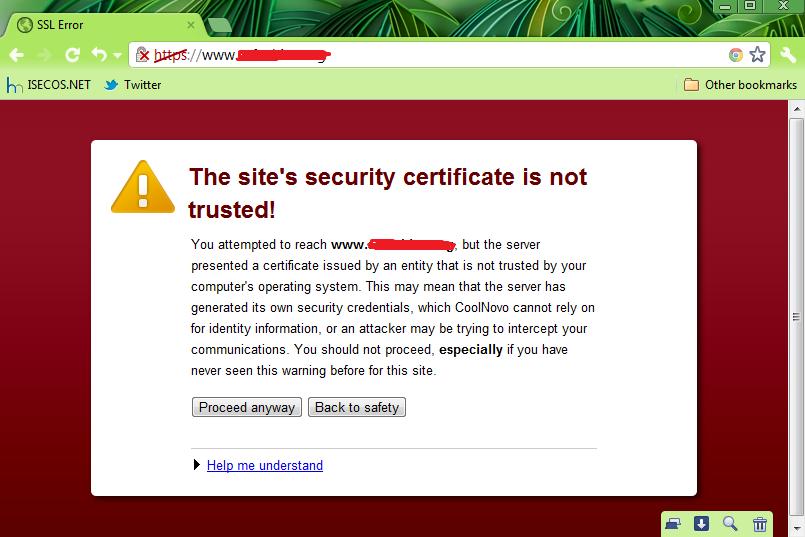
There are three reasons for SSL certificate verification failure:
- 1. The SSL certificate was not issued by a trusted CA.
- 2. The certificate has expired.
- 3. The domain name of the website being accessed does not match the domain name bound to the certificate.
These three reasons are also the prompts given by IE browsers.
Tip: If you particularly hate a root CA, you can delete its root certificate, and then all certificates issued by it will not be trusted.
Security Issues with SSL Certificates
The most common attack method against HTTPS is SSL certificate spoofing, also called SSL hijacking, which is a typical man-in-the-middle attack. However, SSL hijacking is not only used for attack purposes. In some special cases, we can use SSL hijacking to access the network more smoothly. I will mention this later.
If you do not pay attention to the browser's security warnings, it is easy to fall victim to SSL hijacking used for attack purposes. When a man-in-the-middle in the network launches an SSL hijacking attack, the attacker needs to forge an SSL certificate and send it to the browser. At this point, because the forged SSL certificate is not trusted, the browser will give a warning.
There is a misconception here. When an SSL certificate is not trusted, it does not necessarily mean SSL hijacking is occurring. One exception is that some personal websites cannot afford legitimate SSL certificates, so they create their own SSL certificates to encrypt transmitted data. If you frequently visit a personal website and you know what the website is for, then you do not need to worry about this situation. But if you are visiting online banking, online payment, or corporate websites such as hotmail.com, gmail.com, etc., such websites will definitely apply for legitimate SSL certificates (except 12306.cn). Once the SSL certificate is not trusted, you should decisively stop visiting. At this time, there must be abnormal behavior in the network, and community broadband users should pay special attention to this.
Therefore, as an individual user, you must know what website you are visiting. If you are just an ordinary Internet user without much computer knowledge, I believe you will not often visit those personal websites that create their own SSL certificates (except 12306.cn). Therefore, if you cannot determine whether the network is abnormal, as long as there is a problem with the certificate, simply stop visiting.
Tip: For 12306.cn, be sure to follow what the website says: "To ensure smooth ticket purchasing, please download and install the root certificate."
Finally, let us summarize the issues to pay attention to when using SSL certificates:
- 1. Unless necessary, do not install root certificates casually. When installing a root certificate, be sure to clarify the source of the certificate.
- 2. For websites such as online banking, online payment, and important email, be sure that the SSL certificate is free of problems. If the browser gives an SSL certificate error warning, you must refuse to visit. Some community broadband users should pay special attention to this.
- 3. Since it is now relatively cheap for individuals to apply for SSL certificates, be sure to watch out for phishing websites that carry legitimate SSL certificates (more common abroad). For phishing websites, be sure to check the domain name carefully. Also, do not believe any lottery or prize messages, and install security software with phishing protection.