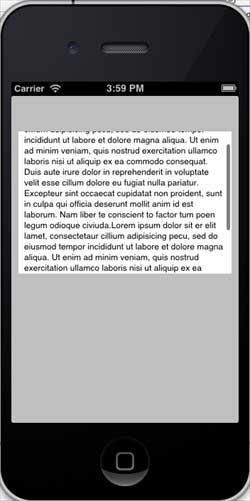
iOSテキストビューの使用
テキストビューは、複数行にわたってスクロールするテキストを表示するために使用されます。
重要な属性
- dataDetectorTypes
- delegate
- editable
- inputAccessoryView
- inputView
- text
- textAlignment
- textColor
重要なデリゲートメソッド
-(void)textViewDidBeginEditing:(UITextView *)textView
-(void)textViewDidEndEditing:(UITextView *)textView
-(void)textViewDidChange:(UITextView *)textView
-(BOOL)textViewShouldEndEditing:(UITextView *)textView
カスタムメソッド addTextView を追加
-(void)addTextView{
    myTextView = [[UITextView alloc]initWithFrame:
    CGRectMake(10, 50, 300, 200)];
    [myTextView setText:@"Lorem ipsum dolor sit er elit lamet, consectetaur
    cillium adipisicing pecu, sed do eiusmod tempor incididunt ut labore et
    dolore magna aliqua. Ut enim ad minim veniam, quis nostrud exercitation
    ullamco laboris nisi ut aliquip ex ea commodo consequat. Duis aute irure
    dolor in reprehenderit in voluptate velit esse cillum dolore eu fugiat
    nulla pariatur. Excepteur sint occaecat cupidatat non proident, sunt in
    culpa qui officia deserunt mollit anim id est laborum. Nam liber te
    conscient to factor tum poen legum odioque civiuda.
    Lorem ipsum dolor sit er elit lamet, consectetaur cillium adipisicing
    pecu, sed do eiusmod tempor incididunt ut labore et dolore magna aiqua.
    Ut enim ad minim veniam, quis nostrud exercitation ullamco laboris nisi
    aliquip ex ea commodo consequat. Duis aute irure dolor in reprehenderit
    in voluptate velit esse cillum dolore eu fugiat nulla pariatur.
    Excepteur sint occaecat cupidatat non proident, sunt in culpa
    qui officia deserunt mollit anim id est laborum. Nam liber te conscient
    to factor tum poen legum odioque civiuda."];
    myTextView.delegate = self;
    [self.view addSubview:myTextView];

}
ViewController.m での textView デリゲートの実装
#pragma mark - Text View delegates

-(BOOL)textView:(UITextView *)textView shouldChangeTextInRange:
 (NSRange)range replacementText:(NSString *)text{
    if ([text isEqualToString:@"\n"]) {
        [textView resignFirstResponder];
    }
    return YES;
}
-(void)textViewDidBeginEditing:(UITextView *)textView{
    NSLog(@"Did begin editing");
}
-(void)textViewDidChange:(UITextView *)textView{
    NSLog(@"Did Change");

}
-(void)textViewDidEndEditing:(UITextView *)textView{
    NSLog(@"Did End editing");

}
-(BOOL)textViewShouldEndEditing:(UITextView *)textView{
    [textView resignFirstResponder];
    return YES;
}
ViewController.m の viewDidLoad メソッドを次のように変更します
(void)viewDidLoad
{
   [super viewDidLoad];
   [self addTextView];
}
結果出力
それでは、このアプリケーションを実行すると、以下の出力が表示されます。