CSS linear-gradient() function
Example
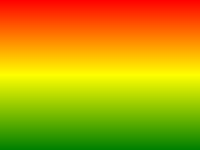
The following example demonstrates a linear gradient starting from the top, beginning with red, turning to yellow, and then to blue:
Try it Yourself »
Definition and usage
The linear-gradient() function is used to create an image representing a linear gradient of two or more colors.
To create a linear gradient, you need to specify two colors. You can also achieve gradient effects in different directions (specified as an angle). If no direction is specified, the gradient defaults from top to bottom.
CSS online gradient color generator:https://www.jyshare.com/front-end/9921/。
Linear Gradient Examples
Supported version: CSS3
Browser Support
The numbers in the table indicate the first browser version that supports the function.
The numbers specified with "webkit", "moz", or "o" indicate the first version number prefix that supports the function.
| Function | |||||
|---|---|---|---|---|---|
| linear-gradient() | 26.0 10.0 -webkit- |
10.0 | 16.0 3.6 -moz- |
6.1 5.1 -webkit- |
12.1 11.1 -o- |
CSS Syntax
background-image: linear-gradient(direction, color-stop1, color-stop2, ...);
| Value | Description |
|---|---|
| direction | Use an angle value to specify the direction (or angle) of the gradient. |
| color-stop1, color-stop2,... | Used to specify the start and end colors of the gradient. |
More Examples
Example
The following example demonstrates a linear gradient starting from the left, beginning with red and turning to yellow:
Try it Yourself »
Example
The following example demonstrates a linear gradient from the top-left corner to the bottom-right corner:
Try it Yourself »
Example
The following example demonstrates a linear gradient with a specified angle:
Try it Yourself »
Example
The following examples demonstrate multiple color stops:
Try it Yourself »
Example
The following examples use transparency:
Try it Yourself »
CSS Tutorial:CSS3 Gradients
other extensions