CSS padding (fill)
CSS padding is a shorthand property that defines the space between an element's border and its content, i.e., the padding on the top, right, bottom, and left sides.
padding (fill)
When an element's padding is cleared, the released area will be filled with the element's background color.
Using the padding property alone can change the padding on all four sides.
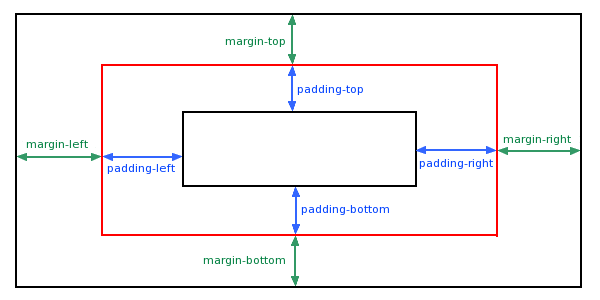
possible values
| Value | Description |
|---|---|
| length | Defines a fixed padding (pixels, pt, em, etc.) |
| % | Define a padding using percentage values |
Padding - single-side padding properties
In CSS, it can specify different padding for different sides:
Example
padding-bottom:25px;
padding-right:50px;
padding-left:50px;
Try it Yourself »
- Top padding is 25px
- Right padding is 50px
- Bottom padding is 25px
- Left padding is 50px
Padding - shorthand properties
To shorten the code, it can specify all padding properties in one property.
This is called a shorthand property. The shorthand property for all padding properties is:padding :
The padding property can have one to four values.
padding:25px 50px 75px 100px;
- Top padding is 25px
- Right padding is 50px
- Bottom padding is 75px
- Left padding is 100px
padding:25px 50px 75px;
- Top padding is 25px
- Left and right padding are 50px
- Bottom padding is 75px
padding:25px 50px;
- Top and bottom padding are 25px
- Left and right padding are 50px
padding:25px;
- All padding is 25px

More Examples
All padding properties in one declaration
This example demonstrates how to use the shorthand property to set all padding properties in one declaration, which can have one to four values.
Set left padding
This example demonstrates how to set the left padding of an element.
Set right padding
This example demonstrates how to set the right padding of an element.
Set top padding
This example demonstrates how to set the top padding of an element.
Set bottom padding
This example demonstrates how to set the bottom padding of an element.
All CSS padding properties
| Property | Description |
|---|---|
| padding | Use the shorthand property to set all padding properties in one declaration. |
| padding-bottom | Set the bottom padding of the element. |
| padding-left | Sets the left padding of an element |
| padding-right | Sets the right padding of an element |
| padding-top | Set the top padding of the element. |