Python Chinese Encoding
In the previous chapters, we have learned how to use Python to output"Hello, World!"English is no problem, but if you output Chinese characters"Hello, world"you may encounter Chinese encoding problems.
If the encoding is not specified in a Python file, an error will be reported during execution:
#!/usr/bin/python

print ("你好,世界")
The output of the above program execution is:
  File "test.py", line 2
SyntaxError: Non-ASCII character '\xe4' in file test.py on line 2, but no encoding declared; see http://www.python.org/peps/pep-0263.html for details
The default encoding format in Python is ASCII. Without changing the encoding format, Chinese characters cannot be printed correctly, so an error is reported when reading Chinese.
The solution is to simply add at the beginning of the file# -*- coding: UTF-8 -*-or# coding=utf-8and that's it.
Note:# coding=utf-8of=Do not add spaces on either side of the # sign.
Examples (Python 2.0+)
Run Example »
The output result is:
Hello, world
Therefore, if your code contains Chinese while you are learning, you need to specify the encoding at the top.
Other extensionsNote:Python 3.x source files use UTF-8 encoding by default, so Chinese can be parsed normally without specifying UTF-8 encoding.
Note:If you use an editor, you also need to set the storage format of the py file to UTF-8, otherwise you will get an error message similar to the following:
SyntaxError: (unicode error) ‘utf-8’ codec can’t decode byte 0xc4 in position 0:
invalid continuation byte
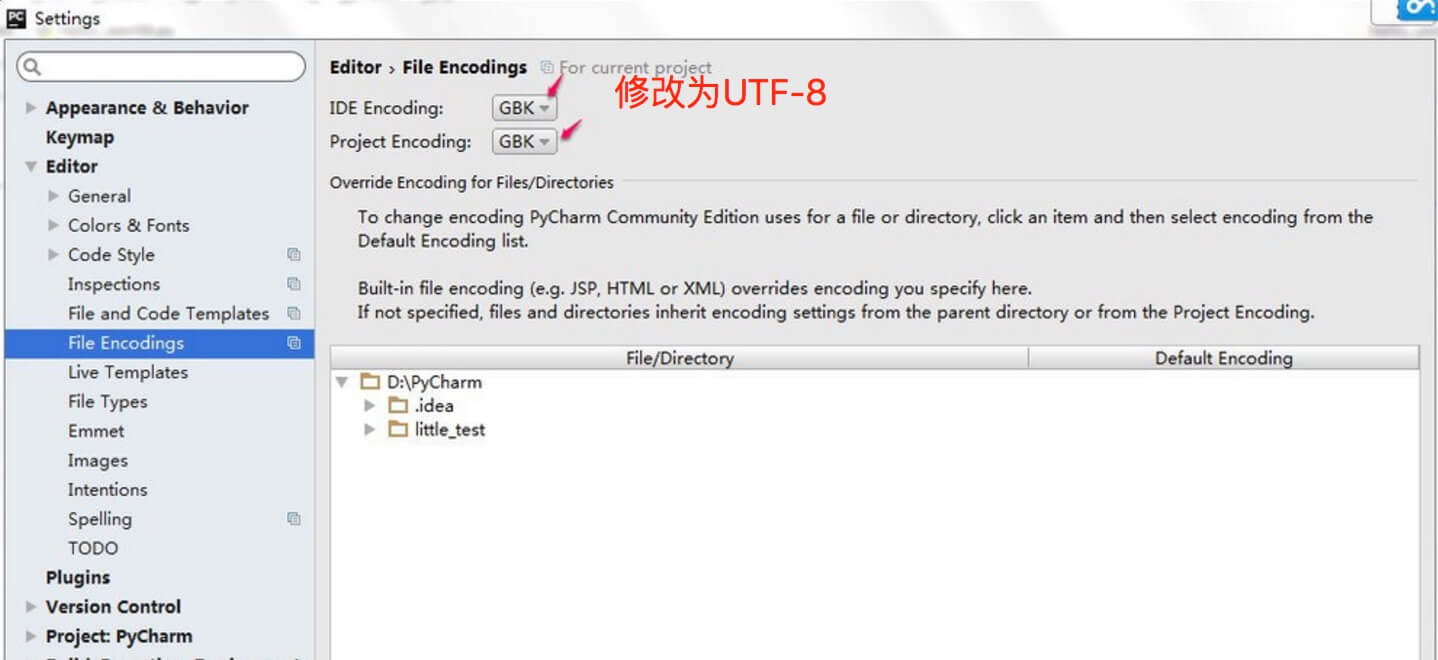
PyCharm setup steps:
- Go tofile > Settingssearch in the input boxencoding。
- findEditor > File encodingssetIDE EncodingandProject Encodingto UTF-8.