Uso de los selectores
El selector es una vista desplazable que se utiliza para seleccionar valores de una lista de elementos.
Propiedades importantes
- delegate
- dataSource
Métodos importantes
- (void)reloadAllComponents
- (void)reloadComponent:(NSInteger)component
- (NSInteger)selectedRowInComponent:(NSInteger)component
- (void)selectRow:(NSInteger)row inComponent:(NSInteger)component
  animated:(BOOL)animated
Modificar ViewController.h
Agregaremos un campo de texto, una vista de selector y un array.
Adoptaremos los protocolos UITextFieldDelegate, UIPickerViewDataSource y UIPickerViewDelegate. El código del archivo ViewController.h se muestra a continuación:
#import <UIKit/UIKit.h>

@interface ViewController : UIViewController
<UITextFieldDelegate,UIPickerViewDataSource,UIPickerViewDelegate>
{

    UITextField *myTextField;
    UIPickerView *myPickerView;
    NSArray *pickerArray;
}
@end
Agregar el método personalizado addPickerView
-(void)addPickerView{
    pickerArray = [[NSArray alloc]initWithObjects:@"Chess",
    @"Cricket",@"Football",@"Tennis",@"Volleyball", nil];
    myTextField = [[UITextField alloc]initWithFrame:
    CGRectMake(10, 100, 300, 30)];
    myTextField.borderStyle = UITextBorderStyleRoundedRect;
    myTextField.textAlignment = UITextAlignmentCenter;
    myTextField.delegate = self;
    [self.view addSubview:myTextField];
    [myTextField setPlaceholder:@"Pick a Sport"];
    myPickerView = [[UIPickerView alloc]init];
    myPickerView.dataSource = self;
    myPickerView.delegate = self;
    myPickerView.showsSelectionIndicator = YES;
    UIBarButtonItem *doneButton = [[UIBarButtonItem alloc]
    initWithTitle:@"Done" style:UIBarButtonItemStyleDone
    target:self action:@selector(done:)];
    UIToolbar *toolBar = [[UIToolbar alloc]initWithFrame:
    CGRectMake(0, self.view.frame.size.height-
    myPickerView.frame.size.height-50, 320, 50)];
    [toolBar setBarStyle:UIBarStyleBlackOpaque];
    NSArray *toolbarItems = [NSArray arrayWithObjects:
    doneButton, nil];
    [toolBar setItems:toolbarItems];
    myTextField.inputView = myPickerView;
    myTextField.inputAccessoryView = toolBar;

}
Implementar el delegado, como se muestra a continuación:
#pragma mark - Text field delegates

-(void)textFieldDidBeginEditing:(UITextField *)textField{
    if ([textField.text isEqualToString:@""]) {
        [self dateChanged:nil];
    }
}
#pragma mark - Picker View Data source
-(NSInteger)numberOfComponentsInPickerView:(UIPickerView *)pickerView{
    return 1;
}
-(NSInteger)pickerView:(UIPickerView *)pickerView
 numberOfRowsInComponent:(NSInteger)component{
    return [pickerArray count];
}

#pragma mark- Picker View Delegate

-(void)pickerView:(UIPickerView *)pickerView didSelectRow:
 (NSInteger)row inComponent:(NSInteger)component{
    [myTextField setText:[pickerArray objectAtIndex:row]];
}
- (NSString *)pickerView:(UIPickerView *)pickerView titleForRow:
  (NSInteger)row forComponent:(NSInteger)component{
    return [pickerArray objectAtIndex:row];
}
En ViewController.m, modifique viewDidLoad de la siguiente manera:
(void)viewDidLoad
{
   [super viewDidLoad];
   [self addPickerView];
}
Salida
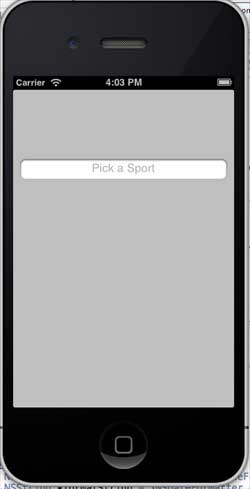
Ahora, cuando ejecutemos la aplicación, veremos la siguiente salida:
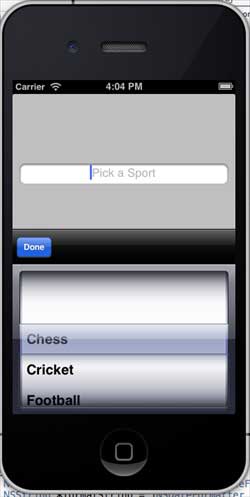
La vista del selector de texto se muestra a continuación; podemos elegir el valor que necesitemos: