C++ Multidimensional arrays
C++ supports multidimensional arrays. The general form of declaring a multidimensional array is as follows:
type name[size1][size2]...[sizeN];
For example, the following declaration creates a three-dimensional 5 x 10 x 4 integer array:
int threedim[5][10][4];
Two-dimensional array
The simplest form of a multidimensional array is the two-dimensional array. A two-dimensional array is, in essence, a list of one-dimensional arrays. To declare a two-dimensional integer array with x rows and y columns, the form is as follows:
type arrayName [ x ][ y ];
where,typetype can be any valid C++ data type,arrayNameand arrayName is a valid C++ identifier.
A two-dimensional array can be thought of as a table with x rows and y columns. Below is a two-dimensional array with 3 rows and 4 columns:
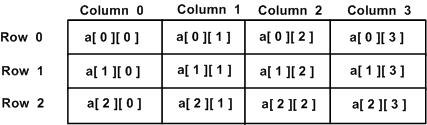
Therefore, each element in the array is identified by an element name of the form a[ i , j ], where a is the array name, and i and j are the subscripts that uniquely identify each element in a.
Initialize two-dimensional array
Multidimensional arrays can be initialized by specifying values for each row within braces. Below is an array with 3 rows and 4 columns.
int a[3][4] = {
 {0, 1, 2, 3} ,   /*  初始化索引号为 0 的行 */
 {4, 5, 6, 7} ,   /*  初始化索引号为 1 的行 */
 {8, 9, 10, 11}   /*  初始化索引号为 2 的行 */
};
The inner nested braces are optional, and the following initialization is equivalent to the one above:
int a[3][4] = {0,1,2,3,4,5,6,7,8,9,10,11};
Accessing Two-Dimensional Array Elements
Elements in a two-dimensional array are accessed by using subscripts (that is, the row index and column index of the array). For example:
int val = a[2][3];
The above statement will retrieve the element in the 3rd row and 4th column of the array. You can verify this using the diagram above. Let's look at the following program, where we will use nested loops to handle a two-dimensional array:
Example
When the above code is compiled and executed, it will produce the following results:
a[0][0]: 0
a[0][1]: 0
a[1][0]: 1
a[1][1]: 2
a[2][0]: 2
a[2][1]: 4
a[3][0]: 3
a[3][1]: 6
a[4][0]: 4
a[4][1]: 8
As mentioned above, you can create arrays of any dimension, but in general, the arrays we create are one-dimensional and two-dimensional arrays.
other extensions