C++ Loops
Sometimes, it may be necessary to execute the same block of code multiple times. In general, statements are executed sequentially: the first statement in a function executes first, then the second, and so on.
Programming languages provide various control structures that allow more complex execution paths.
Loop statements allow us to execute a statement or a group of statements multiple times. The following is the general form of a loop statement in most programming languages:
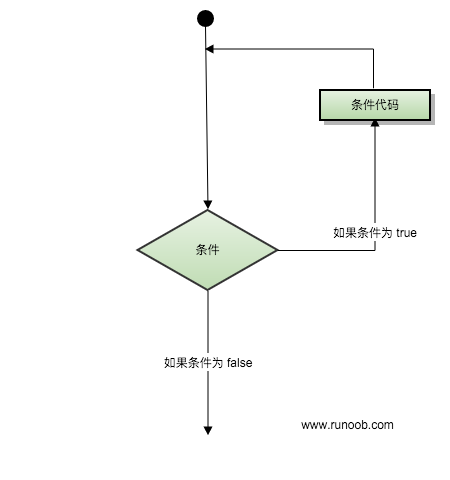
Loop Types
The C++ programming language provides the following types of loops. Click the links to view details of each type.
| Loop Types | Description |
|---|---|
| while loop | Repeats a statement or group of statements while a given condition is true. It tests the condition before executing the loop body. |
| for Loop | Executes a sequence of statements multiple times, and simplifies the code that manages the loop variable. |
| do...while loop | Similar to a while statement, except that it tests the condition at the end of the loop body. |
| Nested Loops | You can use one or more loops inside a while, for, or do..while loop. |
Loop control statements
Loop control statements change the normal sequence of execution. When execution leaves a scope, all automatic objects created in that scope are destroyed.
C++ provides the following control statements. Click the links to view details of each statement.
| Control Statements | Description |
|---|---|
| break Statement | TerminatelooporswitchThe statement causes program flow to continue with the next statement immediately following the loop or switch. |
| continue Statement | Causes the loop to skip the remainder of its body and immediately retest its condition. |
| goto Statement | Transfers control to a labeled statement. However, the use of the goto statement is not recommended in programs. |
Infinite Loop
If the condition is never false, the loop becomes an infinite loop.forA loop can be used to implement an infinite loop in the traditional sense. Since none of the three expressions that make up the loop is required, you can leave certain condition expressions blank to form an infinite loop.
Example
When the condition expression is absent, it is assumed to be true. You may also set an initial value and an increment expression, but in general, C++ programmers prefer to use the for(;;) construct to represent an infinite loop.
Note:You can terminate an infinite loop by pressing Ctrl + C.
other extensions