C++ goto Statement
gotoThe statement allows control to be unconditionally transferred to a labeled statement within the same function.
Note:In any programming language, the use of the goto statement is not recommended. Because it makes the control flow of the program difficult to track, making the program hard to understand and hard to modify. Any program that uses the goto statement can be rewritten in a way that does not require the goto statement.
Syntax
In C++goto Statement syntax:
goto label;
..
.
label: statement;
Here,labelIt is an identifier that identifies a labeled statement, and can be any plain text except C++ keywords. A labeled statement can be any statement, placed after the identifier and a colon (:).
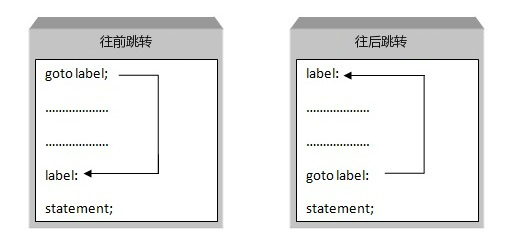
Flowchart

Example
Example
using namespace std;
int main ()
{
// Local variable declaration
int a = 10;
// do loop execution
LOOP:do
{
if( a == 15)
{
// skip iteration
a = a + 1;
goto LOOP;
}
cout << "value of a:" << a << endl;
a = a + 1;
}while( a < 20 );
return 0;
}
When the above code is compiled and executed, it produces the following results:
a 的值: 10
a 的值: 11
a 的值: 12
a 的值: 13
a 的值: 14
a 的值: 16
a 的值: 17
a 的值: 18
a 的值: 19
One good use of the goto statement is to exit deeply nested routines. For example, consider the following code snippet:
for(...) {
   for(...) {
      while(...) {
         if(...) goto stop;
         .
         .
         .
      }
   }
}
stop:
cout << "Error in program.\n";
EliminategotoIt will cause some additional tests to be executed. A simplebreakstatement won't work here, because it will only cause the program to exit the innermost loop.
other extensions