キーワード:if、セレクタ
条件文
条件(if)文は、条件の判定結果に応じて実行文を実行するかどうかを制御するものです。
条件文はキーワード if と else で宣言され、条件式は丸括弧内に記述する必要があります。
条件文の構造は以下のとおりです:
if (condition1)       true_statement1 ;
else if (condition2)        true_statement2 ;
else if (condition3)        true_statement3 ;
else                      default_statement ;
- if 文が実行されるとき、condition1 が真であれば true_statement1 が実行されます。condition1 が偽で condition2 が真であれば true_statement2 が実行されます。以降も同様です。
- else if と else の構造は省略できます。つまり、1つの if 条件判断と1組の実行文 ture_statement1 だけで実行プロセスを構成できます。
- else if は複数重ねて使用でき、1つや2つに限りません。
- ture_statement1 などの実行文は、1つの文でも複数の文でも構いません。複数の実行文の場合は、begin と end キーワードを使用して指定する必要があります。
次のコードは4入力セレクタの機能を実装しています。
例
module mux4to1(
input [1:0] sel ,
input [1:0] p0 ,
input [1:0] p1 ,
input [1:0] p2 ,
input [1:0] p3 ,
output [1:0] sout);
reg [1:0] sout_t ;
always @(*) begin
if (sel == 2'b00)
sout_t = p0 ;
else if (sel == 2'b01)
sout_t = p1 ;
else if (sel == 2'b10)
sout_t = p2 ;
else
sout_t = p3 ;
end
assign sout = sout_t ;
endmodule
input [1:0] sel ,
input [1:0] p0 ,
input [1:0] p1 ,
input [1:0] p2 ,
input [1:0] p3 ,
output [1:0] sout);
reg [1:0] sout_t ;
always @(*) begin
if (sel == 2'b00)
sout_t = p0 ;
else if (sel == 2'b01)
sout_t = p1 ;
else if (sel == 2'b10)
sout_t = p2 ;
else
sout_t = p3 ;
end
assign sout = sout_t ;
endmodule
testbench のコードは次のとおりです:
例
`timescale 1ns/1ns
module test ;
reg [1:0] sel ;
wire [1:0] sout ;
initial begin
sel = 0 ;
#10 sel = 3 ;
#10 sel = 1 ;
#10 sel = 0 ;
#10 sel = 2 ;
end
mux4to1 u_mux4to1 (
.sel (sel),
.p0 (2'b00), //path0 are assigned to 0
.p1 (2'b01), //path1 are assigned to 1
.p2 (2'b10), //path2 are assigned to 2
.p3 (2'b11), //path3 are assigned to 3
.sout (sout));
//finish the simulation
always begin
#100;
if ($time >= 1000) $finish ;
end
endmodule
module test ;
reg [1:0] sel ;
wire [1:0] sout ;
initial begin
sel = 0 ;
#10 sel = 3 ;
#10 sel = 1 ;
#10 sel = 0 ;
#10 sel = 2 ;
end
mux4to1 u_mux4to1 (
.sel (sel),
.p0 (2'b00), //path0 are assigned to 0
.p1 (2'b01), //path1 are assigned to 1
.p2 (2'b10), //path2 are assigned to 2
.p3 (2'b11), //path3 are assigned to 3
.sout (sout));
//finish the simulation
always begin
#100;
if ($time >= 1000) $finish ;
end
endmodule
シミュレーション結果は以下のとおりです。
図から分かるように、出力信号は選択信号および入力信号の状態と一致しています。
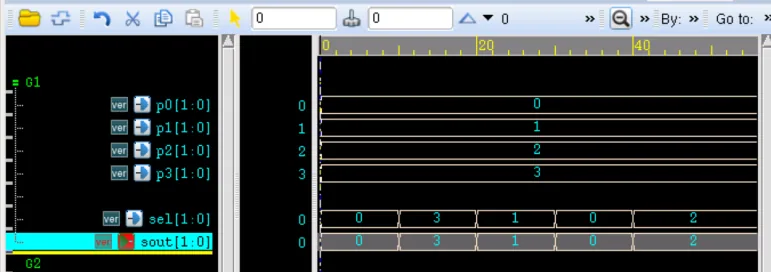
この例では、if 条件ごとに実行される文は1つだけなので、begin と end キーワードは使用されていません。ただし、if-if-else の形式では、実行文が1つだけでも、begin と end キーワードを使用しないと曖昧さが生じます。
例えば次のコードでは、フォーマット上は区別されていますが、else がどの if 条件に対応するかは曖昧です。
例
if(en)
if(sel == 2'b1)
sout = p1s ;
else
sout = p0 ;
if(sel == 2'b1)
sout = p1s ;
else
sout = p0 ;
もちろん、コンパイラは通常「最も近い」原則に従って、else を最も近い if(この例では2番目の if)に対応させます。
しかし、このような書き方は明らかに不規則で安全ではありません。
したがって、条件文に begin と end キーワードを追加することは良い習慣です。
例えば、上記のコードを少し修正すれば、記述上の曖昧さはもうありません。
例
if(en) begin
if(sel == 2'b1) begin
sout = p1s ;
end
else begin
sout = p0 ;
end
end
if(sel == 2'b1) begin
sout = p1s ;
end
else begin
sout = p0 ;
end
end
ソースコードのダウンロード
Download