Git Flow
Git Flow is a Git-based branching model designed to help teams better manage and release software.
Git Flow was proposed by Vincent Driessen in 2010, and through a set of standard branch naming and workflows, it makes the development, testing, and release processes more orderly and efficient.
Git Flow mainly consists of the following types of branches:master、develop、feature、release、hotfix。
Git Flow Installation
Linux
Debian/Ubuntu:
sudo apt-get install git-flow
Fedora:
sudo dnf install gitflow
sudo apt-get install git-flow
macOS
On macOS, you can use Homebrew to install Git Flow:brew install git-flow
Source installation
If Git Flow is not available in your distribution's package manager, you can also install it from source code:
git clone https://github.com/nvie/gitflow.git
cd gitflow
sudo make install
After installation, you can verify whether Git Flow was successfully installed with the following command:
git flow version
Windows
On Windows, you can install Git Flow in the following ways:
-
Use Git for Windows: Git for Windows includes Git Flow. You canGit for WindowsInstall Git, and then use Git Bash to use Git Flow.
-
Using Scoop: If you use the Scoop package manager, you can install Git Flow with the following command:
scoop install git-flow
-
Using Chocolatey: If you use the Chocolatey package manager, you can install Git Flow with the following command:
choco install gitflow
Git Flow branching model
masterbranch:
- Always maintain a stable and releasable state.
- Every time a new version is released, it will be from
developMerge branch intomasterBranch.
developbranch:
- Used to integrate all development branches.
- Represents the latest development progress.
- Feature branches, release branches, and hotfix branches all branch out from here and eventually merge back here.
featurebranch:
- Used to develop new features.
- from
developBranch creation, merge back after development is completedevelopBranch. - Naming conventions:
feature/feature-name。
releasebranch:
- Used to prepare new version releases.
- from
developThe branch is created, final testing and fixing are performed, and then it is merged back todevelopandmasterBranch, and tag with a version. - Naming conventions:
release/release-name。
hotfixbranch:
- Used to fix urgent issues.
- from
masterBranch creation, merge back after the fix is completemasteranddevelopBranch, and tag with a version. - Naming conventions:
hotfix/hotfix-name。
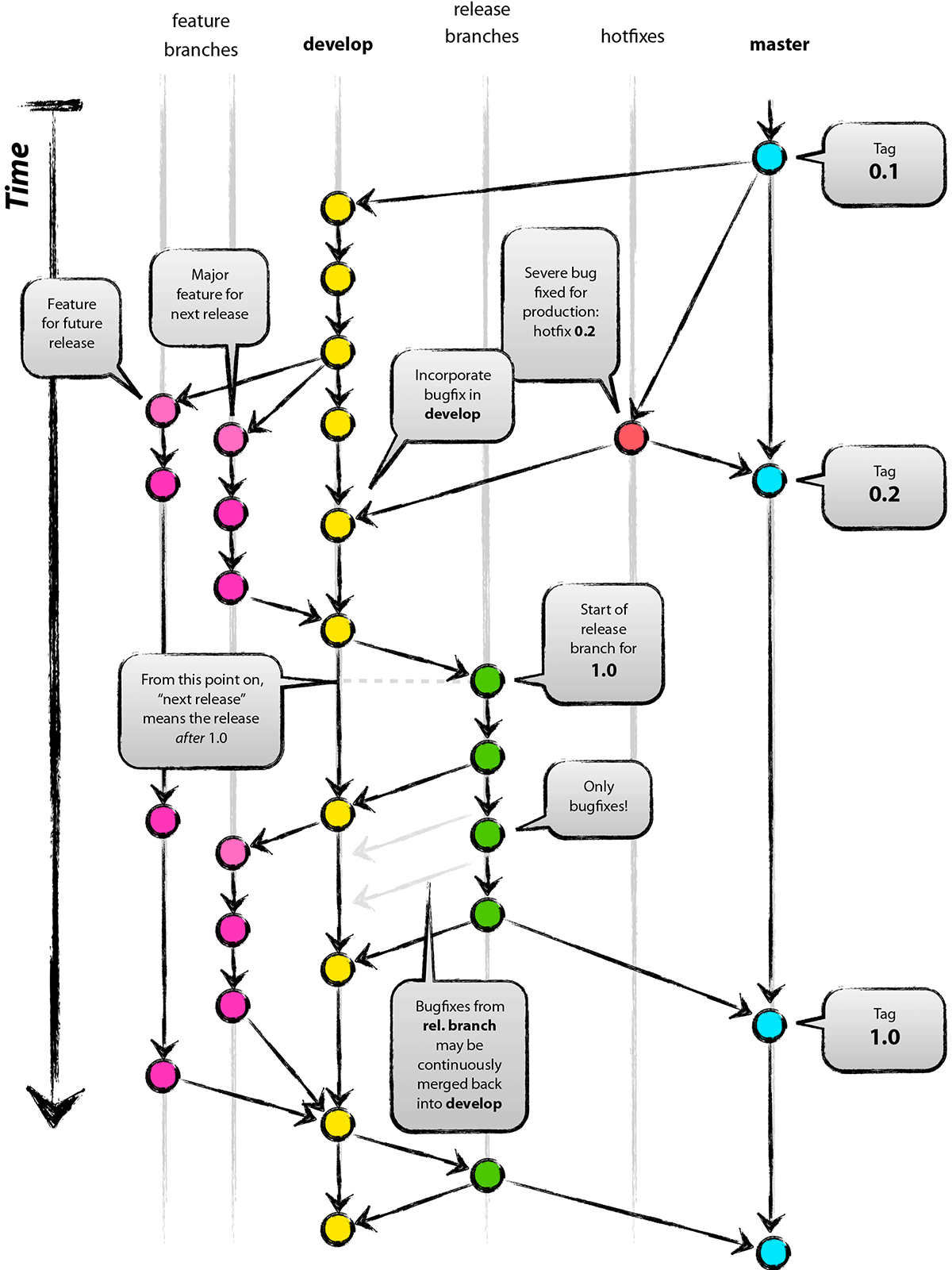
Principles of branch operations
- Each Commit on the Master branch should be tagged, and the Develop branch is created based on Master.
- After a Feature branch is completed, it is merged back into the Develop branch, and the branch is usually deleted.
- A Release branch is created based on Develop, used for testing and fixing bugs. After release, it is merged back into Master and Develop, and a Tag is created to mark the version number.
- The Hotfix branch is created based on Master. After completion, merge it back into Master and Develop, and tag it.1。
Git Flow command examples
- Start a Feature branch:
git flow feature start MYFEATURE - Finish a Feature branch:
git flow feature finish MYFEATURE - Start a Release branch:
git flow release start RELEASE [BASE] - Complete the Release branch: merge into Master and Develop, tag, delete the Release branch.
- Start a Hotfix branch:
git flow hotfix start HOTFIX [BASE] - Complete the Hotfix branch: merge into Master and Develop, tag, delete the Hotfix branch.
Git Flow workflow
1. Initialize Git Flow
First, initialize Git Flow in the project. You can use a Git Flow plugin (for examplegit-flow) to simplify operations.
git flow init
When initializing, you need to set branch naming rules and the default branch.
2. Create a feature branch
When starting to develop a new feature, from thedevelopbranch, create a feature branch.
git flow feature start feature-name
After development is complete, merge the feature branch back into thedevelopbranch, and delete the feature branch.
git flow feature finish feature-name
3. Create a release branch
When preparing to release a new version, from thedevelopbranch, create a release branch.
git flow release start release-name
Perform final tests and fixes on the release branch. Once ready for release, merge the release branch back todevelopandmasterBranch, and tag with a version.
git flow release finish release-name
4. Create a fix branch
When a problem requiring an urgent fix is found, frommasterbranch, create a fix branch.
git flow hotfix start hotfix-name
After the fix is complete, merge the fix branch back into themasteranddevelopbranch, and tag with a version.
git flow hotfix finish hotfix-name
ExampleOperation
The following is a comprehensive example of using Git Flow in practice.
Initialize Git Flow:
git flow init
Create and finish feature branches:
git flow feature start new-feature # 开发新功能
git flow feature finish new-feature
Create and finish release branches:
git flow release start v1.0.0 # 测试和修复
git flow release finish v1.0.0
Create and finish fix branches:
git flow hotfix start hotfix-1.0.1. # 修复紧急问题
git flow hotfix finish hotfix-1.0.1
Advantages and disadvantages
Advantages
- Clear branch model: Clear branch naming and usage rules make the development process well-organized.
- Isolate development and release: The separation of development and release processes reduces the impact of uncertainty in development on releases.
- Version management: Every release and fix is tagged with a version label, making it easy to trace and manage.
Disadvantages
- Complexity: For small teams or simple projects, Git Flow's branching model may seem overly complex.
- Frequent merging: In large teams, frequent branch merging may lead to an increase in merge conflicts.
Git Flow is a structured branching management model that helps teams better manage the software development and release process by defining clear branches and workflows. Although it adds some complexity, Git Flow provides strong support and management capabilities for large projects and team collaboration.
other extensions