Application web Maven
Dans ce chapitre, nous allons apprendre à utiliser le système de gestion de versions Maven pour gérer un projet web, et comment créer, compiler, déployer et exécuter une application web.
Créer une application web
Nous pouvons utiliser le plugin maven-archetype-webapp pour créer une simple application web Java.
Ouvrez la console de commande, entrez dans le dossier C:\MVN, puis exécutez la commande mvn suivante :
C:\MVN>mvn archetype:generate -DgroupId=com.companyname.automobile -DartifactId=trucks -DarchetypeArtifactId=maven-archetype-webapp -DinteractiveMode=false
Après l'exécution, Maven commencera le traitement et créera une structure de répertoires complète pour le projet web Java.
[INFO] Scanning for projects...
[INFO] Searching repository for plugin with prefix: 'archetype'.
[INFO] -------------------------------------------------------------------
[INFO] Building Maven Default Project
[INFO]    task-segment: [archetype:generate] (aggregator-style)
[INFO] -------------------------------------------------------------------
[INFO] Preparing archetype:generate
[INFO] No goals needed for project - skipping
[INFO] [archetype:generate {execution: default-cli}]
[INFO] Generating project in Batch mode
[INFO] --------------------------------------------------------------------
[INFO] Using following parameters for creating project
from Old (1.x) Archetype: maven-archetype-webapp:1.0
[INFO] --------------------------------------------------------------------
[INFO] Parameter: groupId, Value: com.companyname.automobile
[INFO] Parameter: packageName, Value: com.companyname.automobile
[INFO] Parameter: package, Value: com.companyname.automobile
[INFO] Parameter: artifactId, Value: trucks
[INFO] Parameter: basedir, Value: C:\MVN
[INFO] Parameter: version, Value: 1.0-SNAPSHOT
[INFO] project created from Old (1.x) Archetype in dir: C:\MVN\trucks
[INFO] -------------------------------------------------------------------
[INFO] BUILD SUCCESSFUL
[INFO] -------------------------------------------------------------------
[INFO] Total time: 16 seconds
[INFO] Finished at: Tue Jul 17 11:00:00 IST 2012
[INFO] Final Memory: 20M/89M
[INFO] -------------------------------------------------------------------
Après l'exécution, nous pouvons voir le projet trucks sous le dossier C:/MVN. Affichez la structure des répertoires du projet :
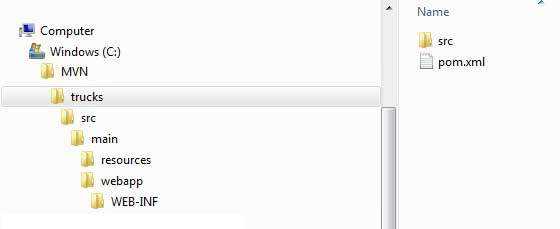
La structure de répertoires Maven est standard, et l'objectif de chaque répertoire est indiqué dans le tableau suivant :
| Structure des dossiers | Description |
|---|---|
| trucks | Contient le dossier src et le fichier pom.xml. |
| src/main/webapp | Contient le fichier index.jsp et le dossier WEB-INF. |
| src/main/webapp/WEB-INF | Contient le fichier web.xml |
| src/main/resources | Contient des fichiers de ressources images et properties. |
Le code du fichier pom.xml est le suivant :
Ensuite, ouvrez le dossier C:\ > MVN > trucks > src > main > webapp >, et vous pouvez voir un fichier index.jsp déjà créé, avec le code suivant :
Construire l'application Web
Ouvrez la console de commande, entrez dans le répertoire C:\MVN\trucks, puis exécutez la commande mvn suivante :
C:\MVN\trucks>mvn clean package
Maven va commencer à construire le projet :
[INFO] Scanning for projects...
[INFO] -------------------------------------------------------------------
[INFO] Building trucks Maven Webapp
[INFO]    task-segment: [clean, package]
[INFO] -------------------------------------------------------------------
[INFO] [clean:clean {execution: default-clean}]
[INFO] [resources:resources {execution: default-resources}]
[WARNING] Using platform encoding (Cp1252 actually) to
copy filtered resources,i.e. build is platform dependent!
[INFO] Copying 0 resource
[INFO] [compiler:compile {execution: default-compile}]
[INFO] No sources to compile
[INFO] [resources:testResources {execution: default-testResources}]
[WARNING] Using platform encoding (Cp1252 actually) to
copy filtered resources,i.e. build is platform dependent!
[INFO] skip non existing resourceDirectory
C:\MVN\trucks\src\test\resources
[INFO] [compiler:testCompile {execution: default-testCompile}]
[INFO] No sources to compile
[INFO] [surefire:test {execution: default-test}]
[INFO] No tests to run.
[INFO] [war:war {execution: default-war}]
[INFO] Packaging webapp
[INFO] Assembling webapp[trucks] in [C:\MVN\trucks\target\trucks]
[INFO] Processing war project
[INFO] Copying webapp resources[C:\MVN\trucks\src\main\webapp]
[INFO] Webapp assembled in[77 msecs]
[INFO] Building war: C:\MVN\trucks\target\trucks.war
[INFO] -------------------------------------------------------------------
[INFO] BUILD SUCCESSFUL
[INFO] -------------------------------------------------------------------
[INFO] Total time: 3 seconds
[INFO] Finished at: Tue Jul 17 11:22:45 IST 2012
[INFO] Final Memory: 11M/85M
[INFO] -------------------------------------------------------------------
Déployer l'application Web
Ouvrez le dossier C:\ < MVN < trucks < target <, trouvez le fichier trucks.war, copiez-le dans le répertoire d'application web de votre serveur web, puis redémarrez le serveur web.
Tester l'application Web
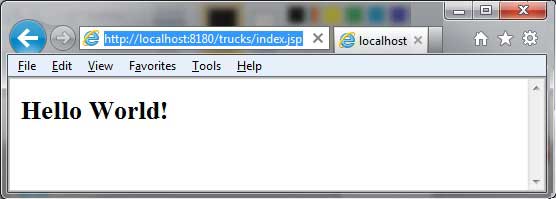
Accédez à l'URL suivante pour exécuter l'application web :
http://:/trucks/index.jsp
Vérifiez le résultat :