Command Pattern
Command Pattern is a data-driven design pattern that belongs to behavioral patterns.
The Command Pattern encapsulates a request as an object, thereby allowing you to parameterize clients with different requests, queue or log requests, and support undoable operations.
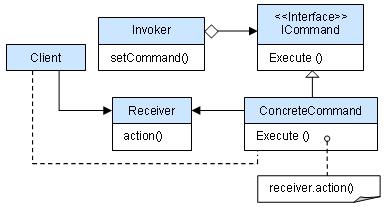
Command pattern structure diagram:
Introduction
intent
Encapsulate a request as an object, allowing users to parameterize clients with different requests.
Main problems addressed
- Solves the tight coupling problem between requesters and executors in software systems, especially in scenarios where behaviors need to be recorded, undone/redone, or transactionally processed.
Use Case
- When behaviors need to be recorded, undone/redone, or transactionally processed, use the Command Pattern to decouple requesters and executors.
Implementation Approach
- Define the command interface: The interface that all commands must implement.
- Create concrete commands: Concrete classes that implement the command interface, containing methods to execute requests.
- Caller: Holds command objects and triggers the execution of commands.
- receiver: The object that actually executes the command.
Key code
- Receiver: The actual object that executes the command.
- Command: The interface that defines command execution.
- Invoker: The entry point for using command objects.
Application example
- Struts 1ActionServlet serves as the Invoker, and the model layer classes serve as the concrete Commands.
Advantages
- Reduce Coupling: The coupling between requesters and executors is reduced.
- Easy to Extend: New commands can be easily added to the system.
Disadvantages
- Too Many Command Classes: The system may have too many concrete command classes, increasing system complexity.
Usage suggestions
- In a GUI, each button or menu item can be regarded as a command.
- Use the Command Pattern in scenarios where command-line operations need to be simulated.
Notes
- If the system needs to support command Undo and Redo operations, the Command Pattern is a suitable choice.
Structure
It mainly involves the following core roles:
Command:
- Defines the interface for executing operations, typically containing a
executeMethod, used to invoke specific operations.
- Defines the interface for executing operations, typically containing a
ConcreteCommand:
- Implements the command interface, responsible for executing specific operations. It usually contains a reference to the receiver, and accomplishes request handling by calling the receiver's methods.
Receiver:
- Knows how to execute operations related to the request; the object that actually executes the command.
Invoker:
- The object that sends commands; it contains a command object and can trigger the execution of the command. The invoker does not directly handle requests, but instead implements this by passing the request to the command object.
Client:
- Create concrete command objects and set their receivers, handing the command objects to the invoker for execution.
Implementation
We first create an interface as the commandOrder, then create the requestStockClass. Concrete command classBuyStockandSellStock, implementsOrderThe interface, which will perform the actual command processing. Create a class as the invoking object.Broker, which accepts an order and can place an order.
BrokerObjects use the Command Pattern, determining which object executes which command based on the type of command.CommandPatternDemoClass usageBrokerclass to demonstrate the command pattern.

Step 1
Create a command interface.
Order.java
Step 2
Create a request class.
Stock.java
Step 3
Create an ImplementationOrderConcrete implementation class of the interface.
BuyStock.java
SellStock.java
Step 4
Create a command invoker class.
Broker.java
Step 5
Use a Broker class to accept and execute commands.
CommandPatternDemo.java
Step 6
Run the program, output result:
Stock [ Name: ABC, Quantity: 10 ] bought
Stock [ Name: ABC, Quantity: 10 ] sold
other extensions