Abstract Factory Pattern
The Abstract Factory Pattern revolves around a super factory that creates other factories. This super factory is also called the factory of other factories. This type of design pattern belongs to the creational patterns, and it provides an optimal way to create objects.
In the abstract factory pattern, the interface is responsible for creating a factory of related objects without explicitly specifying their classes. Each generated factory can provide objects according to the factory pattern.
The abstract factory pattern provides an interface for creating a series of related or interdependent objects without specifying concrete implementation classes. By using the abstract factory pattern, the client can be decoupled from the creation process of concrete products, allowing the client to create a family of products through the factory interface.
summary
intent
Provide an interface for creating a series of related or interdependent objects without specifying their concrete classes.
Mainly Solves
The issue of interface selection.
Applicable scenarios
When the system needs to create multiple related or dependent objects without specifying concrete classes.
Solution
Multiple products are defined within a product family, and concrete factories implement the methods for creating these products.
Key code
Aggregate the creation methods of multiple similar products in one factory.
Application example
Suppose there are different types of wardrobes, each wardrobe (concrete factory) can only store one type of clothing (a complete set of concrete products), such as business wear, fashion wear, etc. Each set of clothes includes specific tops and pants (concrete products). All wardrobes are concrete implementations of the wardrobe class (abstract factory), and all tops and pants implement the top interface and pants interface (abstract products) respectively.
Advantages
- Ensure that objects from the same product family work together.
- The client does not need to know the concrete class of each object, simplifying the code.
Disadvantages
Extending the product family is very difficult. Adding a new product family requires modifying the code of the abstract factory and all concrete factories.
Use Case
- When QQ changes its skin, the entire set of skins is changed together.
- When creating cross-platform applications, generate programs for different operating systems.
Notes
It is relatively easy to add a new product family, but it is more difficult to add a new product hierarchy.
Structure
The Abstract Factory Pattern includes the following main roles:
- Abstract Factory: Declares a set of methods for creating product objects, each method corresponding to a product type. The abstract factory can be an interface or an abstract class.
- Concrete Factory: Implements the abstract factory interface and is responsible for creating instances of concrete product objects.
- Abstract Product: Defines a common interface or abstract class for a set of product objects, describing the public methods of the product objects.
- Concrete Product: Implements the abstract product interface, defining the specific behavior and attributes of the concrete product.
The abstract factory pattern usually involves a family of related products, and each concrete factory class is responsible for creating the concrete products in that family. The client creates product objects by using the abstract factory interface, without directly using the concrete product implementation classes.
Implementation
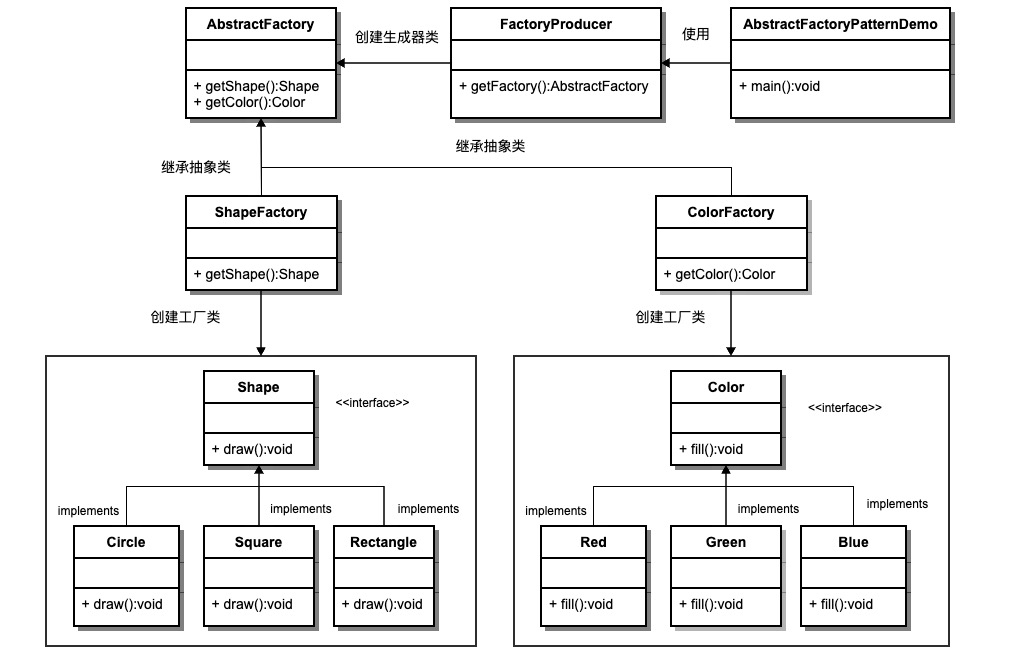
We will createShapeandColorInterfaces and entity classes that implement these interfaces. The next step is to create the abstract factory classAbstractFactory. Next, define the factory classes.ShapeFactoryandColorFactory, and these two factory classes both extendAbstractFactory. Then create a factory creator/generator classFactoryProducer。
AbstractFactoryPatternDemoClass usageFactoryProducerTo obtainAbstractFactoryobject. It will pass toAbstractFactoryPass shape informationShape(CIRCLE / RECTANGLE / SQUARE), so as to obtain the type of the object it needs. At the same time, it alsoAbstractFactoryPass color informationColor(RED / GREEN / BLUE), so as to obtain the type of the object it needs.
Step 1
Create an interface for shapes.
Shape.java
Step 2
Create concrete classes that implement the interface.
Rectangle.java
Rectangle.java
Square.java
Circle.java
Step 3
Create an interface for colors.
Color.java
Step 4
Create concrete classes that implement the interface.
Red.java
Green.java
Blue.java
Step 5
Create an abstract class to obtain factories for Color and Shape objects.
AbstractFactory.java
Step 6
Create factory classes that extend AbstractFactory, generating entity class objects based on the given information.
ShapeFactory.java
ColorFactory.java
Step 7
Create a factory creator/generator class to obtain factories by passing shape or color information.
FactoryProducer.java
Step 8
Use FactoryProducer to get AbstractFactory, and obtain entity class objects by passing type information.
AbstractFactoryPatternDemo.java
Step 9
Execute the program, output the result:
Inside Circle::draw() method.
Inside Rectangle::draw() method.
Inside Square::draw() method.
Inside Red::fill() method.
Inside Green::fill() method.
Inside Blue::fill() method.
other extensions