Adapter Pattern
The Adapter Pattern acts as a bridge between two incompatible interfaces and is a structural design pattern. Through an intermediary (adapter), it converts one class's interface into another interface expected by the client, enabling classes that originally could not work together to collaborate.
This pattern involves a single class that is responsible for joining independent or incompatible interface functionalities. A real-world example is a card reader, which acts as an adapter between a memory card and a laptop. You insert the memory card into the card reader, then insert the card reader into the laptop, so that the memory card can be read through the laptop.
Suppose there is an audio player that can only play MP3 files. Now, we need to play VLC and MP4 files. This can be achieved by creating an adapter:
- Target Interface: Define an audio player interface that can play files in multiple formats.
- Adaptee Class: The existing audio player can only play MP3 files.
- Adapter Class: Create a new class that implements the target interface, uses the adaptee class internally to play MP3 files, and adds support for VLC and MP4 files.
Overview
The Adapter Pattern is a software design pattern aimed at solving compatibility issues between different interfaces.
Purpose: Convert one class's interface into another interface, so that originally incompatible classes can work together.
Main problems solved: In a software system, it is necessary to put an existing object into a new environment, but the interface required by the new environment does not match the existing object.
Use Case
- An existing class needs to be used, but its interface does not meet the system requirements.
- Hope to create a reusable class that works with multiple unrelated classes (including classes that may be introduced in the future), which may not have a unified interface.
- Through interface conversion, integrate one class into another class system.
Implementation Approach
- Inheritance or Dependency: It is recommended to use dependency rather than inheritance to maintain flexibility.
Key code
The adapter inherits from or depends on the existing object and implements the required target interface.
Application example
- Voltage Adapter: Convert 110V voltage to 220V to adapt to the electrical standards of different countries.
- Interface Conversion: For example, converting the Enumeration interface of Java JDK 1.1 to the Iterator interface of 1.2.
- Cross-Platform Operation: Run Windows programs on Linux.
- Database Connection: In Java, JDBC interacts with different types of databases through the Adapter Pattern.
Advantages
- Promotes collaboration between classes, even if they have no direct association.
- Improves class reusability.
- Increases class transparency.
- Provides good flexibility.
Disadvantages
- Overuse of the adapter pattern may lead to a chaotic system structure that is difficult to understand and maintain.
- In Java, because only one class can be inherited, only one class can be adapted, and the target class must be abstract.
Usage suggestions
- The Adapter Pattern should be used with caution, especially in the detailed design stage; it is mostly used to solve problems in existing systems.
- The Adapter pattern is a suitable choice when considering modifying the interface of a normally operating system.
In this way, the Adapter Pattern can clearly express its core concepts and applications while avoiding unnecessary complexity.
Structure
The Adapter Pattern contains the following main roles:
- Target interface (Target): Defines the interface that the client needs.
- Adaptee class (Adaptee): Define an already existing interface that needs to be adapted.
- Adapter class (Adapter): Implement the target interface, and call the methods in the adaptee class through composition or inheritance, thereby realizing the target interface.
Implementation
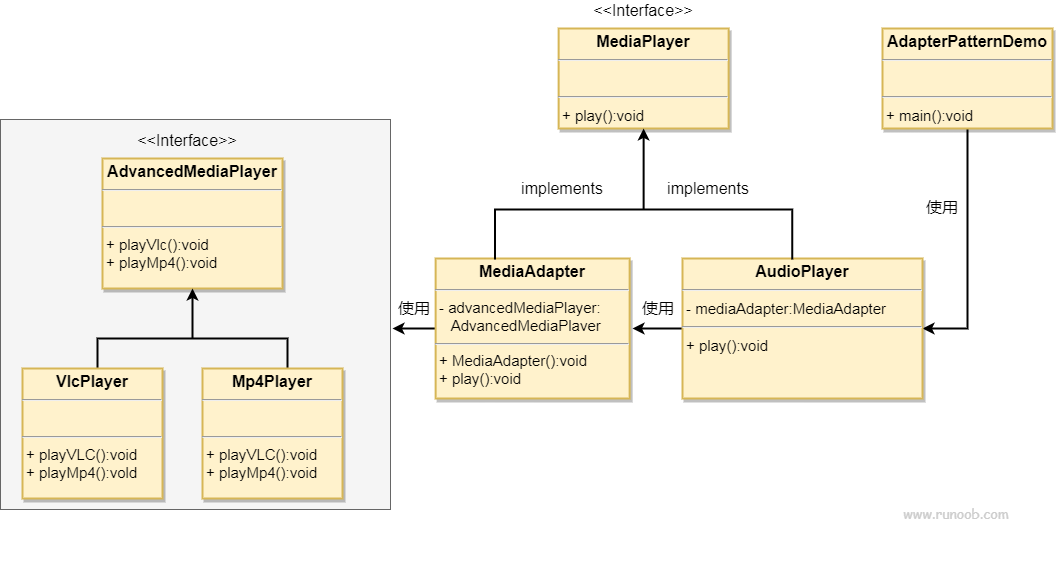
We have aMediaPlayerAn interface and an implementation ofMediaPlayerEntity class of the interfaceAudioPlayer. By default,AudioPlayerCan play audio files in mp3 format.
We also have another interfaceAdvancedMediaPlayerand implementsAdvancedMediaPlayerThe concrete implementation class of the interface. This class can play files in vlc and mp4 formats.
We want to makeAudioPlayerPlay audio files in other formats. To implement this functionality, we need to create one that implements...MediaPlayerAdapter class of the interfaceMediaAdapter, and usesAdvancedMediaPlayerObject to play the required format.
AudioPlayerUsing the adapter classMediaAdapterPass the required audio type; there is no need to know the actual class that can play audio in the required format.AdapterPatternDemoClass usageAudioPlayerClass to play various formats.
Step 1
Create interfaces for the media player and the more advanced media player.
MediaPlayer.java
AdvancedMediaPlayer.java
Step 2
Create an ImplementationAdvancedMediaPlayerEntity class of the interface.
VlcPlayer.java
Mp4Player.java
Step 3
Create an ImplementationMediaPlayerAdapter class for the interface.
MediaAdapter.java
Step 4
Create an ImplementationMediaPlayerEntity class of the interface.
AudioPlayer.java
Step 5
Use AudioPlayer to play different types of audio formats.
AdapterPatternDemo.java
Step 6
Run the program, output the results:
Playing mp3 file. Name: beyond the horizon.mp3
Playing mp4 file. Name: alone.mp4
Playing vlc file. Name: far far away.vlc
Invalid media. avi format not supported
other extensions