HTML canvas textBaselineプロパティ
 Canvas オブジェクト
例
y=100 の位置に赤い線を引き、y=100 の位置に異なる textBaseline 値を使って各単語を配置します。
JavaScript:
var c=document.getElementById("myCanvas");
var ctx=c.getContext("2d");
//Draw a red line at y=100
ctx.strokeStyle="red";
ctx.moveTo(5,100);
ctx.lineTo(395,100);
ctx.stroke();
ctx.font="20px Arial"
//Place each word at y=100 with different textBaseline values
ctx.textBaseline="top";
ctx.fillText("Top",5,100);
ctx.textBaseline="bottom";
ctx.fillText("Bottom",50,100);
ctx.textBaseline="middle";
ctx.fillText("Middle",120,100);
ctx.textBaseline="alphabetic";
ctx.fillText("Alphabetic",190,100);
ctx.textBaseline="hanging";
ctx.fillText("Hanging",290,100);
var ctx=c.getContext("2d");
//Draw a red line at y=100
ctx.strokeStyle="red";
ctx.moveTo(5,100);
ctx.lineTo(395,100);
ctx.stroke();
ctx.font="20px Arial"
//Place each word at y=100 with different textBaseline values
ctx.textBaseline="top";
ctx.fillText("Top",5,100);
ctx.textBaseline="bottom";
ctx.fillText("Bottom",50,100);
ctx.textBaseline="middle";
ctx.fillText("Middle",120,100);
ctx.textBaseline="alphabetic";
ctx.fillText("Alphabetic",190,100);
ctx.textBaseline="hanging";
ctx.fillText("Hanging",290,100);
試してみる »
ブラウザサポート


Internet Explorer 9、Firefox、Opera、Chrome、Safari は textBaseline プロパティをサポートしています。
注意:textBaseline プロパティはブラウザごとに効果が異なります。特に「hanging」または「ideographic」を使用する場合に顕著です。
注意:Internet Explorer 8 およびそれ以前のバージョンは <canvas> 要素をサポートしていません。
定義と用法
textBaseline プロパティは、テキストを描画するときの現在のテキストベースラインを設定または返します。
次の図は、textBaseline プロパティがサポートするさまざまなベースラインを示しています。
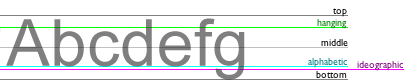
注意:fillText()とstrokeText()メソッドがキャンバス上にテキストを配置するとき、指定された textBaseline 値が使用されます。
| デフォルト値: | alphabetic |
|---|---|
| JavaScript 構文: | context.textBaseline="alphabetic|top|hanging|middle|ideographic|bottom"; |
プロパティ値
| 值 | 説明 |
|---|---|
| alphabetic | デフォルト。テキストベースラインは通常のアルファベットベースラインです。 |
| top | テキストベースラインは em ボックスの上端です。 |
| hanging | テキストベースラインは hanging ベースラインです。 |
| middle | テキストベースラインは em ボックスの中央です。 |
| ideographic | テキストベースラインは表意文字ベースラインです。 |
| bottom | テキストベースラインは em ボックスの下端です。 |
その他の拡張