Go Modules
Go Modules is the official dependency management tool for the Go language, introduced starting from Go 1.11, and became the default dependency management mode in Go 1.16.
Go Modules solves the long-standing pain points in dependency management for the Go language, providing developers with core features such as version control, dependency isolation, and reproducible builds.
Go Modules are a collection of related Go packages that are versioned and managed as a single unit. Each module has a clear version identifier, allowing developers to precisely specify the version of dependencies required in a project.
Core Concepts Explained
Module: containsgo.modDirectory tree of the file that defines the module's path, Go version requirements, and dependencies.
Version: An identifier that follows Semantic Versioning, with the formatvMAJOR.MINOR.PATCH。
Dependency Graph: The hierarchical structure of a module and all its transitive dependencies, which the Go tool automatically resolves and maintains.
Why are Go Modules needed?
Problems with the traditional GOPATH
Before Go Modules appeared, Go used the GOPATH mode, which had the following limitations:
- Workspace Limitations: All projects must be placed under the GOPATH directory
- Version Management Difficulties: Unable to precisely control dependency versions
- Dependency Conflict: Multiple projects may use different versions of the same dependency.
- Reproducible Build Challenges: It is difficult to ensure build consistency across different environments.
Advantages of Go Modules
Traditional GOPATH vs Go Modules Comparison:
| Features | GOPATH Mode | Go Modules |
|---|---|---|
| Project Location Restrictions | Must be placed under GOPATH | Works in Any Location |
| Version Control | Limited Support | Complete semantic versioning |
| Dependency Isolation | Global Sharing | Project-Level Isolation |
| Reproducible Builds | Difficult | Automatic Guarantee |
| Offline Work | Not supported | Local Cache Support |
Core File Analysis
go.mod file
go.modis the module definition file, containing the following main parts:
Example
go 1.21 // Go version requirement
require (
github.com/gin-gonic/gin v1.9.1
golang.org/x/text v0.12.0
)
replace golang.org/x/text => ../local/text // Local replacement
exclude github.com/old/module v1.0.0 // Exclude specific versions
go.sum file
go.sumThe file records cryptographic hashes of dependency modules, used to verify the integrity of module contents:
Example
github.com/bytedance/sonic v1.9.1/go.mod h1:iZcSUejdk5C4OW...
Detailed Explanation of Basic Commands
Module initialization
Example
go mod init example.com/myproject
# Initialize in an existing project
cd /path/to/project
go mod init
Dependency Management
Example
go get github.com/gin-gonic/gin
# Add a specific version
go get github.com/gin-gonic/gin@v1.9.1
# Update to the latest version
go get -u github.com/gin-gonic/gin
# Update all dependencies
go get -u all
# Download dependencies to local cache
go mod download
# Tidy up the go.mod file
go mod tidy
Dependency Query
Example
go list -m all
# View available versions of a specific dependency
go list -m -versions github.com/gin-gonic/gin
# View why a dependency is needed
go mod why github.com/gin-gonic/gin
Real-World Workflow
1. New project initialization
Example
mkdir myproject && cd myproject
# Initialize module
go mod init github.com/username/myproject
# Write code and import dependencies
# Then run the following command to automatically handle dependencies
go mod tidy
2. Dependency version control strategy
Example
require (
github.com/lib/pq v1.10.9 // Exact version
golang.org/x/text v0.3.7 // Exact version
github.com/stretchr/testify v1.8.0 // Test dependency
)
// Indirect dependencies are automatically managed by Go tools
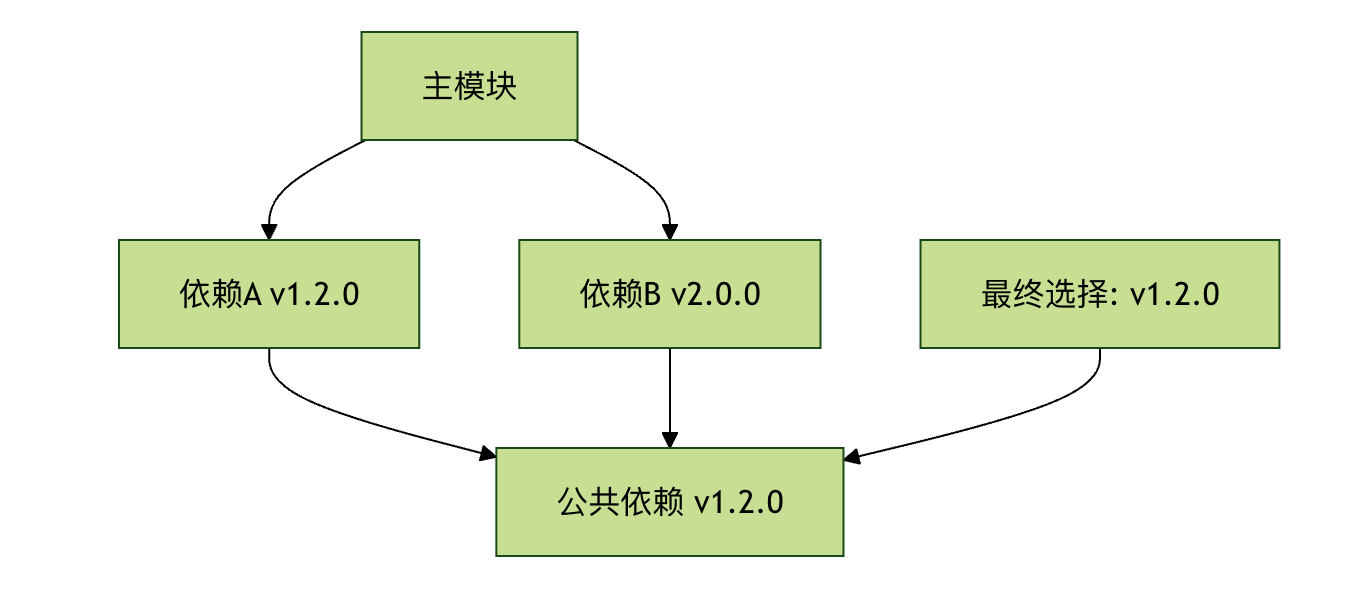
3. Version selection mechanism
Go Modules UsageMinimum Version Selection (MVS)) Algorithm:
Advanced Features
Version replacement (Replace)
// 用本地路径替换远程依赖
replace github.com/some/dependency => ../local/dependency

// 用不同版本替换
replace github.com/some/dependency => github.com/some/dependency v2.0.0

// 用 fork 仓库替换
replace github.com/some/dependency => github.com/myfork/dependency v1.0.0
Excluding Specific Versions
exclude (
    github.com/problematic/module v1.0.0
    github.com/another/badmodule v2.1.0
)
Private Repository Support
# 配置私有仓库认证
git config --global url."https://user:token@github.com".insteadOf "https://github.com"

# 或使用环境变量
export GOPRIVATE=github.com/mycompany/*
Best Practices
1. Version management strategy
# 开发阶段使用最新版本
go get -u ./...

# 发布前锁定版本
go mod tidy
go mod vendor  # 可选:创建vendor目录

# 定期更新依赖
go get -u all
go mod tidy
2. Collaborative development standards
# 提交前确保 go.mod 和 go.sum 一致
go mod tidy
go mod verify

# 检查未使用的依赖
go mod tidy -v
3. CI/CD Integration
# GitHub Actions 示例
jobs:
  test:
    runs-on: ubuntu-latest
    steps:
      - uses: actions/checkout@v3
      - uses: actions/setup-go@v3
        with:
          go-version: '1.21'
      - run: go mod download
      - run: go test ./...
Common problems and solutions
Problem 1: Dependency download failure
Solution:
# 设置代理
go env -w GOPROXY=https://goproxy.cn,direct

# 清理缓存并重试
go clean -modcache
go mod download
Problem 2: Version conflict
Solution:
# 查看依赖图
go mod graph

# 分析冲突原因
go mod why -m conflicting/package

# 使用 replace 指令解决
Problem 3: Private module authentication
Solution:
# 配置 netrc 文件
machine github.com
login username
password token

# 或使用 SSH 替代 HTTPS
git config --global url."git@github.com:".insteadOf "https://github.com/"
Practice exercises
Exercise 1: Create your first module
1. Create a new directory and initialize the module:
mkdir hello-world && cd hello-world
go mod init example.com/hello
2. Createmain.go:
Example
import (
"fmt"
"rsc.io/quote"
)
func main() {
fmt.Println(quote.Hello())
}
3. Run and observe dependency management:
go run main.go
go mod tidy
cat go.mod
Exercise 2: Version control practice
1. Add a dependency of a specific version:
go get golang.org/x/text@v0.3.7
2. Try updating to the latest version:
go get -u golang.org/x/text
3. View version changes:
go list -m all | grep textother extensions