
Primero veamos la lista de etiquetas comunes, que se presentarán una por una más adelante:
<!DOCTYPE html> <!-- 使用 HTML5 doctype,不区分大小写 -->
<html lang="zh-cmn-Hans"> <!-- 更加标准的 lang 属性写法 http://zhi.hu/XyIa -->
<head>
    <meta charset='utf-8'> <!-- 声明文档使用的字符编码 -->
    <meta http-equiv="X-UA-Compatible" content="IE=edge,chrome=1" /> <!-- 优先使用 IE 最新版本和 Chrome -->
    <meta name="description" content="不超过150个字符" /> <!-- 页面描述 -->
    <meta name="keywords" content=""/> <!-- 页面关键词 -->
    <meta name="author" content="name, email@gmail.com" /> <!-- 网页作者 -->
    <meta name="robots" content="index,follow" /> <!-- 搜索引擎抓取 -->

    <!-- 为移动设备添加 viewport -->
    <meta name ="viewport" content ="initial-scale=1, maximum-scale=3, minimum-scale=1, user-scalable=no"> <!-- `width=device-width` 会导致 iPhone 5 添加到主屏后以 WebApp 全屏模式打开页面时出现黑边 http://bigc.at/ios-webapp-viewport-meta.orz -->

    <!-- iOS 设备 begin -->
    <meta name="apple-mobile-web-app-title" content="标题"> <!-- 添加到主屏后的标题(iOS 6 新增) -->
    <meta name="apple-mobile-web-app-capable" content="yes" /> <!-- 是否启用 WebApp 全屏模式 -->
    <meta name="apple-mobile-web-app-status-bar-style" content="black-translucent" /> <!-- 设置状态栏的背景颜色,只有在 `"apple-mobile-web-app-capable" content="yes"` 时生效 -->
    <meta name="format-detection" content="telephone=no" /> <!-- 禁止数字识自动别为电话号码 -->
    <meta name="apple-itunes-app" content="app-id=myAppStoreID, affiliate-data=myAffiliateData, app-argument=myURL"> <!-- 添加智能 App 广告条 Smart App Banner(iOS 6+ Safari) -->

    <!-- iOS 图标 begin -->
    <link rel="apple-touch-icon-precomposed" href="../apple-touch-icon-57x57-precomposed.png.html" /> <!-- iPhone 和 iTouch,默认 57x57 像素,必须有 -->
    <link rel="apple-touch-icon-precomposed" sizes="114x114" href="../apple-touch-icon-114x114-precomposed.png.html" /> <!-- Retina iPhone 和 Retina iTouch,114x114 像素,可以没有,但推荐有 -->
    <link rel="apple-touch-icon-precomposed" sizes="144x144" href="../apple-touch-icon-144x144-precomposed.png.html" /> <!-- Retina iPad,144x144 像素,可以没有,但推荐有 -->
    <!-- iOS 图标 end -->

    <!-- iOS 启动画面 begin -->
    <link rel="apple-touch-startup-image" sizes="768x1004" href="../splash-screen-768x1004.png.html" /> <!-- iPad 竖屏 768 x 1004(标准分辨率) -->
    <link rel="apple-touch-startup-image" sizes="1536x2008" href="../splash-screen-1536x2008.png.html" /> <!-- iPad 竖屏 1536x2008(Retina) -->
    <link rel="apple-touch-startup-image" sizes="1024x748" href="../Default-Portrait-1024x748.png.html" /> <!-- iPad 横屏 1024x748(标准分辨率) -->
    <link rel="apple-touch-startup-image" sizes="2048x1496" href="../splash-screen-2048x1496.png.html" /> <!-- iPad 横屏 2048x1496(Retina) -->

    <link rel="apple-touch-startup-image" href="../splash-screen-320x480.png.html" /> <!-- iPhone/iPod Touch 竖屏 320x480 (标准分辨率) -->
    <link rel="apple-touch-startup-image" sizes="640x960" href="../splash-screen-640x960.png.html" /> <!-- iPhone/iPod Touch 竖屏 640x960 (Retina) -->
    <link rel="apple-touch-startup-image" sizes="640x1136" href="../splash-screen-640x1136.png.html" /> <!-- iPhone 5/iPod Touch 5 竖屏 640x1136 (Retina) -->
    <!-- iOS 启动画面 end -->

    <!-- iOS 设备 end -->
    <meta name="msapplication-TileColor" content="#000"/> <!-- Windows 8 磁贴颜色 -->
    <meta name="msapplication-TileImage" content="icon.png"/> <!-- Windows 8 磁贴图标 -->

    <link rel="alternate" type="application/rss+xml" title="RSS" href="../rss.xml.html" /> <!-- 添加 RSS 订阅 -->
    <link rel="shortcut icon" type="image/ico" href="../favicon.ico" /> <!-- 添加 favicon icon -->

    <title>标题</title>
</head>
Etiquetas básicas
Usa el doctype HTML5, no distingue entre mayúsculas y minúsculas.
<!DOCTYPE html> <!-- 使用 HTML5 doctype,不区分大小写 -->
Declara la codificación de caracteres utilizada por el documento.
<meta charset='utf-8'> <!-- 声明文档使用的字符编码 -->
Una forma más estándar de escribir el atributo langhttp://zhi.hu/XyIa
-
Chino simplificado
<html lang="zh-cmn-Hans"> <!-- 更加标准的 lang 属性写法 http://zhi.hu/XyIa -->
-
Chino tradicional
<html lang="zh-cmn-Hant"> <!-- 更加标准的 lang 属性写法 http://zhi.hu/XyIa -->
En raras ocasiones es necesario añadir el código de región, generalmente para enfatizar las diferencias en el uso del chino entre diferentes regiones, por ejemplo:
<p lang="zh-cmn-Hans">
<strong lang="zh-cmn-Hans-CN">菠萝</strong>和<strong lang="zh-cmn-Hant-TW">鳳梨</strong>其实是同一种水果。只是大陆和台湾称谓不同,且新加坡、马来西亚一带的称谓也是不同的,称之为<strong lang="zh-cmn-Hans-SG">黄梨</strong>。
</p>
Usar preferentemente la última versión de IE y Chrome.
<meta http-equiv="X-UA-Compatible" content="IE=edge,chrome=1" /> <!-- 优先使用 IE 最新版本和 Chrome -->
Optimización SEO
Descripción de la página
Cada página web debe tener una etiqueta de descripción que no supere los 150 caracteres y que refleje con precisión el contenido de la página.Documentación
<meta name="description" content="不超过150个字符" /> <!-- 页面描述 -->
Palabras clave de la página
<meta name="keywords" content=""/> <!-- 页面关键词 -->
Define el título de la página
<title>标题</title>
Define el autor de la página web
<meta name="author" content="name, email@gmail.com" /> <!-- 网页作者 -->
Define el método de indexación de la página en los motores de búsqueda. robotterms es un conjunto de valores separados por comas inglesas «,», que normalmente tiene los siguientes valores: none, noindex, nofollow, all, index y follow.Documentación
<meta name="robots" content="index,follow" /> <!-- 搜索引擎抓取 -->
Etiquetas opcionales
Añadir viewport para dispositivos móviles
<meta name ="viewport" content ="initial-scale=1, maximum-scale=3, minimum-scale=1, user-scalable=no"> <!-- `width=device-width` 会导致 iPhone 5 添加到主屏后以 WebApp 全屏模式打开页面时出现黑边 http://bigc.at/ios-webapp-viewport-meta.orz -->
Parámetros de content:
-
widthAncho de viewport (número/device-width) -
heightAlto de viewport (número/device-height) -
initial-scaleEscala inicial -
maximum-scaleEscala máxima -
minimum-scaleEscala mínima -
user-scalableSi se permite al usuario hacer zoom (yes/no) -
minimal-uiiOS 7.1 beta 2Nuevos atributos añadidos en (Nota: eliminado en iOS8), puede minimizar las barras de estado superior e inferior al cargar la página. Es un valor booleano, se puede escribir directamente así:<meta name="viewport" content="width=device-width, initial-scale=1, minimal-ui">
Dispositivos iOS
Título al añadir a la pantalla de inicio (nuevo en iOS 6)
<meta name="apple-mobile-web-app-title" content="标题"> <!-- 添加到主屏后的标题(iOS 6 新增) -->
Si habilitar el modo de pantalla completa de WebApp
<meta name="apple-mobile-web-app-capable" content="yes" /> <!-- 是否启用 WebApp 全屏模式 -->
Establecer el color de fondo de la barra de estado
<meta name="apple-mobile-web-app-status-bar-style" content="black-translucent" /> <!-- 设置状态栏的背景颜色,只有在 `"apple-mobile-web-app-capable" content="yes"` 时生效 -->
Parámetros de content:
-
defaultValor por defecto. -
blackEl fondo de la barra de estado es negro. -
black-translucentEl fondo de la barra de estado es negro semitransparente.
Si se establece endefaultoblack, el contenido de la página comienza desde la parte inferior de la barra de estado.
Si se establece enblack-translucent, el contenido de la página ocupa toda la pantalla y la parte superior quedará cubierta por la barra de estado.
Evitar que los números se identifiquen automáticamente como números de teléfono.
<meta name="format-detection" content="telephone=no" /> <!-- 禁止数字识自动别为电话号码 -->
Iconos de iOS
Parámetros de rel:
apple-touch-iconLa imagen se procesa automáticamente con efectos como esquinas redondeadas y brillos.
apple-touch-icon-precomposedEvita que el sistema añada efectos automáticamente y muestra directamente la imagen original de diseño.
iPhone y iTouch, por defecto 57x57 píxeles, es obligatorio
<link rel="apple-touch-icon-precomposed" href="../apple-touch-icon-57x57-precomposed.png.html" /> <!-- iPhone 和 iTouch,默认 57x57 像素,必须有 -->
iPad, 72x72 píxeles, puede no tenerlo, pero se recomienda
<link rel="apple-touch-icon-precomposed" sizes="72x72" href="../apple-touch-icon-72x72-precomposed.png.html" /> <!-- iPad,72x72 像素,可以没有,但推荐有 -->
Retina iPhone y Retina iTouch, 114x114 píxeles, puede no tenerlo, pero se recomienda
<link rel="apple-touch-icon-precomposed" sizes="114x114" href="../apple-touch-icon-114x114-precomposed.png.html" /> <!-- Retina iPhone 和 Retina iTouch,114x114 像素,可以没有,但推荐有 -->
Retina iPad, 144x144 píxeles, puede no tenerlo, pero se recomienda
<link rel="apple-touch-icon-precomposed" sizes="144x144" href="../apple-touch-icon-144x144-precomposed.png.html" /> <!-- Retina iPad,144x144 像素,可以没有,但推荐有 -->
Pantalla de inicio de iOS
Documentación oficial:https://developer.apple.com/library/ios/qa/qa1686/_index.html
Artículos de referencia:http://wxd.ctrip.com/blog/2013/09/ios7-hig-24/
La pantalla de inicio de iPad no incluye el área de la barra de estado.
iPad vertical 768 x 1004 (resolución estándar)
<link rel="apple-touch-startup-image" sizes="768x1004" href="../splash-screen-768x1004.png.html" /> <!-- iPad 竖屏 768 x 1004(标准分辨率) -->
iPad vertical 1536x2008 (Retina)
<link rel="apple-touch-startup-image" sizes="1536x2008" href="../splash-screen-1536x2008.png.html" /> <!-- iPad 竖屏 1536x2008(Retina) -->
iPad horizontal 1024x748 (resolución estándar)
<link rel="apple-touch-startup-image" sizes="1024x748" href="../Default-Portrait-1024x748.png.html" /> <!-- iPad 横屏 1024x748(标准分辨率) -->
iPad horizontal 2048x1496 (Retina)
<link rel="apple-touch-startup-image" sizes="2048x1496" href="../splash-screen-2048x1496.png.html" /> <!-- iPad 横屏 2048x1496(Retina) -->
La pantalla de inicio de iPhone y iPod touch incluye el área de la barra de estado.
iPhone/iPod Touch vertical 320x480 (resolución estándar)
<link rel="apple-touch-startup-image" href="../splash-screen-320x480.png.html" /> <!-- iPhone/iPod Touch 竖屏 320x480 (标准分辨率) -->
iPhone/iPod Touch vertical 640x960 (Retina)
<link rel="apple-touch-startup-image" sizes="640x960" href="../splash-screen-640x960.png.html" /> <!-- iPhone/iPod Touch 竖屏 640x960 (Retina) -->
iPhone 5/iPod Touch 5 vertical 640x1136 (Retina)
<link rel="apple-touch-startup-image" sizes="640x1136" href="../splash-screen-640x1136.png.html" /> <!-- iPhone 5/iPod Touch 5 竖屏 640x1136 (Retina) -->
Añadir Smart App Banner (iOS 6+ Safari)Documentación
<meta name="apple-itunes-app" content="app-id=myAppStoreID, affiliate-data=myAffiliateData, app-argument=myURL"> <!-- 添加智能 App 广告条 Smart App Banner(iOS 6+ Safari) -->
Android
El Chrome 39 en Android Lollipop añade la etiqueta meta theme-color para controlar el color de las pestañas.
http://updates.html5rocks.com/2014/11/Support-for-theme-color-in-Chrome-39-for-Android
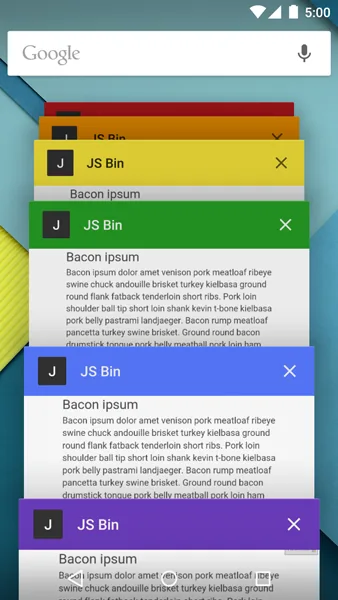
<meta name="theme-color" content="#DB5945">
Windows 8
Color de los mosaicos de Windows 8
<meta name="msapplication-TileColor" content="#000"/> <!-- Windows 8 磁贴颜色 -->
Icono del mosaico de Windows 8
<meta name="msapplication-TileImage" content="icon.png"/> <!-- Windows 8 磁贴图标 -->
Otros
Añadir suscripción RSS
<link rel="alternate" type="application/rss+xml" title="RSS" href="../rss.xml.html" /> <!-- 添加 RSS 订阅 -->
Añadir el icono favicon
<link rel="shortcut icon" type="image/ico" href="../favicon.ico" /> <!-- 添加 favicon icon -->
Evitar que el navegador Chrome sugiera traducciones automáticamente
Más:http://www.w3.org/International/questions/qa-translate-flag
<meta name="google" value="notranslate">