
Schauen wir uns zunächst die Liste der häufig verwendeten Tags an, die später einzeln vorgestellt werden:
<!DOCTYPE html> <!-- 使用 HTML5 doctype,不区分大小写 -->
<html lang="zh-cmn-Hans"> <!-- 更加标准的 lang 属性写法 http://zhi.hu/XyIa -->
<head>
    <meta charset='utf-8'> <!-- 声明文档使用的字符编码 -->
    <meta http-equiv="X-UA-Compatible" content="IE=edge,chrome=1" /> <!-- 优先使用 IE 最新版本和 Chrome -->
    <meta name="description" content="不超过150个字符" /> <!-- 页面描述 -->
    <meta name="keywords" content=""/> <!-- 页面关键词 -->
    <meta name="author" content="name, email@gmail.com" /> <!-- 网页作者 -->
    <meta name="robots" content="index,follow" /> <!-- 搜索引擎抓取 -->

    <!-- 为移动设备添加 viewport -->
    <meta name ="viewport" content ="initial-scale=1, maximum-scale=3, minimum-scale=1, user-scalable=no"> <!-- `width=device-width` 会导致 iPhone 5 添加到主屏后以 WebApp 全屏模式打开页面时出现黑边 http://bigc.at/ios-webapp-viewport-meta.orz -->

    <!-- iOS 设备 begin -->
    <meta name="apple-mobile-web-app-title" content="标题"> <!-- 添加到主屏后的标题(iOS 6 新增) -->
    <meta name="apple-mobile-web-app-capable" content="yes" /> <!-- 是否启用 WebApp 全屏模式 -->
    <meta name="apple-mobile-web-app-status-bar-style" content="black-translucent" /> <!-- 设置状态栏的背景颜色,只有在 `"apple-mobile-web-app-capable" content="yes"` 时生效 -->
    <meta name="format-detection" content="telephone=no" /> <!-- 禁止数字识自动别为电话号码 -->
    <meta name="apple-itunes-app" content="app-id=myAppStoreID, affiliate-data=myAffiliateData, app-argument=myURL"> <!-- 添加智能 App 广告条 Smart App Banner(iOS 6+ Safari) -->

    <!-- iOS 图标 begin -->
    <link rel="apple-touch-icon-precomposed" href="../apple-touch-icon-57x57-precomposed.png.html" /> <!-- iPhone 和 iTouch,默认 57x57 像素,必须有 -->
    <link rel="apple-touch-icon-precomposed" sizes="114x114" href="../apple-touch-icon-114x114-precomposed.png.html" /> <!-- Retina iPhone 和 Retina iTouch,114x114 像素,可以没有,但推荐有 -->
    <link rel="apple-touch-icon-precomposed" sizes="144x144" href="../apple-touch-icon-144x144-precomposed.png.html" /> <!-- Retina iPad,144x144 像素,可以没有,但推荐有 -->
    <!-- iOS 图标 end -->

    <!-- iOS 启动画面 begin -->
    <link rel="apple-touch-startup-image" sizes="768x1004" href="../splash-screen-768x1004.png.html" /> <!-- iPad 竖屏 768 x 1004(标准分辨率) -->
    <link rel="apple-touch-startup-image" sizes="1536x2008" href="../splash-screen-1536x2008.png.html" /> <!-- iPad 竖屏 1536x2008(Retina) -->
    <link rel="apple-touch-startup-image" sizes="1024x748" href="../Default-Portrait-1024x748.png.html" /> <!-- iPad 横屏 1024x748(标准分辨率) -->
    <link rel="apple-touch-startup-image" sizes="2048x1496" href="../splash-screen-2048x1496.png.html" /> <!-- iPad 横屏 2048x1496(Retina) -->

    <link rel="apple-touch-startup-image" href="../splash-screen-320x480.png.html" /> <!-- iPhone/iPod Touch 竖屏 320x480 (标准分辨率) -->
    <link rel="apple-touch-startup-image" sizes="640x960" href="../splash-screen-640x960.png.html" /> <!-- iPhone/iPod Touch 竖屏 640x960 (Retina) -->
    <link rel="apple-touch-startup-image" sizes="640x1136" href="../splash-screen-640x1136.png.html" /> <!-- iPhone 5/iPod Touch 5 竖屏 640x1136 (Retina) -->
    <!-- iOS 启动画面 end -->

    <!-- iOS 设备 end -->
    <meta name="msapplication-TileColor" content="#000"/> <!-- Windows 8 磁贴颜色 -->
    <meta name="msapplication-TileImage" content="icon.png"/> <!-- Windows 8 磁贴图标 -->

    <link rel="alternate" type="application/rss+xml" title="RSS" href="../rss.xml.html" /> <!-- 添加 RSS 订阅 -->
    <link rel="shortcut icon" type="image/ico" href="../favicon.ico" /> <!-- 添加 favicon icon -->

    <title>标题</title>
</head>
Grundlegende Tags
Verwenden Sie den HTML5-Doctype, Groß-/Kleinschreibung wird nicht unterschieden.
<!DOCTYPE html> <!-- 使用 HTML5 doctype,不区分大小写 -->
Deklarieren Sie die vom Dokument verwendete Zeichenkodierung
<meta charset='utf-8'> <!-- 声明文档使用的字符编码 -->
Eine standardgemäßere Schreibweise für das lang-Attributhttp://zhi.hu/XyIa
-
Vereinfachtes Chinesisch
<html lang="zh-cmn-Hans"> <!-- 更加标准的 lang 属性写法 http://zhi.hu/XyIa -->
-
Traditionelles Chinesisch
<html lang="zh-cmn-Hant"> <!-- 更加标准的 lang 属性写法 http://zhi.hu/XyIa -->
Nur in seltenen Fällen müssen Sie einen Regionscode hinzufügen, normalerweise um Unterschiede im chinesischen Sprachgebrauch zwischen verschiedenen Regionen hervorzuheben, zum Beispiel:
<p lang="zh-cmn-Hans">
<strong lang="zh-cmn-Hans-CN">菠萝</strong>和<strong lang="zh-cmn-Hant-TW">鳳梨</strong>其实是同一种水果。只是大陆和台湾称谓不同,且新加坡、马来西亚一带的称谓也是不同的,称之为<strong lang="zh-cmn-Hans-SG">黄梨</strong>。
</p>
Bevorzugen Sie die neueste Version von IE und Chrome
<meta http-equiv="X-UA-Compatible" content="IE=edge,chrome=1" /> <!-- 优先使用 IE 最新版本和 Chrome -->
SEO-Optimierung
Seitenbeschreibung
Jede Webseite sollte ein Description-Tag haben, das nicht mehr als 150 Zeichen umfasst und den Seiteninhalt genau widerspiegelt.Dokumentation
<meta name="description" content="不超过150个字符" /> <!-- 页面描述 -->
Seiten-Schlüsselwörter
<meta name="keywords" content=""/> <!-- 页面关键词 -->
Definieren Sie den Seitentitel
<title>标题</title>
Definieren Sie den Autor der Webseite
<meta name="author" content="name, email@gmail.com" /> <!-- 网页作者 -->
Definieren Sie die Suchmaschinen-Indexierungsmethode für die Webseite. robotterms ist eine Reihe von Werten, die durch englische Kommas "," getrennt sind, typischerweise mit den folgenden Werten: none, noindex, nofollow, all, index und follow.Dokumentation
<meta name="robots" content="index,follow" /> <!-- 搜索引擎抓取 -->
Optionale Tags
Viewport für mobile Geräte hinzufügen
<meta name ="viewport" content ="initial-scale=1, maximum-scale=3, minimum-scale=1, user-scalable=no"> <!-- `width=device-width` 会导致 iPhone 5 添加到主屏后以 WebApp 全屏模式打开页面时出现黑边 http://bigc.at/ios-webapp-viewport-meta.orz -->
content-Parameter:
-
widthViewport-Breite (value/device-width) -
heightViewport-Höhe (value/device-height) -
initial-scaleAnfängliche Zoom-Skalierung -
maximum-scaleMaximale Zoom-Skalierung -
minimum-scaleMinimale Zoom-Skalierung -
user-scalableOb das Zoomen durch den Benutzer erlaubt ist (yes/no) -
minimal-uiiOS 7.1 beta 2Neu hinzugefügte Attribute in (Hinweis: in iOS8 entfernt); es kann beim Laden der Seite die obere und untere Statusleiste minimieren. Dies ist ein boolescher Wert und kann direkt so geschrieben werden:<meta name="viewport" content="width=device-width, initial-scale=1, minimal-ui">
iOS-Geräte
Titel nach dem Hinzufügen zum Home-Bildschirm (neu in iOS 6)
<meta name="apple-mobile-web-app-title" content="标题"> <!-- 添加到主屏后的标题(iOS 6 新增) -->
Ob der WebApp-Vollbildmodus aktiviert werden soll
<meta name="apple-mobile-web-app-capable" content="yes" /> <!-- 是否启用 WebApp 全屏模式 -->
Hintergrundfarbe der Statusleiste festlegen
<meta name="apple-mobile-web-app-status-bar-style" content="black-translucent" /> <!-- 设置状态栏的背景颜色,只有在 `"apple-mobile-web-app-capable" content="yes"` 时生效 -->
content-Parameter:
-
defaultStandardwert. -
blackDer Hintergrund der Statusleiste ist schwarz. -
black-translucentDer Hintergrund der Statusleiste ist schwarz und halbtransparent.
Wenn festgelegt aufdefaultoderblack, der Webseiteninhalt beginnt am unteren Rand der Statusleiste.
Wenn festgelegt aufblack-translucent, der Webseiteninhalt füllt den gesamten Bildschirm, und der obere Bereich wird von der Statusleiste überdeckt.
Verhindern, dass Zahlen automatisch als Telefonnummern erkannt werden
<meta name="format-detection" content="telephone=no" /> <!-- 禁止数字识自动别为电话号码 -->
iOS-Symbole
rel-Parameter:
apple-touch-iconDas Bild wird automatisch mit Effekten wie abgerundeten Ecken und Glanzlichtern verarbeitet.
apple-touch-icon-precomposedVerhindern, dass das System automatisch Effekte hinzufügt, und das ursprüngliche Designbild direkt anzeigen.
iPhone und iTouch, Standard 57x57 Pixel, erforderlich
<link rel="apple-touch-icon-precomposed" href="../apple-touch-icon-57x57-precomposed.png.html" /> <!-- iPhone 和 iTouch,默认 57x57 像素,必须有 -->
iPad, 72x72 Pixel, optional, aber empfohlen
<link rel="apple-touch-icon-precomposed" sizes="72x72" href="../apple-touch-icon-72x72-precomposed.png.html" /> <!-- iPad,72x72 像素,可以没有,但推荐有 -->
Retina iPhone und Retina iTouch, 114x114 Pixel, optional, aber empfohlen
<link rel="apple-touch-icon-precomposed" sizes="114x114" href="../apple-touch-icon-114x114-precomposed.png.html" /> <!-- Retina iPhone 和 Retina iTouch,114x114 像素,可以没有,但推荐有 -->
Retina iPad, 144x144 Pixel, optional, aber empfohlen
<link rel="apple-touch-icon-precomposed" sizes="144x144" href="../apple-touch-icon-144x144-precomposed.png.html" /> <!-- Retina iPad,144x144 像素,可以没有,但推荐有 -->
iOS-Startbildschirme
Offizielle Dokumentation:https://developer.apple.com/library/ios/qa/qa1686/_index.html
Referenzartikel:http://wxd.ctrip.com/blog/2013/09/ios7-hig-24/
Der iPad-Startbildschirm enthält nicht den Statusleistenbereich.
iPad Hochformat 768 x 1004 (Standardauflösung)
<link rel="apple-touch-startup-image" sizes="768x1004" href="../splash-screen-768x1004.png.html" /> <!-- iPad 竖屏 768 x 1004(标准分辨率) -->
iPad Hochformat 1536x2008 (Retina)
<link rel="apple-touch-startup-image" sizes="1536x2008" href="../splash-screen-1536x2008.png.html" /> <!-- iPad 竖屏 1536x2008(Retina) -->
iPad Querformat 1024x748 (Standardauflösung)
<link rel="apple-touch-startup-image" sizes="1024x748" href="../Default-Portrait-1024x748.png.html" /> <!-- iPad 横屏 1024x748(标准分辨率) -->
iPad Querformat 2048x1496 (Retina)
<link rel="apple-touch-startup-image" sizes="2048x1496" href="../splash-screen-2048x1496.png.html" /> <!-- iPad 横屏 2048x1496(Retina) -->
Die Startbildschirme für iPhone und iPod touch enthalten den Statusleistenbereich.
iPhone/iPod Touch Hochformat 320x480 (Standardauflösung)
<link rel="apple-touch-startup-image" href="../splash-screen-320x480.png.html" /> <!-- iPhone/iPod Touch 竖屏 320x480 (标准分辨率) -->
iPhone/iPod Touch Hochformat 640x960 (Retina)
<link rel="apple-touch-startup-image" sizes="640x960" href="../splash-screen-640x960.png.html" /> <!-- iPhone/iPod Touch 竖屏 640x960 (Retina) -->
iPhone 5/iPod Touch 5 Hochformat 640x1136 (Retina)
<link rel="apple-touch-startup-image" sizes="640x1136" href="../splash-screen-640x1136.png.html" /> <!-- iPhone 5/iPod Touch 5 竖屏 640x1136 (Retina) -->
Smart App Banner hinzufügen (iOS 6+ Safari)Dokumentation
<meta name="apple-itunes-app" content="app-id=myAppStoreID, affiliate-data=myAffiliateData, app-argument=myURL"> <!-- 添加智能 App 广告条 Smart App Banner(iOS 6+ Safari) -->
Android
Chrome 39 unter Android Lollipop fügt das theme-color-Meta-Tag hinzu, mit dem die Tab-Farbe gesteuert wird.
http://updates.html5rocks.com/2014/11/Support-for-theme-color-in-Chrome-39-for-Android
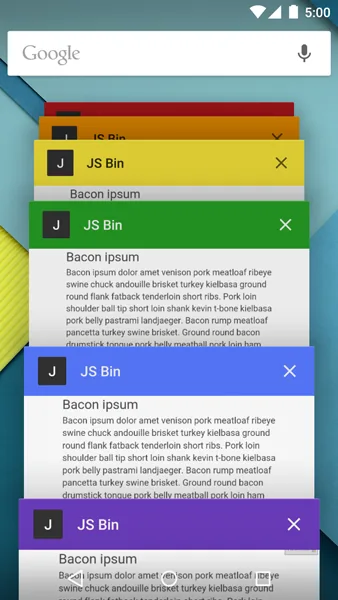
<meta name="theme-color" content="#DB5945">
Windows 8
Windows 8 Kachelfarbe
<meta name="msapplication-TileColor" content="#000"/> <!-- Windows 8 磁贴颜色 -->
Windows 8 Kachelsymbol
<meta name="msapplication-TileImage" content="icon.png"/> <!-- Windows 8 磁贴图标 -->
Andere
RSS-Abonnement hinzufügen
<link rel="alternate" type="application/rss+xml" title="RSS" href="../rss.xml.html" /> <!-- 添加 RSS 订阅 -->
Favicon-Symbol hinzufügen
<link rel="shortcut icon" type="image/ico" href="../favicon.ico" /> <!-- 添加 favicon icon -->
Automatische Übersetzungsaufforderungen im Chrome-Browser deaktivieren
Mehr:http://www.w3.org/International/questions/qa-translate-flag
<meta name="google" value="notranslate">