HTML canvas textBaselineAtributo
Ejemplo
Dibuja una línea roja en y=100, luego coloca cada palabra en y=100 con diferentes valores de textBaseline:
JavaScript:
var c=document.getElementById("myCanvas");
var ctx=c.getContext("2d");
//Draw a red line at y=100
ctx.strokeStyle="red";
ctx.moveTo(5,100);
ctx.lineTo(395,100);
ctx.stroke();
ctx.font="20px Arial"
//Place each word at y=100 with different textBaseline values
ctx.textBaseline="top";
ctx.fillText("Top",5,100);
ctx.textBaseline="bottom";
ctx.fillText("Bottom",50,100);
ctx.textBaseline="middle";
ctx.fillText("Middle",120,100);
ctx.textBaseline="alphabetic";
ctx.fillText("Alphabetic",190,100);
ctx.textBaseline="hanging";
ctx.fillText("Hanging",290,100);
var ctx=c.getContext("2d");
//Draw a red line at y=100
ctx.strokeStyle="red";
ctx.moveTo(5,100);
ctx.lineTo(395,100);
ctx.stroke();
ctx.font="20px Arial"
//Place each word at y=100 with different textBaseline values
ctx.textBaseline="top";
ctx.fillText("Top",5,100);
ctx.textBaseline="bottom";
ctx.fillText("Bottom",50,100);
ctx.textBaseline="middle";
ctx.fillText("Middle",120,100);
ctx.textBaseline="alphabetic";
ctx.fillText("Alphabetic",190,100);
ctx.textBaseline="hanging";
ctx.fillText("Hanging",290,100);
Pruébalo »
Soporte del navegador


Internet Explorer 9, Firefox, Opera, Chrome y Safari soportan la propiedad textBaseline.
Nota:La propiedad textBaseline tiene efectos diferentes en distintos navegadores, especialmente al usar "hanging" o "ideographic".
Nota:Internet Explorer 8 y versiones anteriores no soportan el elemento <canvas>.
Definición y uso
La propiedad textBaseline establece o devuelve la línea base de texto actual al dibujar texto.
El siguiente diagrama demuestra las diversas líneas base que soporta la propiedad textBaseline:
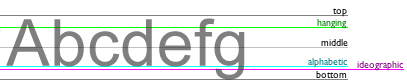
Nota:fillText()ystrokeText()Cuando el método posiciona texto en el lienzo, utilizará el valor textBaseline especificado.
| Valor predeterminado: | alphabetic |
|---|---|
| Sintaxis de JavaScript: | context.textBaseline="alphabetic|top|hanging|middle|ideographic|bottom"; |
Valores del atributo
| Valor | Descripción |
|---|---|
| alphabetic | Predeterminado. La línea base del texto es la línea base normal de las letras. |
| top | La línea base del texto es la parte superior del cuadro em. |
| hanging | La línea base del texto es la línea base colgante. |
| middle | La línea base del texto es el centro del cuadro em. |
| ideographic | La línea base del texto es la línea base ideográfica. |
| bottom | La línea base del texto es la parte inferior del cuadro em. |
 HTML canvas Referencia Otras extensiones